Hi all, I'm new here so forgive me if this isn't the right place for my question. I searched around and couldn't find any info on my chip: I'm looking at a QS Xeon E-2136 sr3ww. Is there any difference (stepping, etc) I should be aware of between that and a retail chip? It's going into a MBD-X11SCL-IF-O
ES Xeon Discussion
- Thread starter britinpdx
- Start date
Notice: Page may contain affiliate links for which we may earn a small commission through services like Amazon Affiliates or Skimlinks.
official QS are same silicon of prod.unit, just ES bit is set to exclude warranty & support for non-validated customers.Hi all, I'm new here so forgive me if this isn't the right place for my question. I searched around and couldn't find any info on my chip: I'm looking at a QS Xeon E-2136 sr3ww. Is there any difference (stepping, etc) I should be aware of between that and a retail chip? It's going into a MBD-X11SCL-IF-O
if you see the brand string " Xeon E-2136" with extended (ES) in CPU-Z it is QS, if you see "0000" it is not QS,

Here are photos of the official version and the ES/QS(leaving out the question of trust of course).
Intel Xeon 8461V
afaik at SPR it is the first time intel does two QS stages:
Q16Z E3 = EV-QS (early validation QS)
Q23E E5 = QS
both have full brand string "8461v" ES will have only "0000"
Last edited:
Hi, I'm looking at buying a Supermicro X12SPM board along with a QWAT/QWAP CPU. From searching this awesome thread, it seems it should work with BIOS version 1.6.
However, Supermicro has since then released a version 1.9. Does anyone know if that BIOS still accepts the ES2/step6 CPUs?
However, Supermicro has since then released a version 1.9. Does anyone know if that BIOS still accepts the ES2/step6 CPUs?
However, Supermicro has since then released a version 1.9. Does anyone know if that BIOS still accepts the ES2/step6 CPUs?
working
Last edited:
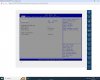
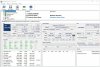
X12SPM-LN4F - w.BIOS 1.9 - QWAT on it.Hi, I'm looking at buying a Supermicro X12SPM board along with a QWAT/QWAP CPU. From searching this awesome thread, it seems it should work with BIOS version 1.6.
However, Supermicro has since then released a version 1.9. Does anyone know if that BIOS still accepts the ES2/step6 CPUs?
Last edited:
Fantastic! Thank you so much for testing it!X12SPM-LN4F - QWAT on it.windows HWinfo proof later, someone stole the NVME...
View attachment 34992View attachment 34993
I'm a bit tempted by the Xeon W-3300 CPUs since they turbo higher than the SPs, and I don't really need a ton of cores.
This thread
makes me optimistic that I can have a QS working in a Supermicro X12SPM board.
There is a bunch of W-3345 QS floating around on eBay. The pictured ones are SRKSU, like the final retail chip. This is standard for QS, right?
Any idea if these QS W-3345s will work in the X12SPM with latest BIOS? Or if I'm missing something?
This thread
makes me optimistic that I can have a QS working in a Supermicro X12SPM board.
There is a bunch of W-3345 QS floating around on eBay. The pictured ones are SRKSU, like the final retail chip. This is standard for QS, right?
Any idea if these QS W-3345s will work in the X12SPM with latest BIOS? Or if I'm missing something?
no, not a pic of cpu you get. QS = "Intel Confidential - Qxxx" like other ESThere is a bunch of W-3345 QS floating around on eBay. The pictured ones are SRKSU, like the final retail chip. This is standard for QS, right?
Intel Xeon W-3375 IceLake QXZL 57MB 38c 2.5 GHz 4.0 GHz 270W DDR4-3200
Intel Xeon W-3365 IceLake QXZK 48MB 32c 2.7 GHz 4.0 GHz 270W DDR4-3200
Intel Xeon W-3345 IceLake QXZJ 36MB 24c 3.0 GHz 4.0 GHz 250W DDR4-3200
Intel Xeon W-3335 IceLake QXQS 24MB 16c 3.4 GHz 4.0 GHz 250W DDR4-3200
Intel Xeon W-3323 IceLake QXQQ 21MB 12c 3.5 GHz 3.9 GHz 220W DDR4-3200
Last edited:
should work. at least ASRock SPC621 boards have Xeon W-3300 in the supported list of CPU.Any idea if these QS W-3345s will work in the X12SPM with latest BIOS? Or if I'm missing something?
edit:
gigabyte MU72-SU0 supports
- 3rd Gen Intel® Xeon® Scalable Processors
- Intel® Xeon® W-3300 Processors
Last edited:
ielectronics_alteratethis is very optimistic LOLThere is a bunch of W-3345 QS floating around on eBay.
The Intel Xeon W-3345 is a server/workstation processor with 24 cores, launched in July 2021. It is part of the Xeon W lineup, using the Ice Lake-W architecture with Socket 4189. Thanks to Intel Hyper-Threading the core-count is effectively doubled, to 48 threads. To further increase overall system performance, up to two Xeon W-3345 CPUs can link up in a multi-processor (SMP) configuration.
should work. at least ASRock SPC621 boards have Xeon W-3300 in the supported list of CPU.
edit:
gigabyte MU72-SU0 supports
3rd Gen Intel® Xeon® Scalable Processors
Intel® Xeon® W-3300 Processors
Interesting. Supermicro were not as optimistic when I contracted them to ask if putting a W-3300 in a X12SPM/X12SPZ would work.
 The response I got was:
We actually don’t know, it’s not tested and we haven’t come to an opportunity to test it ourselves or hear from other customers who have tried it.
I do say however that Intel segregates their platforms more and more to push customers into specific combinations, for that reason I think the motherboards will simply not POST with the CPU.
Also, I don't know if I can conclude anything from this, but comparing the microcode from the BIOS of the X12SPA-TF (which does officially support W-3300) with X12SPM:
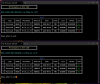
It seems they support the same CPUs?
Also, I don't know if I can conclude anything from this, but comparing the microcode from the BIOS of the X12SPA-TF (which does officially support W-3300) with X12SPM:
they share same cpuid and microcode. there is only one chipset for Ice lake-SP and Ice Lake-X = C621AIt seems they support the same CPUs?
I confirm. ASRock Rack SPC621D8-2L2T with latest BIOS, Xeon W-3375 QS (QXZL) works perfectly fine.should work. at least ASRock SPC621 boards have Xeon W-3300 in the supported list of CPU.
edit:
gigabyte MU72-SU0 supports
- 3rd Gen Intel® Xeon® Scalable Processors
- Intel® Xeon® W-3300 Processors
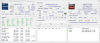
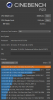
any chance to put this in a supermicro X12SPL or X12SPM ?I confirm. ASRock Rack SPC621D8-2L2T with latest BIOS, Xeon W-3375 QS (QXZL) works perfectly fine.
i have a SM board but not the pocket money for a Xeon W-3300
I do not have any SM boards of that generation. Being an ASRock fanboy the only reason for me having any SM boards was that 4th gen ASRock board was delayed so I had to buy SM X13 to test my processors And even that board is gone now - I’m switching to ASRock soon so I gave my SM setup for my daughters workstation.
And even that board is gone now - I’m switching to ASRock soon so I gave my SM setup for my daughters workstation.
What kind of answers did you expect to receive from SM?We actually don’t know, it’s not tested and we haven’t come to an opportunity to test it ourselves or hear from other customers who have tried it.
when I sent them the MOBO for repair, where there was a problem on their part, they answered me:
"We tried to fix it but couldn't, our engineer decided that it was beyond repair"
As if I sent it for repairs to some workshop where newbies sit
I join your side, but still SM is much better, even if their RMA is lame as a duckBeing an ASRock fanboy
Guys, tell me, I downloaded this version MC Extractor v1.96.0 r279 on GitHubInteresting. Supermicro were not as optimistic when I contracted them to ask if putting a W-3300 in a X12SPM/X12SPZ would work.
We actually don’t know, it’s not tested and we haven’t come to an opportunity to test it ourselves or hear from other customers who have tried it.
I do say however that Intel segregates their platforms more and more to push customers into specific combinations, for that reason I think the motherboards will simply not POST with the CPU.
Also, I don't know if I can conclude anything from this, but comparing the microcode from the BIOS of the X12SPA-TF (which does officially support W-3300) with X12SPM:
View attachment 35027
It seems they support the same CPUs?
but nothing works for me when I drag and drop the BIOS into MCE.py
can't open anything