
What BIOS and BMC version are you on ?Hm, nope, I don't have such problem
Tyan S8030GM2NE
- Thread starter hmw
- Start date
Notice: Page may contain affiliate links for which we may earn a small commission through services like Amazon Affiliates or Skimlinks.
TYAN S8030GM2NE will often fail to boot into windows.
Boot sequence looks like this:
Later, Windows event log states kernel-power with 0’s in all fields. (Not every time this bootloop happens, though)
Board is from the early revisions, with 32MB BMC flash.
Current BMC and BIOS versions are v3.00 and v4.00. Windows Server 2019 was updated to the lastest version.
Full hardware list:
CPU - EPYC 7302
MB - TYAN S8030GM2NE
CPU Cooler - Exegate ESNK-P0064AP4
RAM - SK Hynix 16Gb 2Rx8 PC4-3200AA HMA82GR7CJR8N-XN, 8 sticks
Case - SilverStone Grandia GD07
PSU - DEEPCOOL PQ750M
NIC - Mellanox ConnectX-3 CX354A
SSD - Intel 545s SSDSC2KW256G8XT.
Checked windows boot logs. Failed one differs with the good one at “BOOTLOG_NOT_LOADED \SystemRoot\System32\drivers\dxgkrnl.sys”
Bad one has that string 2 times, and ends exactly at the second attempt. Good one keeps loading further, gets a 3rd (failed?) attempt and keeps going.
All failed boot logs look exactly the same, while successful ones usually have several driver entries in different positions in the log (overall number of entries is the same).
Boot sequence looks like this:
- BMC loading starts → ends
- BIOS loading starts → ends
- Windows loading starts → several spins of dotted donut
- Keyboard lighting blinks and everything goes to 1.
Later, Windows event log states kernel-power with 0’s in all fields. (Not every time this bootloop happens, though)
Board is from the early revisions, with 32MB BMC flash.
Current BMC and BIOS versions are v3.00 and v4.00. Windows Server 2019 was updated to the lastest version.
Full hardware list:
CPU - EPYC 7302
MB - TYAN S8030GM2NE
CPU Cooler - Exegate ESNK-P0064AP4
RAM - SK Hynix 16Gb 2Rx8 PC4-3200AA HMA82GR7CJR8N-XN, 8 sticks
Case - SilverStone Grandia GD07
PSU - DEEPCOOL PQ750M
NIC - Mellanox ConnectX-3 CX354A
SSD - Intel 545s SSDSC2KW256G8XT.
Checked windows boot logs. Failed one differs with the good one at “BOOTLOG_NOT_LOADED \SystemRoot\System32\drivers\dxgkrnl.sys”
3 25 2024 16:33:24.500
BOOTLOG_LOADED \SystemRoot\system32\ntoskrnl.exe
BOOTLOG_LOADED \SystemRoot\system32\hal.dll
BOOTLOG_LOADED \SystemRoot\system32\kd.dll
BOOTLOG_LOADED \SystemRoot\system32\mcupdate_AuthenticAMD.dll
BOOTLOG_LOADED \SystemRoot\System32\drivers\msrpc.sys
BOOTLOG_LOADED \SystemRoot\System32\drivers\ksecdd.sys
BOOTLOG_LOADED \SystemRoot\System32\drivers\werkernel.sys
BOOTLOG_LOADED \SystemRoot\System32\drivers\CLFS.SYS
BOOTLOG_LOADED \SystemRoot\System32\drivers\tm.sys
BOOTLOG_LOADED \SystemRoot\system32\PSHED.dll
BOOTLOG_LOADED \SystemRoot\system32\BOOTVID.dll
BOOTLOG_LOADED \SystemRoot\System32\drivers\FLTMGR.SYS
BOOTLOG_LOADED \SystemRoot\System32\drivers\clipsp.sys
BOOTLOG_LOADED \SystemRoot\System32\drivers\cmimcext.sys
BOOTLOG_LOADED \SystemRoot\System32\drivers\ntosext.sys
BOOTLOG_LOADED \SystemRoot\system32\CI.dll
BOOTLOG_LOADED \SystemRoot\System32\drivers\cng.sys
BOOTLOG_LOADED \SystemRoot\system32\drivers\Wdf01000.sys
BOOTLOG_LOADED \SystemRoot\system32\drivers\WDFLDR.SYS
BOOTLOG_LOADED \SystemRoot\system32\drivers\WppRecorder.sys
BOOTLOG_LOADED \SystemRoot\system32\drivers\SleepStudyHelper.sys
BOOTLOG_LOADED \SystemRoot\System32\Drivers\acpiex.sys
BOOTLOG_LOADED \SystemRoot\system32\drivers\msseccore.sys
BOOTLOG_LOADED \SystemRoot\system32\drivers\SgrmAgent.sys
BOOTLOG_LOADED \SystemRoot\system32\drivers\lxss.sys
BOOTLOG_LOADED \SystemRoot\system32\drivers\LXCORE.SYS
BOOTLOG_LOADED \SystemRoot\System32\drivers\ACPI.sys
BOOTLOG_LOADED \SystemRoot\System32\drivers\WMILIB.SYS
BOOTLOG_LOADED \SystemRoot\system32\drivers\wd\WdBoot.sys
BOOTLOG_LOADED \SystemRoot\system32\drivers\WindowsTrustedRT.sys
BOOTLOG_LOADED \SystemRoot\System32\drivers\intelpep.sys
BOOTLOG_LOADED \SystemRoot\System32\drivers\WindowsTrustedRTProxy.sys
BOOTLOG_LOADED \SystemRoot\System32\drivers\pcw.sys
BOOTLOG_LOADED \SystemRoot\system32\DRIVERS\sacdrv.sys
BOOTLOG_LOADED \SystemRoot\system32\DRIVERS\NDIS.SYS
BOOTLOG_LOADED \SystemRoot\system32\DRIVERS\NETIO.SYS
BOOTLOG_LOADED \SystemRoot\System32\drivers\msisadrv.sys
BOOTLOG_LOADED \SystemRoot\System32\drivers\vdrvroot.sys
BOOTLOG_LOADED \SystemRoot\System32\drivers\pci.sys
BOOTLOG_LOADED \SystemRoot\system32\drivers\pdc.sys
BOOTLOG_LOADED \SystemRoot\system32\drivers\CEA.sys
BOOTLOG_LOADED \SystemRoot\System32\drivers\partmgr.sys
BOOTLOG_LOADED \SystemRoot\System32\drivers\spaceport.sys
BOOTLOG_LOADED \SystemRoot\System32\drivers\volmgr.sys
BOOTLOG_LOADED \SystemRoot\System32\drivers\volmgrx.sys
BOOTLOG_LOADED \SystemRoot\System32\drivers\mountmgr.sys
BOOTLOG_LOADED \SystemRoot\System32\drivers\storahci.sys
BOOTLOG_LOADED \SystemRoot\System32\drivers\storport.sys
BOOTLOG_LOADED \SystemRoot\System32\drivers\EhStorClass.sys
BOOTLOG_LOADED \SystemRoot\System32\Drivers\Wof.sys
BOOTLOG_LOADED \SystemRoot\system32\drivers\wd\WdFilter.sys
BOOTLOG_LOADED \SystemRoot\System32\Drivers\Ntfs.sys
BOOTLOG_LOADED \SystemRoot\System32\Drivers\Fs_Rec.sys
BOOTLOG_LOADED \SystemRoot\System32\Drivers\ksecpkg.sys
BOOTLOG_LOADED \SystemRoot\System32\drivers\tcpip.sys
BOOTLOG_LOADED \SystemRoot\System32\drivers\fwpkclnt.sys
BOOTLOG_LOADED \SystemRoot\System32\drivers\wfplwfs.sys
BOOTLOG_LOADED \SystemRoot\system32\drivers\VmsProxy.sys
BOOTLOG_LOADED \SystemRoot\system32\drivers\vmbkmclr.sys
BOOTLOG_LOADED \SystemRoot\system32\drivers\VmsProxyHNic.sys
BOOTLOG_LOADED \SystemRoot\System32\drivers\volume.sys
BOOTLOG_LOADED \SystemRoot\System32\drivers\volsnap.sys
BOOTLOG_LOADED \SystemRoot\System32\Drivers\mup.sys
BOOTLOG_LOADED \SystemRoot\system32\drivers\iorate.sys
BOOTLOG_LOADED \SystemRoot\System32\drivers\hwpolicy.sys
BOOTLOG_LOADED \SystemRoot\System32\drivers\disk.sys
BOOTLOG_LOADED \SystemRoot\System32\drivers\CLASSPNP.SYS
BOOTLOG_LOADED \SystemRoot\System32\drivers\cdrom.sys
BOOTLOG_LOADED \SystemRoot\system32\drivers\filecrypt.sys
BOOTLOG_LOADED \SystemRoot\System32\Drivers\Null.SYS
BOOTLOG_LOADED \SystemRoot\System32\drivers\dxgkrnl.sys
BOOTLOG_NOT_LOADED \SystemRoot\System32\drivers\dxgkrnl.sys
BOOTLOG_LOADED \SystemRoot\System32\DriverStore\FileRepository\basicdisplay.inf_amd64_5103ac179273be89\BasicDisplay.sys
BOOTLOG_NOT_LOADED \SystemRoot\System32\drivers\dxgkrnl.sys
BOOTLOG_LOADED \SystemRoot\System32\DriverStore\FileRepository\basicrender.inf_amd64_efdc64af60c69a6d\BasicRender.sys
BOOTLOG_LOADED \SystemRoot\System32\Drivers\Npfs.SYS
BOOTLOG_LOADED \SystemRoot\System32\Drivers\Msfs.SYS
BOOTLOG_LOADED \SystemRoot\system32\DRIVERS\tdx.sys
BOOTLOG_LOADED \SystemRoot\system32\DRIVERS\SeLow_x64.sys
BOOTLOG_LOADED \SystemRoot\system32\drivers\ws2ifsl.sys
BOOTLOG_LOADED \SystemRoot\System32\DRIVERS\netbt.sys
BOOTLOG_LOADED \SystemRoot\system32\drivers\afunix.sys
BOOTLOG_LOADED \SystemRoot\system32\drivers\afd.sys
BOOTLOG_LOADED \SystemRoot\System32\drivers\pacer.sys
BOOTLOG_LOADED \SystemRoot\system32\drivers\netbios.sys
BOOTLOG_LOADED \SystemRoot\system32\DRIVERS\rdbss.sys
BOOTLOG_LOADED \SystemRoot\system32\drivers\nsiproxy.sys
BOOTLOG_LOADED \SystemRoot\System32\drivers\npsvctrig.sys
BOOTLOG_LOADED \SystemRoot\System32\drivers\mssmbios.sys
BOOTLOG_LOADED \SystemRoot\System32\Drivers\dfsc.sys
BOOTLOG_LOADED \SystemRoot\system32\drivers\bam.sys
BOOTLOG_LOADED \SystemRoot\system32\DRIVERS\ahcache.sys
BOOTLOG_LOADED \SystemRoot\System32\drivers\vmbusr.sys
BOOTLOG_LOADED \SystemRoot\System32\drivers\vmswitch.sys
BOOTLOG_LOADED \SystemRoot\System32\drivers\Neo6_x64_VPN.sys
BOOTLOG_LOADED \SystemRoot\System32\drivers\Vid.sys
BOOTLOG_LOADED \SystemRoot\System32\DriverStore\FileRepository\compositebus.inf_amd64_e4d35af746093dc3\CompositeBus.sys
BOOTLOG_LOADED \SystemRoot\System32\drivers\kdnic.sys
BOOTLOG_LOADED \SystemRoot\System32\drivers\umbus.sys
BOOTLOG_LOADED \SystemRoot\System32\drivers\mlx4_bus.sys
BOOTLOG_LOADED \SystemRoot\System32\drivers\ibbus.sys
BOOTLOG_LOADED \SystemRoot\System32\drivers\ndfltr.sys
BOOTLOG_LOADED \SystemRoot\System32\drivers\winverbs.sys
BOOTLOG_LOADED \SystemRoot\System32\drivers\winmad.sys
BOOTLOG_LOADED \SystemRoot\system32\drivers\ucx01000.sys
BOOTLOG_LOADED \SystemRoot\System32\drivers\USBXHCI.SYS
BOOTLOG_NOT_LOADED \SystemRoot\System32\drivers\dxgkrnl.sys
BOOTLOG_LOADED \SystemRoot\System32\drivers\astkmd.sys
BOOTLOG_LOADED \SystemRoot\System32\drivers\e1r68x64.sys
BOOTLOG_LOADED \SystemRoot\System32\drivers\serial.sys
BOOTLOG_LOADED \SystemRoot\System32\drivers\serenum.sys
BOOTLOG_LOADED \SystemRoot\System32\drivers\IPMIDrv.sys
BOOTLOG_LOADED \SystemRoot\System32\Drivers\msgpioclx.sys
BOOTLOG_LOADED \SystemRoot\System32\drivers\amdgpio2.sys
BOOTLOG_LOADED \SystemRoot\System32\drivers\amdppm.sys
BOOTLOG_LOADED \SystemRoot\System32\drivers\errdev.sys
BOOTLOG_LOADED \SystemRoot\System32\drivers\vpcivsp.sys
BOOTLOG_LOADED \SystemRoot\System32\drivers\storvsp.sys
BOOTLOG_LOADED \SystemRoot\System32\drivers\NdisVirtualBus.sys
BOOTLOG_LOADED \SystemRoot\System32\DriverStore\FileRepository\swenum.inf_amd64_31f554b660026323\swenum.sys
BOOTLOG_LOADED \SystemRoot\System32\drivers\rdpbus.sys
BOOTLOG_LOADED \SystemRoot\System32\drivers\UsbHub3.sys
BOOTLOG_NOT_LOADED \SystemRoot\System32\drivers\dxgkrnl.sys
BOOTLOG_LOADED \SystemRoot\system32\ntoskrnl.exe
BOOTLOG_LOADED \SystemRoot\system32\hal.dll
BOOTLOG_LOADED \SystemRoot\system32\kd.dll
BOOTLOG_LOADED \SystemRoot\system32\mcupdate_AuthenticAMD.dll
BOOTLOG_LOADED \SystemRoot\System32\drivers\msrpc.sys
BOOTLOG_LOADED \SystemRoot\System32\drivers\ksecdd.sys
BOOTLOG_LOADED \SystemRoot\System32\drivers\werkernel.sys
BOOTLOG_LOADED \SystemRoot\System32\drivers\CLFS.SYS
BOOTLOG_LOADED \SystemRoot\System32\drivers\tm.sys
BOOTLOG_LOADED \SystemRoot\system32\PSHED.dll
BOOTLOG_LOADED \SystemRoot\system32\BOOTVID.dll
BOOTLOG_LOADED \SystemRoot\System32\drivers\FLTMGR.SYS
BOOTLOG_LOADED \SystemRoot\System32\drivers\clipsp.sys
BOOTLOG_LOADED \SystemRoot\System32\drivers\cmimcext.sys
BOOTLOG_LOADED \SystemRoot\System32\drivers\ntosext.sys
BOOTLOG_LOADED \SystemRoot\system32\CI.dll
BOOTLOG_LOADED \SystemRoot\System32\drivers\cng.sys
BOOTLOG_LOADED \SystemRoot\system32\drivers\Wdf01000.sys
BOOTLOG_LOADED \SystemRoot\system32\drivers\WDFLDR.SYS
BOOTLOG_LOADED \SystemRoot\system32\drivers\WppRecorder.sys
BOOTLOG_LOADED \SystemRoot\system32\drivers\SleepStudyHelper.sys
BOOTLOG_LOADED \SystemRoot\System32\Drivers\acpiex.sys
BOOTLOG_LOADED \SystemRoot\system32\drivers\msseccore.sys
BOOTLOG_LOADED \SystemRoot\system32\drivers\SgrmAgent.sys
BOOTLOG_LOADED \SystemRoot\system32\drivers\lxss.sys
BOOTLOG_LOADED \SystemRoot\system32\drivers\LXCORE.SYS
BOOTLOG_LOADED \SystemRoot\System32\drivers\ACPI.sys
BOOTLOG_LOADED \SystemRoot\System32\drivers\WMILIB.SYS
BOOTLOG_LOADED \SystemRoot\system32\drivers\wd\WdBoot.sys
BOOTLOG_LOADED \SystemRoot\system32\drivers\WindowsTrustedRT.sys
BOOTLOG_LOADED \SystemRoot\System32\drivers\intelpep.sys
BOOTLOG_LOADED \SystemRoot\System32\drivers\WindowsTrustedRTProxy.sys
BOOTLOG_LOADED \SystemRoot\System32\drivers\pcw.sys
BOOTLOG_LOADED \SystemRoot\system32\DRIVERS\sacdrv.sys
BOOTLOG_LOADED \SystemRoot\system32\DRIVERS\NDIS.SYS
BOOTLOG_LOADED \SystemRoot\system32\DRIVERS\NETIO.SYS
BOOTLOG_LOADED \SystemRoot\System32\drivers\msisadrv.sys
BOOTLOG_LOADED \SystemRoot\System32\drivers\vdrvroot.sys
BOOTLOG_LOADED \SystemRoot\System32\drivers\pci.sys
BOOTLOG_LOADED \SystemRoot\system32\drivers\pdc.sys
BOOTLOG_LOADED \SystemRoot\system32\drivers\CEA.sys
BOOTLOG_LOADED \SystemRoot\System32\drivers\partmgr.sys
BOOTLOG_LOADED \SystemRoot\System32\drivers\spaceport.sys
BOOTLOG_LOADED \SystemRoot\System32\drivers\volmgr.sys
BOOTLOG_LOADED \SystemRoot\System32\drivers\volmgrx.sys
BOOTLOG_LOADED \SystemRoot\System32\drivers\mountmgr.sys
BOOTLOG_LOADED \SystemRoot\System32\drivers\storahci.sys
BOOTLOG_LOADED \SystemRoot\System32\drivers\storport.sys
BOOTLOG_LOADED \SystemRoot\System32\drivers\EhStorClass.sys
BOOTLOG_LOADED \SystemRoot\System32\Drivers\Wof.sys
BOOTLOG_LOADED \SystemRoot\system32\drivers\wd\WdFilter.sys
BOOTLOG_LOADED \SystemRoot\System32\Drivers\Ntfs.sys
BOOTLOG_LOADED \SystemRoot\System32\Drivers\Fs_Rec.sys
BOOTLOG_LOADED \SystemRoot\System32\Drivers\ksecpkg.sys
BOOTLOG_LOADED \SystemRoot\System32\drivers\tcpip.sys
BOOTLOG_LOADED \SystemRoot\System32\drivers\fwpkclnt.sys
BOOTLOG_LOADED \SystemRoot\System32\drivers\wfplwfs.sys
BOOTLOG_LOADED \SystemRoot\system32\drivers\VmsProxy.sys
BOOTLOG_LOADED \SystemRoot\system32\drivers\vmbkmclr.sys
BOOTLOG_LOADED \SystemRoot\system32\drivers\VmsProxyHNic.sys
BOOTLOG_LOADED \SystemRoot\System32\drivers\volume.sys
BOOTLOG_LOADED \SystemRoot\System32\drivers\volsnap.sys
BOOTLOG_LOADED \SystemRoot\System32\Drivers\mup.sys
BOOTLOG_LOADED \SystemRoot\system32\drivers\iorate.sys
BOOTLOG_LOADED \SystemRoot\System32\drivers\hwpolicy.sys
BOOTLOG_LOADED \SystemRoot\System32\drivers\disk.sys
BOOTLOG_LOADED \SystemRoot\System32\drivers\CLASSPNP.SYS
BOOTLOG_LOADED \SystemRoot\System32\drivers\cdrom.sys
BOOTLOG_LOADED \SystemRoot\system32\drivers\filecrypt.sys
BOOTLOG_LOADED \SystemRoot\System32\Drivers\Null.SYS
BOOTLOG_LOADED \SystemRoot\System32\drivers\dxgkrnl.sys
BOOTLOG_NOT_LOADED \SystemRoot\System32\drivers\dxgkrnl.sys
BOOTLOG_LOADED \SystemRoot\System32\DriverStore\FileRepository\basicdisplay.inf_amd64_5103ac179273be89\BasicDisplay.sys
BOOTLOG_NOT_LOADED \SystemRoot\System32\drivers\dxgkrnl.sys
BOOTLOG_LOADED \SystemRoot\System32\DriverStore\FileRepository\basicrender.inf_amd64_efdc64af60c69a6d\BasicRender.sys
BOOTLOG_LOADED \SystemRoot\System32\Drivers\Npfs.SYS
BOOTLOG_LOADED \SystemRoot\System32\Drivers\Msfs.SYS
BOOTLOG_LOADED \SystemRoot\system32\DRIVERS\tdx.sys
BOOTLOG_LOADED \SystemRoot\system32\DRIVERS\SeLow_x64.sys
BOOTLOG_LOADED \SystemRoot\system32\drivers\ws2ifsl.sys
BOOTLOG_LOADED \SystemRoot\System32\DRIVERS\netbt.sys
BOOTLOG_LOADED \SystemRoot\system32\drivers\afunix.sys
BOOTLOG_LOADED \SystemRoot\system32\drivers\afd.sys
BOOTLOG_LOADED \SystemRoot\System32\drivers\pacer.sys
BOOTLOG_LOADED \SystemRoot\system32\drivers\netbios.sys
BOOTLOG_LOADED \SystemRoot\system32\DRIVERS\rdbss.sys
BOOTLOG_LOADED \SystemRoot\system32\drivers\nsiproxy.sys
BOOTLOG_LOADED \SystemRoot\System32\drivers\npsvctrig.sys
BOOTLOG_LOADED \SystemRoot\System32\drivers\mssmbios.sys
BOOTLOG_LOADED \SystemRoot\System32\Drivers\dfsc.sys
BOOTLOG_LOADED \SystemRoot\system32\drivers\bam.sys
BOOTLOG_LOADED \SystemRoot\system32\DRIVERS\ahcache.sys
BOOTLOG_LOADED \SystemRoot\System32\drivers\vmbusr.sys
BOOTLOG_LOADED \SystemRoot\System32\drivers\vmswitch.sys
BOOTLOG_LOADED \SystemRoot\System32\drivers\Neo6_x64_VPN.sys
BOOTLOG_LOADED \SystemRoot\System32\drivers\Vid.sys
BOOTLOG_LOADED \SystemRoot\System32\DriverStore\FileRepository\compositebus.inf_amd64_e4d35af746093dc3\CompositeBus.sys
BOOTLOG_LOADED \SystemRoot\System32\drivers\kdnic.sys
BOOTLOG_LOADED \SystemRoot\System32\drivers\umbus.sys
BOOTLOG_LOADED \SystemRoot\System32\drivers\mlx4_bus.sys
BOOTLOG_LOADED \SystemRoot\System32\drivers\ibbus.sys
BOOTLOG_LOADED \SystemRoot\System32\drivers\ndfltr.sys
BOOTLOG_LOADED \SystemRoot\System32\drivers\winverbs.sys
BOOTLOG_LOADED \SystemRoot\System32\drivers\winmad.sys
BOOTLOG_LOADED \SystemRoot\system32\drivers\ucx01000.sys
BOOTLOG_LOADED \SystemRoot\System32\drivers\USBXHCI.SYS
BOOTLOG_NOT_LOADED \SystemRoot\System32\drivers\dxgkrnl.sys
BOOTLOG_LOADED \SystemRoot\System32\drivers\astkmd.sys
BOOTLOG_LOADED \SystemRoot\System32\drivers\e1r68x64.sys
BOOTLOG_LOADED \SystemRoot\System32\drivers\serial.sys
BOOTLOG_LOADED \SystemRoot\System32\drivers\serenum.sys
BOOTLOG_LOADED \SystemRoot\System32\drivers\IPMIDrv.sys
BOOTLOG_LOADED \SystemRoot\System32\Drivers\msgpioclx.sys
BOOTLOG_LOADED \SystemRoot\System32\drivers\amdgpio2.sys
BOOTLOG_LOADED \SystemRoot\System32\drivers\amdppm.sys
BOOTLOG_LOADED \SystemRoot\System32\drivers\errdev.sys
BOOTLOG_LOADED \SystemRoot\System32\drivers\vpcivsp.sys
BOOTLOG_LOADED \SystemRoot\System32\drivers\storvsp.sys
BOOTLOG_LOADED \SystemRoot\System32\drivers\NdisVirtualBus.sys
BOOTLOG_LOADED \SystemRoot\System32\DriverStore\FileRepository\swenum.inf_amd64_31f554b660026323\swenum.sys
BOOTLOG_LOADED \SystemRoot\System32\drivers\rdpbus.sys
BOOTLOG_LOADED \SystemRoot\System32\drivers\UsbHub3.sys
BOOTLOG_NOT_LOADED \SystemRoot\System32\drivers\dxgkrnl.sys
3 25 2024 16:35:24.500
BOOTLOG_LOADED \SystemRoot\system32\ntoskrnl.exe
BOOTLOG_LOADED \SystemRoot\system32\hal.dll
BOOTLOG_LOADED \SystemRoot\system32\kd.dll
BOOTLOG_LOADED \SystemRoot\system32\mcupdate_AuthenticAMD.dll
BOOTLOG_LOADED \SystemRoot\System32\drivers\msrpc.sys
BOOTLOG_LOADED \SystemRoot\System32\drivers\ksecdd.sys
BOOTLOG_LOADED \SystemRoot\System32\drivers\werkernel.sys
BOOTLOG_LOADED \SystemRoot\System32\drivers\CLFS.SYS
BOOTLOG_LOADED \SystemRoot\System32\drivers\tm.sys
BOOTLOG_LOADED \SystemRoot\system32\PSHED.dll
BOOTLOG_LOADED \SystemRoot\system32\BOOTVID.dll
BOOTLOG_LOADED \SystemRoot\System32\drivers\FLTMGR.SYS
BOOTLOG_LOADED \SystemRoot\System32\drivers\clipsp.sys
BOOTLOG_LOADED \SystemRoot\System32\drivers\cmimcext.sys
BOOTLOG_LOADED \SystemRoot\System32\drivers\ntosext.sys
BOOTLOG_LOADED \SystemRoot\system32\CI.dll
BOOTLOG_LOADED \SystemRoot\System32\drivers\cng.sys
BOOTLOG_LOADED \SystemRoot\system32\drivers\Wdf01000.sys
BOOTLOG_LOADED \SystemRoot\system32\drivers\WDFLDR.SYS
BOOTLOG_LOADED \SystemRoot\system32\drivers\WppRecorder.sys
BOOTLOG_LOADED \SystemRoot\system32\drivers\SleepStudyHelper.sys
BOOTLOG_LOADED \SystemRoot\System32\Drivers\acpiex.sys
BOOTLOG_LOADED \SystemRoot\system32\drivers\msseccore.sys
BOOTLOG_LOADED \SystemRoot\system32\drivers\SgrmAgent.sys
BOOTLOG_LOADED \SystemRoot\system32\drivers\lxss.sys
BOOTLOG_LOADED \SystemRoot\system32\drivers\LXCORE.SYS
BOOTLOG_LOADED \SystemRoot\System32\drivers\ACPI.sys
BOOTLOG_LOADED \SystemRoot\System32\drivers\WMILIB.SYS
BOOTLOG_LOADED \SystemRoot\system32\drivers\wd\WdBoot.sys
BOOTLOG_LOADED \SystemRoot\system32\drivers\WindowsTrustedRT.sys
BOOTLOG_LOADED \SystemRoot\System32\drivers\intelpep.sys
BOOTLOG_LOADED \SystemRoot\System32\drivers\WindowsTrustedRTProxy.sys
BOOTLOG_LOADED \SystemRoot\System32\drivers\pcw.sys
BOOTLOG_LOADED \SystemRoot\system32\DRIVERS\sacdrv.sys
BOOTLOG_LOADED \SystemRoot\system32\DRIVERS\NDIS.SYS
BOOTLOG_LOADED \SystemRoot\system32\DRIVERS\NETIO.SYS
BOOTLOG_LOADED \SystemRoot\System32\drivers\msisadrv.sys
BOOTLOG_LOADED \SystemRoot\System32\drivers\vdrvroot.sys
BOOTLOG_LOADED \SystemRoot\System32\drivers\pci.sys
BOOTLOG_LOADED \SystemRoot\system32\drivers\pdc.sys
BOOTLOG_LOADED \SystemRoot\system32\drivers\CEA.sys
BOOTLOG_LOADED \SystemRoot\System32\drivers\partmgr.sys
BOOTLOG_LOADED \SystemRoot\System32\drivers\spaceport.sys
BOOTLOG_LOADED \SystemRoot\System32\drivers\volmgr.sys
BOOTLOG_LOADED \SystemRoot\System32\drivers\volmgrx.sys
BOOTLOG_LOADED \SystemRoot\System32\drivers\mountmgr.sys
BOOTLOG_LOADED \SystemRoot\System32\drivers\storahci.sys
BOOTLOG_LOADED \SystemRoot\System32\drivers\storport.sys
BOOTLOG_LOADED \SystemRoot\System32\drivers\EhStorClass.sys
BOOTLOG_LOADED \SystemRoot\System32\Drivers\Wof.sys
BOOTLOG_LOADED \SystemRoot\system32\drivers\wd\WdFilter.sys
BOOTLOG_LOADED \SystemRoot\System32\Drivers\Ntfs.sys
BOOTLOG_LOADED \SystemRoot\System32\Drivers\Fs_Rec.sys
BOOTLOG_LOADED \SystemRoot\System32\Drivers\ksecpkg.sys
BOOTLOG_LOADED \SystemRoot\System32\drivers\tcpip.sys
BOOTLOG_LOADED \SystemRoot\System32\drivers\fwpkclnt.sys
BOOTLOG_LOADED \SystemRoot\System32\drivers\wfplwfs.sys
BOOTLOG_LOADED \SystemRoot\system32\drivers\VmsProxy.sys
BOOTLOG_LOADED \SystemRoot\system32\drivers\vmbkmclr.sys
BOOTLOG_LOADED \SystemRoot\system32\drivers\VmsProxyHNic.sys
BOOTLOG_LOADED \SystemRoot\System32\drivers\volume.sys
BOOTLOG_LOADED \SystemRoot\System32\drivers\volsnap.sys
BOOTLOG_LOADED \SystemRoot\System32\Drivers\mup.sys
BOOTLOG_LOADED \SystemRoot\system32\drivers\iorate.sys
BOOTLOG_LOADED \SystemRoot\System32\drivers\hwpolicy.sys
BOOTLOG_LOADED \SystemRoot\System32\drivers\disk.sys
BOOTLOG_LOADED \SystemRoot\System32\drivers\CLASSPNP.SYS
BOOTLOG_LOADED \SystemRoot\System32\drivers\cdrom.sys
BOOTLOG_LOADED \SystemRoot\system32\drivers\filecrypt.sys
BOOTLOG_LOADED \SystemRoot\System32\Drivers\Null.SYS
BOOTLOG_LOADED \SystemRoot\System32\drivers\dxgkrnl.sys
BOOTLOG_NOT_LOADED \SystemRoot\System32\drivers\dxgkrnl.sys
BOOTLOG_LOADED \SystemRoot\System32\DriverStore\FileRepository\basicdisplay.inf_amd64_5103ac179273be89\BasicDisplay.sys
BOOTLOG_NOT_LOADED \SystemRoot\System32\drivers\dxgkrnl.sys
BOOTLOG_LOADED \SystemRoot\System32\DriverStore\FileRepository\basicrender.inf_amd64_efdc64af60c69a6d\BasicRender.sys
BOOTLOG_LOADED \SystemRoot\System32\Drivers\Npfs.SYS
BOOTLOG_LOADED \SystemRoot\System32\Drivers\Msfs.SYS
BOOTLOG_LOADED \SystemRoot\system32\DRIVERS\tdx.sys
BOOTLOG_LOADED \SystemRoot\system32\DRIVERS\SeLow_x64.sys
BOOTLOG_LOADED \SystemRoot\system32\drivers\ws2ifsl.sys
BOOTLOG_LOADED \SystemRoot\System32\DRIVERS\netbt.sys
BOOTLOG_LOADED \SystemRoot\system32\drivers\afunix.sys
BOOTLOG_LOADED \SystemRoot\system32\drivers\afd.sys
BOOTLOG_LOADED \SystemRoot\System32\drivers\pacer.sys
BOOTLOG_LOADED \SystemRoot\system32\drivers\netbios.sys
BOOTLOG_LOADED \SystemRoot\system32\DRIVERS\rdbss.sys
BOOTLOG_LOADED \SystemRoot\system32\drivers\nsiproxy.sys
BOOTLOG_LOADED \SystemRoot\System32\drivers\npsvctrig.sys
BOOTLOG_LOADED \SystemRoot\System32\drivers\mssmbios.sys
BOOTLOG_LOADED \SystemRoot\System32\Drivers\dfsc.sys
BOOTLOG_LOADED \SystemRoot\system32\drivers\bam.sys
BOOTLOG_LOADED \SystemRoot\system32\DRIVERS\ahcache.sys
BOOTLOG_LOADED \SystemRoot\System32\drivers\vmbusr.sys
BOOTLOG_LOADED \SystemRoot\System32\drivers\vmswitch.sys
BOOTLOG_LOADED \SystemRoot\System32\drivers\Neo6_x64_VPN.sys
BOOTLOG_LOADED \SystemRoot\System32\drivers\Vid.sys
BOOTLOG_LOADED \SystemRoot\System32\DriverStore\FileRepository\compositebus.inf_amd64_e4d35af746093dc3\CompositeBus.sys
BOOTLOG_LOADED \SystemRoot\System32\drivers\kdnic.sys
BOOTLOG_LOADED \SystemRoot\System32\drivers\umbus.sys
BOOTLOG_LOADED \SystemRoot\System32\drivers\mlx4_bus.sys
BOOTLOG_LOADED \SystemRoot\System32\drivers\ibbus.sys
BOOTLOG_LOADED \SystemRoot\System32\drivers\ndfltr.sys
BOOTLOG_LOADED \SystemRoot\System32\drivers\winverbs.sys
BOOTLOG_LOADED \SystemRoot\System32\drivers\winmad.sys
BOOTLOG_LOADED \SystemRoot\system32\drivers\ucx01000.sys
BOOTLOG_LOADED \SystemRoot\System32\drivers\USBXHCI.SYS
BOOTLOG_NOT_LOADED \SystemRoot\System32\drivers\dxgkrnl.sys
BOOTLOG_LOADED \SystemRoot\System32\drivers\astkmd.sys
BOOTLOG_LOADED \SystemRoot\System32\drivers\e1r68x64.sys
BOOTLOG_LOADED \SystemRoot\System32\drivers\serial.sys
BOOTLOG_LOADED \SystemRoot\System32\drivers\serenum.sys
BOOTLOG_LOADED \SystemRoot\System32\drivers\IPMIDrv.sys
BOOTLOG_LOADED \SystemRoot\System32\Drivers\msgpioclx.sys
BOOTLOG_LOADED \SystemRoot\System32\drivers\amdgpio2.sys
BOOTLOG_LOADED \SystemRoot\System32\drivers\amdppm.sys
BOOTLOG_LOADED \SystemRoot\System32\drivers\errdev.sys
BOOTLOG_LOADED \SystemRoot\System32\drivers\vpcivsp.sys
BOOTLOG_LOADED \SystemRoot\System32\drivers\storvsp.sys
BOOTLOG_LOADED \SystemRoot\System32\drivers\NdisVirtualBus.sys
BOOTLOG_LOADED \SystemRoot\System32\DriverStore\FileRepository\swenum.inf_amd64_31f554b660026323\swenum.sys
BOOTLOG_LOADED \SystemRoot\System32\drivers\rdpbus.sys
BOOTLOG_LOADED \SystemRoot\System32\drivers\UsbHub3.sys
BOOTLOG_NOT_LOADED \SystemRoot\System32\drivers\dxgkrnl.sys
BOOTLOG_LOADED \SystemRoot\System32\drivers\monitor.sys
BOOTLOG_NOT_LOADED \SystemRoot\System32\drivers\dxgkrnl.sys
BOOTLOG_LOADED \SystemRoot\System32\drivers\rdpvideominiport.sys
BOOTLOG_LOADED \SystemRoot\system32\drivers\wcifs.sys
BOOTLOG_LOADED \SystemRoot\system32\drivers\luafv.sys
BOOTLOG_LOADED \SystemRoot\system32\drivers\cldflt.sys
BOOTLOG_LOADED \SystemRoot\system32\drivers\storqosflt.sys
BOOTLOG_LOADED \SystemRoot\System32\drivers\rdpdr.sys
BOOTLOG_LOADED \SystemRoot\system32\drivers\mslldp.sys
BOOTLOG_LOADED \SystemRoot\System32\DRIVERS\wanarp.sys
BOOTLOG_LOADED \SystemRoot\system32\drivers\rspndr.sys
BOOTLOG_LOADED \SystemRoot\system32\drivers\lltdio.sys
BOOTLOG_LOADED \SystemRoot\system32\DRIVERS\bowser.sys
BOOTLOG_LOADED \SystemRoot\system32\DRIVERS\mrxsmb.sys
BOOTLOG_LOADED \SystemRoot\system32\DRIVERS\mrxsmb20.sys
BOOTLOG_LOADED \SystemRoot\System32\drivers\mpsdrv.sys
BOOTLOG_LOADED \SystemRoot\system32\drivers\winquic.sys
BOOTLOG_LOADED \SystemRoot\system32\drivers\HTTP.sys
BOOTLOG_LOADED \SystemRoot\system32\drivers\mqac.sys
BOOTLOG_LOADED \SystemRoot\System32\DRIVERS\srvnet.sys
BOOTLOG_LOADED \SystemRoot\system32\drivers\peauth.sys
BOOTLOG_LOADED \SystemRoot\System32\drivers\tcpipreg.sys
BOOTLOG_LOADED \SystemRoot\System32\DRIVERS\srv2.sys
BOOTLOG_LOADED \SystemRoot\System32\drivers\rassstp.sys
BOOTLOG_LOADED \SystemRoot\System32\DRIVERS\NDProxy.sys
BOOTLOG_LOADED \SystemRoot\System32\drivers\AgileVpn.sys
BOOTLOG_NOT_LOADED \SystemRoot\System32\DRIVERS\NDProxy.sys
BOOTLOG_LOADED \SystemRoot\System32\drivers\rasl2tp.sys
BOOTLOG_NOT_LOADED \SystemRoot\System32\DRIVERS\NDProxy.sys
BOOTLOG_LOADED \SystemRoot\System32\drivers\raspptp.sys
BOOTLOG_NOT_LOADED \SystemRoot\System32\DRIVERS\NDProxy.sys
BOOTLOG_LOADED \SystemRoot\System32\DRIVERS\raspppoe.sys
BOOTLOG_NOT_LOADED \SystemRoot\System32\DRIVERS\NDProxy.sys
BOOTLOG_LOADED \SystemRoot\System32\drivers\rasgre.sys
BOOTLOG_NOT_LOADED \SystemRoot\System32\DRIVERS\NDProxy.sys
BOOTLOG_LOADED \SystemRoot\System32\DRIVERS\ndistapi.sys
BOOTLOG_LOADED \SystemRoot\System32\drivers\ndiswan.sys
BOOTLOG_LOADED \SystemRoot\System32\drivers\condrv.sys
BOOTLOG_LOADED ??\C:\Windows\system32\Drivers\iqvsw64e.sys
BOOTLOG_LOADED \SystemRoot\System32\drivers\ipoib6x.sys
BOOTLOG_NOT_LOADED \SystemRoot\system32\drivers\wd\WdFilter.sys
BOOTLOG_LOADED \SystemRoot\System32\drivers\usbccgp.sys
BOOTLOG_LOADED \SystemRoot\System32\drivers\hidusb.sys
BOOTLOG_LOADED \SystemRoot\System32\drivers\mouhid.sys
BOOTLOG_LOADED \SystemRoot\System32\drivers\mouclass.sys
BOOTLOG_LOADED \SystemRoot\System32\drivers\kbdhid.sys
BOOTLOG_LOADED \SystemRoot\System32\drivers\kbdclass.sys
BOOTLOG_LOADED \SystemRoot\System32\DRIVERS\smbdirect.sys
BOOTLOG_LOADED \SystemRoot\system32\ntoskrnl.exe
BOOTLOG_LOADED \SystemRoot\system32\hal.dll
BOOTLOG_LOADED \SystemRoot\system32\kd.dll
BOOTLOG_LOADED \SystemRoot\system32\mcupdate_AuthenticAMD.dll
BOOTLOG_LOADED \SystemRoot\System32\drivers\msrpc.sys
BOOTLOG_LOADED \SystemRoot\System32\drivers\ksecdd.sys
BOOTLOG_LOADED \SystemRoot\System32\drivers\werkernel.sys
BOOTLOG_LOADED \SystemRoot\System32\drivers\CLFS.SYS
BOOTLOG_LOADED \SystemRoot\System32\drivers\tm.sys
BOOTLOG_LOADED \SystemRoot\system32\PSHED.dll
BOOTLOG_LOADED \SystemRoot\system32\BOOTVID.dll
BOOTLOG_LOADED \SystemRoot\System32\drivers\FLTMGR.SYS
BOOTLOG_LOADED \SystemRoot\System32\drivers\clipsp.sys
BOOTLOG_LOADED \SystemRoot\System32\drivers\cmimcext.sys
BOOTLOG_LOADED \SystemRoot\System32\drivers\ntosext.sys
BOOTLOG_LOADED \SystemRoot\system32\CI.dll
BOOTLOG_LOADED \SystemRoot\System32\drivers\cng.sys
BOOTLOG_LOADED \SystemRoot\system32\drivers\Wdf01000.sys
BOOTLOG_LOADED \SystemRoot\system32\drivers\WDFLDR.SYS
BOOTLOG_LOADED \SystemRoot\system32\drivers\WppRecorder.sys
BOOTLOG_LOADED \SystemRoot\system32\drivers\SleepStudyHelper.sys
BOOTLOG_LOADED \SystemRoot\System32\Drivers\acpiex.sys
BOOTLOG_LOADED \SystemRoot\system32\drivers\msseccore.sys
BOOTLOG_LOADED \SystemRoot\system32\drivers\SgrmAgent.sys
BOOTLOG_LOADED \SystemRoot\system32\drivers\lxss.sys
BOOTLOG_LOADED \SystemRoot\system32\drivers\LXCORE.SYS
BOOTLOG_LOADED \SystemRoot\System32\drivers\ACPI.sys
BOOTLOG_LOADED \SystemRoot\System32\drivers\WMILIB.SYS
BOOTLOG_LOADED \SystemRoot\system32\drivers\wd\WdBoot.sys
BOOTLOG_LOADED \SystemRoot\system32\drivers\WindowsTrustedRT.sys
BOOTLOG_LOADED \SystemRoot\System32\drivers\intelpep.sys
BOOTLOG_LOADED \SystemRoot\System32\drivers\WindowsTrustedRTProxy.sys
BOOTLOG_LOADED \SystemRoot\System32\drivers\pcw.sys
BOOTLOG_LOADED \SystemRoot\system32\DRIVERS\sacdrv.sys
BOOTLOG_LOADED \SystemRoot\system32\DRIVERS\NDIS.SYS
BOOTLOG_LOADED \SystemRoot\system32\DRIVERS\NETIO.SYS
BOOTLOG_LOADED \SystemRoot\System32\drivers\msisadrv.sys
BOOTLOG_LOADED \SystemRoot\System32\drivers\vdrvroot.sys
BOOTLOG_LOADED \SystemRoot\System32\drivers\pci.sys
BOOTLOG_LOADED \SystemRoot\system32\drivers\pdc.sys
BOOTLOG_LOADED \SystemRoot\system32\drivers\CEA.sys
BOOTLOG_LOADED \SystemRoot\System32\drivers\partmgr.sys
BOOTLOG_LOADED \SystemRoot\System32\drivers\spaceport.sys
BOOTLOG_LOADED \SystemRoot\System32\drivers\volmgr.sys
BOOTLOG_LOADED \SystemRoot\System32\drivers\volmgrx.sys
BOOTLOG_LOADED \SystemRoot\System32\drivers\mountmgr.sys
BOOTLOG_LOADED \SystemRoot\System32\drivers\storahci.sys
BOOTLOG_LOADED \SystemRoot\System32\drivers\storport.sys
BOOTLOG_LOADED \SystemRoot\System32\drivers\EhStorClass.sys
BOOTLOG_LOADED \SystemRoot\System32\Drivers\Wof.sys
BOOTLOG_LOADED \SystemRoot\system32\drivers\wd\WdFilter.sys
BOOTLOG_LOADED \SystemRoot\System32\Drivers\Ntfs.sys
BOOTLOG_LOADED \SystemRoot\System32\Drivers\Fs_Rec.sys
BOOTLOG_LOADED \SystemRoot\System32\Drivers\ksecpkg.sys
BOOTLOG_LOADED \SystemRoot\System32\drivers\tcpip.sys
BOOTLOG_LOADED \SystemRoot\System32\drivers\fwpkclnt.sys
BOOTLOG_LOADED \SystemRoot\System32\drivers\wfplwfs.sys
BOOTLOG_LOADED \SystemRoot\system32\drivers\VmsProxy.sys
BOOTLOG_LOADED \SystemRoot\system32\drivers\vmbkmclr.sys
BOOTLOG_LOADED \SystemRoot\system32\drivers\VmsProxyHNic.sys
BOOTLOG_LOADED \SystemRoot\System32\drivers\volume.sys
BOOTLOG_LOADED \SystemRoot\System32\drivers\volsnap.sys
BOOTLOG_LOADED \SystemRoot\System32\Drivers\mup.sys
BOOTLOG_LOADED \SystemRoot\system32\drivers\iorate.sys
BOOTLOG_LOADED \SystemRoot\System32\drivers\hwpolicy.sys
BOOTLOG_LOADED \SystemRoot\System32\drivers\disk.sys
BOOTLOG_LOADED \SystemRoot\System32\drivers\CLASSPNP.SYS
BOOTLOG_LOADED \SystemRoot\System32\drivers\cdrom.sys
BOOTLOG_LOADED \SystemRoot\system32\drivers\filecrypt.sys
BOOTLOG_LOADED \SystemRoot\System32\Drivers\Null.SYS
BOOTLOG_LOADED \SystemRoot\System32\drivers\dxgkrnl.sys
BOOTLOG_NOT_LOADED \SystemRoot\System32\drivers\dxgkrnl.sys
BOOTLOG_LOADED \SystemRoot\System32\DriverStore\FileRepository\basicdisplay.inf_amd64_5103ac179273be89\BasicDisplay.sys
BOOTLOG_NOT_LOADED \SystemRoot\System32\drivers\dxgkrnl.sys
BOOTLOG_LOADED \SystemRoot\System32\DriverStore\FileRepository\basicrender.inf_amd64_efdc64af60c69a6d\BasicRender.sys
BOOTLOG_LOADED \SystemRoot\System32\Drivers\Npfs.SYS
BOOTLOG_LOADED \SystemRoot\System32\Drivers\Msfs.SYS
BOOTLOG_LOADED \SystemRoot\system32\DRIVERS\tdx.sys
BOOTLOG_LOADED \SystemRoot\system32\DRIVERS\SeLow_x64.sys
BOOTLOG_LOADED \SystemRoot\system32\drivers\ws2ifsl.sys
BOOTLOG_LOADED \SystemRoot\System32\DRIVERS\netbt.sys
BOOTLOG_LOADED \SystemRoot\system32\drivers\afunix.sys
BOOTLOG_LOADED \SystemRoot\system32\drivers\afd.sys
BOOTLOG_LOADED \SystemRoot\System32\drivers\pacer.sys
BOOTLOG_LOADED \SystemRoot\system32\drivers\netbios.sys
BOOTLOG_LOADED \SystemRoot\system32\DRIVERS\rdbss.sys
BOOTLOG_LOADED \SystemRoot\system32\drivers\nsiproxy.sys
BOOTLOG_LOADED \SystemRoot\System32\drivers\npsvctrig.sys
BOOTLOG_LOADED \SystemRoot\System32\drivers\mssmbios.sys
BOOTLOG_LOADED \SystemRoot\System32\Drivers\dfsc.sys
BOOTLOG_LOADED \SystemRoot\system32\drivers\bam.sys
BOOTLOG_LOADED \SystemRoot\system32\DRIVERS\ahcache.sys
BOOTLOG_LOADED \SystemRoot\System32\drivers\vmbusr.sys
BOOTLOG_LOADED \SystemRoot\System32\drivers\vmswitch.sys
BOOTLOG_LOADED \SystemRoot\System32\drivers\Neo6_x64_VPN.sys
BOOTLOG_LOADED \SystemRoot\System32\drivers\Vid.sys
BOOTLOG_LOADED \SystemRoot\System32\DriverStore\FileRepository\compositebus.inf_amd64_e4d35af746093dc3\CompositeBus.sys
BOOTLOG_LOADED \SystemRoot\System32\drivers\kdnic.sys
BOOTLOG_LOADED \SystemRoot\System32\drivers\umbus.sys
BOOTLOG_LOADED \SystemRoot\System32\drivers\mlx4_bus.sys
BOOTLOG_LOADED \SystemRoot\System32\drivers\ibbus.sys
BOOTLOG_LOADED \SystemRoot\System32\drivers\ndfltr.sys
BOOTLOG_LOADED \SystemRoot\System32\drivers\winverbs.sys
BOOTLOG_LOADED \SystemRoot\System32\drivers\winmad.sys
BOOTLOG_LOADED \SystemRoot\system32\drivers\ucx01000.sys
BOOTLOG_LOADED \SystemRoot\System32\drivers\USBXHCI.SYS
BOOTLOG_NOT_LOADED \SystemRoot\System32\drivers\dxgkrnl.sys
BOOTLOG_LOADED \SystemRoot\System32\drivers\astkmd.sys
BOOTLOG_LOADED \SystemRoot\System32\drivers\e1r68x64.sys
BOOTLOG_LOADED \SystemRoot\System32\drivers\serial.sys
BOOTLOG_LOADED \SystemRoot\System32\drivers\serenum.sys
BOOTLOG_LOADED \SystemRoot\System32\drivers\IPMIDrv.sys
BOOTLOG_LOADED \SystemRoot\System32\Drivers\msgpioclx.sys
BOOTLOG_LOADED \SystemRoot\System32\drivers\amdgpio2.sys
BOOTLOG_LOADED \SystemRoot\System32\drivers\amdppm.sys
BOOTLOG_LOADED \SystemRoot\System32\drivers\errdev.sys
BOOTLOG_LOADED \SystemRoot\System32\drivers\vpcivsp.sys
BOOTLOG_LOADED \SystemRoot\System32\drivers\storvsp.sys
BOOTLOG_LOADED \SystemRoot\System32\drivers\NdisVirtualBus.sys
BOOTLOG_LOADED \SystemRoot\System32\DriverStore\FileRepository\swenum.inf_amd64_31f554b660026323\swenum.sys
BOOTLOG_LOADED \SystemRoot\System32\drivers\rdpbus.sys
BOOTLOG_LOADED \SystemRoot\System32\drivers\UsbHub3.sys
BOOTLOG_NOT_LOADED \SystemRoot\System32\drivers\dxgkrnl.sys
BOOTLOG_LOADED \SystemRoot\System32\drivers\monitor.sys
BOOTLOG_NOT_LOADED \SystemRoot\System32\drivers\dxgkrnl.sys
BOOTLOG_LOADED \SystemRoot\System32\drivers\rdpvideominiport.sys
BOOTLOG_LOADED \SystemRoot\system32\drivers\wcifs.sys
BOOTLOG_LOADED \SystemRoot\system32\drivers\luafv.sys
BOOTLOG_LOADED \SystemRoot\system32\drivers\cldflt.sys
BOOTLOG_LOADED \SystemRoot\system32\drivers\storqosflt.sys
BOOTLOG_LOADED \SystemRoot\System32\drivers\rdpdr.sys
BOOTLOG_LOADED \SystemRoot\system32\drivers\mslldp.sys
BOOTLOG_LOADED \SystemRoot\System32\DRIVERS\wanarp.sys
BOOTLOG_LOADED \SystemRoot\system32\drivers\rspndr.sys
BOOTLOG_LOADED \SystemRoot\system32\drivers\lltdio.sys
BOOTLOG_LOADED \SystemRoot\system32\DRIVERS\bowser.sys
BOOTLOG_LOADED \SystemRoot\system32\DRIVERS\mrxsmb.sys
BOOTLOG_LOADED \SystemRoot\system32\DRIVERS\mrxsmb20.sys
BOOTLOG_LOADED \SystemRoot\System32\drivers\mpsdrv.sys
BOOTLOG_LOADED \SystemRoot\system32\drivers\winquic.sys
BOOTLOG_LOADED \SystemRoot\system32\drivers\HTTP.sys
BOOTLOG_LOADED \SystemRoot\system32\drivers\mqac.sys
BOOTLOG_LOADED \SystemRoot\System32\DRIVERS\srvnet.sys
BOOTLOG_LOADED \SystemRoot\system32\drivers\peauth.sys
BOOTLOG_LOADED \SystemRoot\System32\drivers\tcpipreg.sys
BOOTLOG_LOADED \SystemRoot\System32\DRIVERS\srv2.sys
BOOTLOG_LOADED \SystemRoot\System32\drivers\rassstp.sys
BOOTLOG_LOADED \SystemRoot\System32\DRIVERS\NDProxy.sys
BOOTLOG_LOADED \SystemRoot\System32\drivers\AgileVpn.sys
BOOTLOG_NOT_LOADED \SystemRoot\System32\DRIVERS\NDProxy.sys
BOOTLOG_LOADED \SystemRoot\System32\drivers\rasl2tp.sys
BOOTLOG_NOT_LOADED \SystemRoot\System32\DRIVERS\NDProxy.sys
BOOTLOG_LOADED \SystemRoot\System32\drivers\raspptp.sys
BOOTLOG_NOT_LOADED \SystemRoot\System32\DRIVERS\NDProxy.sys
BOOTLOG_LOADED \SystemRoot\System32\DRIVERS\raspppoe.sys
BOOTLOG_NOT_LOADED \SystemRoot\System32\DRIVERS\NDProxy.sys
BOOTLOG_LOADED \SystemRoot\System32\drivers\rasgre.sys
BOOTLOG_NOT_LOADED \SystemRoot\System32\DRIVERS\NDProxy.sys
BOOTLOG_LOADED \SystemRoot\System32\DRIVERS\ndistapi.sys
BOOTLOG_LOADED \SystemRoot\System32\drivers\ndiswan.sys
BOOTLOG_LOADED \SystemRoot\System32\drivers\condrv.sys
BOOTLOG_LOADED ??\C:\Windows\system32\Drivers\iqvsw64e.sys
BOOTLOG_LOADED \SystemRoot\System32\drivers\ipoib6x.sys
BOOTLOG_NOT_LOADED \SystemRoot\system32\drivers\wd\WdFilter.sys
BOOTLOG_LOADED \SystemRoot\System32\drivers\usbccgp.sys
BOOTLOG_LOADED \SystemRoot\System32\drivers\hidusb.sys
BOOTLOG_LOADED \SystemRoot\System32\drivers\mouhid.sys
BOOTLOG_LOADED \SystemRoot\System32\drivers\mouclass.sys
BOOTLOG_LOADED \SystemRoot\System32\drivers\kbdhid.sys
BOOTLOG_LOADED \SystemRoot\System32\drivers\kbdclass.sys
BOOTLOG_LOADED \SystemRoot\System32\DRIVERS\smbdirect.sys
Bad one has that string 2 times, and ends exactly at the second attempt. Good one keeps loading further, gets a 3rd (failed?) attempt and keeps going.
All failed boot logs look exactly the same, while successful ones usually have several driver entries in different positions in the log (overall number of entries is the same).
Hi all - I finally received all my parts for my build an put my server together today. I'm in the process of building a server with the Tyan Tomcat HX S8030 (S8030GM2NE) motherboard and EPYC 7302p. When flip the PSU switch to give the board power the BMC green led is solid, then after 15 seconds it switches to blinking and the CPU fan starts spinning. I checked for the IPMI IP on my router but do not see it. When I press the power button on the case, nothing happens. There is no video output via the integrated VGA port on the motherboard. I can't tell if the power button on the case does anything because the CPU fan comes on its own when the BMC starts blinking green. When I hold the power button down nothing happens. All of the jumpers on the board are in the default configuration. When I press the System Reset button on board nothing happens. When I press the power button on board nothing happens. I cleared the CMOS following the procedure in the manual. I tried it with 1 stick of memory. Tried it with 4 sticks. Tried it with 0 sticks. Still no luck. No video output. Without a video feed, I'm at a loss as to what else to try.
Last edited:
BIOS is configured to auto on after AC loss. press pwrbtn for more than 4 seconds should turn OFF.When flip the PSU switch to give the board power the BMC green led is solid, then after 15 seconds it switches to blinking and the CPU fan starts spinning.
only one stick RAM (check manual which slot) is good to reduce RAM test time.
reseat CPU, check for forgotten misplaced mobo standoffs.
have you real analog VGA monitor or adapter ? (adapter may not work)
is the keyboards numlock led lighting after some time ?
What RolloZ170 said, also ...When flip the PSU switch to give the board power the BMC green led is solid, then after 15 seconds it switches to blinking and the CPU fan starts spinning.
- test the motherboard outside without any case
- where did you get the CPU from? Is it vendor locked by any chance?
Wouldn't the auto on after AC loss be turned off if I reset the CMOS? Makes me thing the CMOS reset I did didn't work. When I hold the pwrbtn nothing happens, it doesn't turn off. I tried with one stick of RAM, no difference. I don't have any extra thermal paste so I can't reseat the CPU but I was very careful when seating it so I'm pretty sure that isn't the problem. I also checked the standoffs before placing the mobo in the case to ensure there was a screw hold for each standoff. Yes, I'm using a real analog VGA monitor with VGA cable, no adaptor. No numlock led light on keyboard. Thank you very much for the help.BIOS is configured to auto on after AC loss. press pwrbtn for more than 4 seconds should turn OFF.
only one stick RAM (check manual which slot) is good to reduce RAM test time.
reseat CPU, check for forgotten misplaced mobo standoffs.
have you real analog VGA monitor or adapter ? (adapter may not work)
is the keyboards numlock led lighting after some time ?
I don't think it's vendor locked because the Tyan S8030 should still display video output with error code for locked CPU. ThanksWhat RolloZ170 said, also ...
- test the motherboard outside without any case
- where did you get the CPU from? Is it vendor locked by any chance?
not if this is default setting.Wouldn't the auto on after AC loss be turned off if I reset the CMOS?
no life. PSU bad ?Yes, I'm using a real analog VGA monitor with VGA cable, no adaptor. No numlock led light on keyboard. Thank you very much for the help.
to sort things out you need other mobo and or CPU.
btw: RAM is RDIMM yes ?
It's a brand new sea sonic titanium 850 watt. I don't think it's bad.not if this is default setting.
no life. PSU bad ?
to sort things out you need other mobo and or CPU.
btw: RAM is RDIMM yes ?
Yes, RDIMM.
Yeah... I think you are right.. I don't have another CPU or mobo. I wish there was a way to tell what part was bad Mem, CPU, or Mobo without needing extra parts.
Last edited:
Via wireshark I managed to get to the IPMI login page by directly connecting to the motherboard using a ethernet cable to a laptop and setting the laptop IP to the same subnet. Now the problem is root/superuser isn't working and I don't know the username and password. Is there a way to hardware reset the BMC with no video output? I tried setting J101: ID Button Switch jumper to Pin 1-2 Closed: Press 5 seconds for BMC HW Reset. When I press the ID Button for 5 seconds it doesn't seem to do anything.
I flashed the BIOS with a clip on programmer and it didn't change anything. I wasn't able to flash the BMC using the clip on style programmer. I think this was because I had to power the board in order for the programmer to not throw a overcurrent error since the chip's circuit powers other devices on the board. Because of this, the BMC was technically powered on reading from memory. This prevented me from flashing it. I don't have a soldering kit to be able to desolder a 16 pin chip so I decided to leave it. If flashing the BIOS didn't do anything, I don't think flashing the BMC will either since it's not needed to POST.
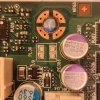
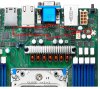
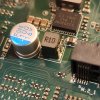
I unplugged everything and took the motherboard out of the case. I inspected it with a flashlight for the 10th time and I finally found what I think to be the culprit. There is a missing component on the motherboard. I can see the broken solder joints. It's near the CPU power delivery so I don't think the CPU is getting power. My guess is since EPYC uses a built in chipset (SoC), without CPU power, pretty much nothing happens outside of the BMC. I took a screenshot of the picture of the motherboard in the manual and circled the component that broke off. You can see in the picture of my motherboard where the component is clearly broken off and missing. Any idea what component broke off and its function? I can see it says R10 on it and there are multiple soldered on the board.
I unplugged everything and took the motherboard out of the case. I inspected it with a flashlight for the 10th time and I finally found what I think to be the culprit. There is a missing component on the motherboard. I can see the broken solder joints. It's near the CPU power delivery so I don't think the CPU is getting power. My guess is since EPYC uses a built in chipset (SoC), without CPU power, pretty much nothing happens outside of the BMC. I took a screenshot of the picture of the motherboard in the manual and circled the component that broke off. You can see in the picture of my motherboard where the component is clearly broken off and missing. Any idea what component broke off and its function? I can see it says R10 on it and there are multiple soldered on the board.
Attachments
-
 286.6 KB Views: 30
 -
 286.9 KB Views: 30
 -
 639 KB Views: 30
Looks like a coil, and most likely belongs to a switching voltage regulator circuit.
Thanks for the help. I edited my post and added another picture of one I found on my board in a different location. It's a much better view for id.Looks like a coil, and most likely belongs to a switching voltage regulator circuit.
1. Has anyone applied either the BIOS (which appears to just update microcode for Rome & Milan) or the BMC and have any experiential feedback?New Bios and BMC is out by the way
2. Does applying the BMC update clear out and reset the admin username/passwords and return to the default root/superuser combo?
Don't think that 32mb version is eligible for themNew Bios and BMC is out by the way
Yeah, I've got a 64mb board versionDon't think that 32mb version is eligible for them
Not the BMC but surely the BIOS can be updated even on the 32MB version ?Don't think that 32mb version is eligible for them
One of the highlights of EPYC is 128 PCIe lanes, so I don't think there is any lane sharing between any of the PCIe buses and either the m.2 slots or the mini-SAS ports. I went thru the manual pretty extensively before setting up my system, and the only admonishment that I recall regarding the PCIe buses was for users (such as I) running 2 or more GPUs, was to put your primary GPU in slot 2.Hello all, I was wonder if anyone knew of pcie lane sharing with m.2/ slim sas and mini sas. Looked through docs and can't find any information related.
(S8030GM2NE)