
Do you have couple of post codes from the sequence before hangup?
I might be wrong here, but as far as I understood MS33 doesn't have POST snooping, logs show power events and that basically it.
I'll look into redfish api may be I can get more out of mainboard.
Generally it should tell you what's wrong (what detection stage has some issues like RAM/CPU/PCIe etc.)
I'd expect so, but I don't think it gets to that stage. I remove everything from mainboard except CPU and PSU connection.
No beep for missing memory.
ES Xeon Discussion
- Thread starter britinpdx
- Start date
You are using an out of date browser. It may not display this or other websites correctly.
You should upgrade or use an alternative browser.
Notice: Page may contain affiliate links for which we may earn a small commission through services like Amazon Affiliates or Skimlinks.
Worst case scenario - you probably can get relatively cheap SPI/GPIO or perhaps even LPC/PCIe diagnostics/debug board (sometimes called post tester, motherboard analyzer, etc.) for £5-£20 on ebay which will show codes to you on built-in display (LCD or 7-segment pack)....I might be wrong here, but as far as I understood MS33 doesn't have POST snooping, logs show power events and that basically it.
I'll look into redfish api may be I can get more out of mainboard...
Last edited:
Oh wow! Thanks! I didn't know that such thing exists will look into it.Worst case scenario - you probably can get relatively cheap SPI/GPIO or perhaps even LPC/PCIe diagnostics/debug board (sometimes called post tester, analyzer, etc.) for £5-£20 on ebay which will show codes to you on built-in display (LCD or 7-segment pack).
AC power cycle after BMC/BIOS update.Is no POST nor video Output = dead cpu?
Some activity on CPU sensors, if I read it right, but feels like it's just MB hickup.
R07 should work.
check POST code.

Host must be ON to see this....
have you checked the MS33 with other CPU first ?Stupid question, gygabyte MS33-AR0 ("BIOSVersion" : "R07") - latest I'm afrade, xeon ES QYFS .
Is no POST nor video Output = dead cpu?
QYFQ runs on MS33-CPA BIOS F09 which is very very similar to MS33-AR0 F07 (i have too but not installed)
so dead motherboard or bad CPU installation, the mainboard usualy don't beep,
you can see all in the BMCWebGUI, update BIOS there.
note: to see the lately flashed new BIOS version in BMCWebGUI you need successfully POST. This is for historical reason and
the BMC Firmware is universal to all boards with AST2600, some have dual BIOS and the Firmware still can't know which BIOS is running.
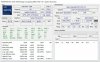
Hi @RolloZ170, thanks a ton for reply.
+ based on what you are saying about beeping and MB show stats, funs are spinning I hope it's CPU. I wish there were way to be more certain but what one can do
Nope. I have only one at the moment. Considering to buying one from somebody you know on ebay.have you checked the MS33 with other CPU first ?
That what I'd like to figure out. But it looks like to do so I have to get MB or CPU. And sine CPU is cheaper. I think I'll get it first after Christmas.QYFQ runs on MS33-CPA BIOS F09 which is very very similar to MS33-AR0 F07 (i have too but not installed)
so dead motherboard or bad CPU installation, the mainboard usualy don't beep,
you can see all in the BMCWebGUI, update BIOS there.
+ based on what you are saying about beeping and MB show stats, funs are spinning I hope it's CPU. I wish there were way to be more certain but what one can do
That's very helpful, since I flashed F0 with GbtUtility-2.1.78.jar both and it still shows R07.note: to see the lately flashed new BIOS version in BMCWebGUI you need successfully POST. This is for historical reason and
the BMC Firmware is universal to all boards with AST2600, some have dual BIOS and the Firmware still can't know which BIOS is running.
why do you use this crap ? you can update/downgrade BIOS with BCMWebGUI.That's very helpful, since I flashed F0 with GbtUtility-2.1.78.jar both and it still shows R07.
are you sure you have installed the CPU properly ? have you modern PSU ? (not 20 year old)
checked if there is any POST code yet ?That what I'd like to figure out. But it looks like to do so I have to get MB or CPU.
I tried few of them. Wasn't sure if gigabyte removed ES macrocodes from new firmware.why do you use this crap ? you can update/downgrade BIOS with BCMWebGUI.
Also somebody claimed here https://forums.servethehome.com/ind...board-bios-recovery-jumper.40812/#post-452184 that at least it give him video output.
And yes I flash them both ways UI and GbtUtility. Actually I'd prefer GbtUtility since it spits out info during flashing.
but in both cases I see "bios flash alert" in MB log.
I hope so. Did it twice. The second time I didn't screw fun properly, just place CPU in carrier to socket. In hope to here some beeps at least or events in log. And seems MB detected it and didn't power it up.are you sure you have installed the CPU properly ?
Asus ROG Strix 1000 Whave you modern PSU ? (not 20 year old)
you need 80 kilogramms pressure.I hope so. Did it twice. The second time I didn't screw fun properly, just place CPU in carrier to socket. In hope to here some beeps at least or events in log. And seems MB detected it and didn't power it up
can burn out CPU and motherboard easy.The second time I didn't screw fun properly, just place CPU in carrier to socket.
Oh really?you need 80 kilogramms pressure.
At this stage I prepared to take risks. Most probably one of them is dead already. Or I'm too dumb and pretty much deserve itcan burn out CPU and motherboard easy.


To me it felt like for LGA4677 there's resistance spring-s (on both sides) which prevents carrier-mounted CPU from landing onto contacts fully, it's simply impossible to have all contacts in right position without sufficient pressure, at the same time if some random contacts are connected but some are not then there's a possibility of having wrong current balance leading to (m)Amps flowing via pins which are not designed for it, this can easily result in bricked CPU or MB....I hope so. Did it twice. The second time I didn't screw fun properly, just place CPU in carrier to socket. In hope to here some beeps at least or events in log. And seems MB detected it and didn't power it up...
Last edited:
ID: 26 BMC Event sensor of type OEM logged a BMC Event : BIOS Update Image-1 Success was assertedAnd yes I flash them both ways UI and GbtUtility. Actually I'd prefer GbtUtility since it spits out info during flashing.
but in both cases I see "bios flash alert" in MB log.
MS73-HBx - needs probably BIOS R03 or a tweak, ask me if not work.Hi, is there a 2-socket motherboard that would work well with the Emerald Rapids ES (Q2SR)?
It seems that only r07 and r08 bios can be downloaded from the official Gigabyte website. What should I do?MS73-HBx - needs probably BIOS R03 or a tweak, ask me if not work.
no way. i use superbuy.Rollo this goofish ship to Europe?
The price really?220 euro?
you can't use intl.RMB to pay, they only take usd and this will be: 1666yuan = 240usd
Also, I'm wondering if it's possible to update the bios without using a genuine cpu (when an unsupported cpu is installed).MS73-HBx - needs probably BIOS R03 or a tweak, ask me if not work.
if you have the motherboard and 2x Q2SR i can provide it ( if realy needed )It seems that only r07 and r08 bios can be downloaded from the official Gigabyte website. What should I do?
we have already 2x Q30G running on MS73-HB1 with a little help.
Last edited:
Exactly what I see in log.ID: 26 BMC Event sensor of type OEM logged a BMC Event : BIOS Update Image-1 Success was asserted
sure. at intel platforms the BIOS is connected to chipset(PCH) not CPU like AMD.Also, I'm wondering if it's possible to update the bios without using a genuine cpu (when an unsupported cpu is installed).
Similar threads
- Replies
- 0
- Views
- 669
- Replies
- 35
- Views
- 8K

- Replies
- 0
- Views
- 721
- Replies
- 2
- Views
- 2K
