Thanks , I already change it to 4K , now consider change it backNo, changing it to 4k won't do anything. It might decrease some DRAM usage if you are storing lots of small files, but since you are storing normal user-sized files, I doubt it'll make any difference.
Notice: Page may contain affiliate links for which we may earn a small commission through services like Amazon Affiliates or Skimlinks.

My maximum RAM usage so far has been under 1GB and that was copying a Solidworks install that includes tens of thousands of small files. Not the same as being hammered by 10 VMs all running 15k user databases I suppose.
I'm sure it'll go up a bit when I start playing with loads of VMs but from my experience so far I'm not as scared as the manual initially made me.
My 3.2TB card was £150 and has 100% reserves remaining and about 15PB out of 20 remaining.
New ones are £200.
Faster 6.4TB versions are £400, £500 new.
I've posted my UK source in the deals section:
https://forums.servethehome.com/ind...o-£150-3-2tb-and-£400-6-4tb-pci-e-ssds.25348/
I'm sure it'll go up a bit when I start playing with loads of VMs but from my experience so far I'm not as scared as the manual initially made me.
My 3.2TB card was £150 and has 100% reserves remaining and about 15PB out of 20 remaining.
New ones are £200.
Faster 6.4TB versions are £400, £500 new.
I've posted my UK source in the deals section:
https://forums.servethehome.com/ind...o-£150-3-2tb-and-£400-6-4tb-pci-e-ssds.25348/
In fact, all meaningful error messages are only logged by driver.Has anyone been able to resolve: "Status unknown: Driver is in MINIMAL MODE: General channel initialization failure"?
For any fancy errors please try to load linux driver and post results of:
Code:
dmesg | grep fioSure-erase saves the lebmap in RAM, erases everything and restores lebmap to its original state. That's why interrupted sure-erase would leave the card without lebmap.Well, if you can't get sure-erase to complete, (it wipes the leb-map) there might be something else wrong.
Not sure about "nvdata", that seem to be some extra piece of metadata stored somewhere in the nand array (not to be confused with "midprom"). In case of lost lebmap, nvdata is also lost.
For gen3 sure-erase process was altered somehow, possibly to make it less susceptible to errors and interrupts. In result now its not possible to reformat a card with missing lebmap. Missing nvdata is also a fatal error for gen3.

I've noticed I have tens of thousands of fio-msrv entries in Event Viewer, almost every single second I get the following
I have two cards, an ioDrive Duo 320GB SLC and a 1.3TB ioScale. Both drives have the most up to date firmware and drivers. I've low-level formatted all drives and the errors are still showing up. ioSphere shows no issues.
EDIT: Uninstalled and reinstalled drivers and ioSphere. Error is a little more descriptive now.
Code:
sqlite_mobj_connection: sqlite_write_stmt.execute(): SQL error on statement 'update mobj_2 set updated=strftime('%s','now'),softdel=NULL,a90=?,a207=?,a320=?,a321=?,a612=?,a613=?,a614=? where key=?;', error was: (11) database disk image is malformedEDIT: Uninstalled and reinstalled drivers and ioSphere. Error is a little more descriptive now.
Code:
The description for Event ID 4096 from source fio-msrv cannot be found. Either the component that raises this event is not installed on your local computer or the installation is corrupted. You can install or repair the component on the local computer.

If the event originated on another computer, the display information had to be saved with the event.

The following information was included with the event:

[sqlite_mobj_connection] ERROR: sqlite_write_stmt.execute(): SQL error on statement 'update mobj_2 set updated=strftime('%s','now'),softdel=NULL,a89=?,a207=?,a321=?,a611=?,a613=?,a625=? where key=?;', error was: (11) database disk image is malformed

The message resource is present but the message was not found in the message table
Last edited:
I came by a Dell-branded SX300 that is running some weird firmware:
C:\Program Files\Common Files\VSL Utils>fio-status -a
Found 1 VSL driver package:
4.3.5 build 1121 Storport Driver: loaded
Found 1 ioMemory device in this system
Adapter: ioMono (driver 4.3.5)
ioMemory SX300-6400, Product Number:MM86C, SN:1445G1897
ioMemory Adapter Controller, PN:1PXNH
Product UUID:d8414950-c29d-5299-9189-8e7400e46017
PCIe Power limit threshold: 74.75W
PCIe slot available power: unavailable
Connected ioMemory modules:
fct0: 01:00.0, Product Number:MM86C, SN:1445G1897
fct0 Status unknown: Driver is in MINIMAL MODE:
The firmware on this device is not compatible with the currently installed version of the driver
ioMemory Adapter Controller, Product Number:MM86C, SN:1445G1897
!! ---> There are active errors or warnings on this device! Read below for details.
ioMemory Adapter Controller, PN:1PXNH
Microcode Versions: App:0.0.30.0
Powerloss protection: not available
PCI:01:00.0, Slot Number:1
Vendor:1aed, Device:3001, Sub vendor:1028, Sub device:1fa1
Firmware v1023.1023.1023, rev 4294967295 Internal
Geometry and capacity information not available.
Format: not low-level formatted
PCIe slot available power: unavailable
Internal temperature: 230.33 degC, max 230.33 degC
Internal voltage: avg 3.00V, max 3.00V
Aux voltage: avg 3.00V, max 3.00V
Rated PBW: 22.00 PB
Lifetime data volumes:
Physical bytes written: 0
Physical bytes read : 0
RAM usage:
Current: 0 bytes
Peak : 0 bytes
ACTIVE WARNINGS:
The ioMemory is currently running in a minimal state.
Firmware update with 4.3.5 Dell firmware package is just stuck at 0%:
C:\Program Files\Common Files\VSL Utils>fio-update-iodrive.exe -f -d /dev/fct0 dell_iodrive_4.3.5-20190313.fff
WARNING: DO NOT TURN OFF POWER OR RUN ANY IODRIVE UTILITIES WHILE THE FIRMWARE UPDATE IS IN PROGRESS
Please wait...this could take a while
WARNING: '/dev/fct0': YOU ARE ATTEMPTING TO FORCE A FIRMWARE VERSION DOWNGRADE - THIS MAY RESULT IN DATA LOSS
Do you wish to continue updating '/dev/fct0' [y/n]? y
Updating: [ ] ( 0%) /
Can this poor baby still be saved somehow?
C:\Program Files\Common Files\VSL Utils>fio-status -a
Found 1 VSL driver package:
4.3.5 build 1121 Storport Driver: loaded
Found 1 ioMemory device in this system
Adapter: ioMono (driver 4.3.5)
ioMemory SX300-6400, Product Number:MM86C, SN:1445G1897
ioMemory Adapter Controller, PN:1PXNH
Product UUID:d8414950-c29d-5299-9189-8e7400e46017
PCIe Power limit threshold: 74.75W
PCIe slot available power: unavailable
Connected ioMemory modules:
fct0: 01:00.0, Product Number:MM86C, SN:1445G1897
fct0 Status unknown: Driver is in MINIMAL MODE:
The firmware on this device is not compatible with the currently installed version of the driver
ioMemory Adapter Controller, Product Number:MM86C, SN:1445G1897
!! ---> There are active errors or warnings on this device! Read below for details.
ioMemory Adapter Controller, PN:1PXNH
Microcode Versions: App:0.0.30.0
Powerloss protection: not available
PCI:01:00.0, Slot Number:1
Vendor:1aed, Device:3001, Sub vendor:1028, Sub device:1fa1
Firmware v1023.1023.1023, rev 4294967295 Internal
Geometry and capacity information not available.
Format: not low-level formatted
PCIe slot available power: unavailable
Internal temperature: 230.33 degC, max 230.33 degC
Internal voltage: avg 3.00V, max 3.00V
Aux voltage: avg 3.00V, max 3.00V
Rated PBW: 22.00 PB
Lifetime data volumes:
Physical bytes written: 0
Physical bytes read : 0
RAM usage:
Current: 0 bytes
Peak : 0 bytes
ACTIVE WARNINGS:
The ioMemory is currently running in a minimal state.
Firmware update with 4.3.5 Dell firmware package is just stuck at 0%:
C:\Program Files\Common Files\VSL Utils>fio-update-iodrive.exe -f -d /dev/fct0 dell_iodrive_4.3.5-20190313.fff
WARNING: DO NOT TURN OFF POWER OR RUN ANY IODRIVE UTILITIES WHILE THE FIRMWARE UPDATE IS IN PROGRESS
Please wait...this could take a while
WARNING: '/dev/fct0': YOU ARE ATTEMPTING TO FORCE A FIRMWARE VERSION DOWNGRADE - THIS MAY RESULT IN DATA LOSS
Do you wish to continue updating '/dev/fct0' [y/n]? y
Updating: [ ] ( 0%) /
Can this poor baby still be saved somehow?
Question for Acquacow.
We have 4 servers HP DL380's that each have two 6.4 TB SX350 cards installed ( the Cisco USC version) last week the on two different server about about 6 hours apart each server lost one of the cards.
The Windows event showed the same pattern on both servers.
Every seen these types of errors ? Servers don't report any power issue. they both run the same workload so wondering what could have cause a software crash ?
Server A - 9/6/2019 12:43:38 AM
fioerr Cisco UCS 6400GB SanDisk ioMemory SX350 (7,2): 12303 Watchdog fired - request stuck issued 106953125 us ago last completion 59000000 us ago
Server B - 9/5/2019 1:05:57 PM
-fioerr Cisco UCS 6400GB SanDisk ioMemory SX350 (7,2): 12303 Watchdog fired - request stuck issued 56140625 us ago last completion 53046875 us ago
The rest of the errors logged by iomemory_vsl4_mc were the same on both servers.
- Cisco UCS 6400GB SanDisk ioMemory SX350 (7,2): Stuck req
then
- fioerr Cisco UCS 6400GB SanDisk ioMemory SX350 (7,2): 12318 Failing channel (0x1000).
Last error :
fioerr ioMemory driver: 06156 fct0: Notification received that this device has failed.
The the disk manager reports the drive is offline next message relate to card trying to take a crash dump ?
- Cisco UCS 6400GB SanDisk ioMemory SX350 (7,2): Groomer for data log is tearing down
- Cisco UCS 6400GB SanDisk ioMemory SX350 (7,2): Groomer for data log halted.
-fiowrn Cisco UCS 6400GB SanDisk ioMemory SX350 (7,2): Error saving metadata. Reattach will require rebuild (-12).
-Cisco UCS 6400GB SanDisk ioMemory SX350 (7,2): BEGIN CSR DUMP
Cisco UCS 6400GB SanDisk ioMemory SX350 (7,2): CSR DUMP: oDQCAP8+ZmlvaW5mIENpc2NvIFVDUyA2NDAwR0IgU2FuRGlzayBpb01lbW9yeSBTWDM1MCAoNywy
100 plus more CSR DUMP
Last entry :
-Cisco UCS 6400GB SanDisk ioMemory SX350 (7,2): END CSR DUMP
card info :
Adapter: ioMono (driver 4.3.5)
Cisco UCS 6400GB SanDisk ioMemory SX350, Product Number FIOS64002, SN:Fxxxxxx
PCIe Power limit threshold: 24.75W
Connected ioMemory modules:
fct0: 07:00.0, Product NumberFIOS64002, SN:xxxxxxxxxxxx
fct0 Attached
ioMemory Adapter Controller, Product NumberFIOS64002, SN:xxxxxxxxxxx
PCI:07:00.0, Slot Number:2
Firmware v8.9.9, rev 20170222 Public
We have 4 servers HP DL380's that each have two 6.4 TB SX350 cards installed ( the Cisco USC version) last week the on two different server about about 6 hours apart each server lost one of the cards.
The Windows event showed the same pattern on both servers.
Every seen these types of errors ? Servers don't report any power issue. they both run the same workload so wondering what could have cause a software crash ?
Server A - 9/6/2019 12:43:38 AM
fioerr Cisco UCS 6400GB SanDisk ioMemory SX350 (7,2): 12303 Watchdog fired - request stuck issued 106953125 us ago last completion 59000000 us ago
Server B - 9/5/2019 1:05:57 PM
-fioerr Cisco UCS 6400GB SanDisk ioMemory SX350 (7,2): 12303 Watchdog fired - request stuck issued 56140625 us ago last completion 53046875 us ago
The rest of the errors logged by iomemory_vsl4_mc were the same on both servers.
- Cisco UCS 6400GB SanDisk ioMemory SX350 (7,2): Stuck req
then
- fioerr Cisco UCS 6400GB SanDisk ioMemory SX350 (7,2): 12318 Failing channel (0x1000).
Last error :
fioerr ioMemory driver: 06156 fct0: Notification received that this device has failed.
The the disk manager reports the drive is offline next message relate to card trying to take a crash dump ?
- Cisco UCS 6400GB SanDisk ioMemory SX350 (7,2): Groomer for data log is tearing down
- Cisco UCS 6400GB SanDisk ioMemory SX350 (7,2): Groomer for data log halted.
-fiowrn Cisco UCS 6400GB SanDisk ioMemory SX350 (7,2): Error saving metadata. Reattach will require rebuild (-12).
-Cisco UCS 6400GB SanDisk ioMemory SX350 (7,2): BEGIN CSR DUMP
Cisco UCS 6400GB SanDisk ioMemory SX350 (7,2): CSR DUMP: oDQCAP8+ZmlvaW5mIENpc2NvIFVDUyA2NDAwR0IgU2FuRGlzayBpb01lbW9yeSBTWDM1MCAoNywy
100 plus more CSR DUMP
Last entry :
-Cisco UCS 6400GB SanDisk ioMemory SX350 (7,2): END CSR DUMP
card info :
Adapter: ioMono (driver 4.3.5)
Cisco UCS 6400GB SanDisk ioMemory SX350, Product Number
FIOS64002, SN:FxxxxxxPCIe Power limit threshold: 24.75W
Connected ioMemory modules:
fct0: 07:00.0, Product Number
FIOS64002, SN:xxxxxxxxxxxxfct0 Attached
ioMemory Adapter Controller, Product Number
FIOS64002, SN:xxxxxxxxxxxPCI:07:00.0, Slot Number:2
Firmware v8.9.9, rev 20170222 Public
My "new open box" 1.2TB ioDrive2 card came today!
It really is new!
Man this things screams! All of my VMs run off of SSD storage (used to be 2 x 256 GB SATA, now this) over 10g and NFS. I can saturate the 10g link easily writing to this even over NFS and inside a VM with no special changes!
[win10, nfs, 10g (1500 mtu), virtio+kvm]

rand read/write is only ok, but expected because of network latency.
Code:
Reserve space status: Healthy; Reserves: 100.00%, warn at 10.00%
Active media: 100.00%
Rated PBW: 17.00 PB, 100.00% remaining
Lifetime data volumes:
Physical bytes written: 375,184,072
Physical bytes read : 6,770,153,520Man this things screams! All of my VMs run off of SSD storage (used to be 2 x 256 GB SATA, now this) over 10g and NFS. I can saturate the 10g link easily writing to this even over NFS and inside a VM with no special changes!
[win10, nfs, 10g (1500 mtu), virtio+kvm]
rand read/write is only ok, but expected because of network latency.
Yep turns out ZFS was pegging cores from the I/O. I was getting abysmal rand4k performance on the host directly too.You've gotta up your thread count or throw some more cores for that testing with crystal =)
After digging through, I tried reformatting the flash as 4k and re-creating the pool w/ ashift=12 which made next to no difference.. Next, I realised it's the recordsize.. Setting recordsize=8k on VM zvols made the rand4k performance much more in line with official spec (~250k IOPS). Woo! Still less than stellar rand4k performance over the network (~50-70k IOPS) but pretty expected, still way better than my SATA ssds before, and the sequential r/w is fantastic...
Hey guys, so Im having a weird issue. I recently purchased a IoScale 1.3 TB card. Installed into my Win10 machine, updated firmware, all seemed fine. But now, I am getting terrible speeds on the drive. Like, super bad. I dropped this into my other Win10 workstation to see if it was an issue there, and same thing.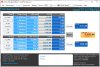


What's the output of "fio-status -a" and "fio-pci-check"Hey guys, so Im having a weird issue. I recently purchased a IoScale 1.3 TB card. Installed into my Win10 machine, updated firmware, all seemed fine. But now, I am getting terrible speeds on the drive. Like, super bad. I dropped this into my other Win10 workstation to see if it was an issue there, and same thing.View attachment 11995 View attachment 11996
Also, how long was the drive being written to? Have you written more than 1.6TB to it?
You may want to try a "fio-format" on it and then create the filesystem and test again.
What's the output of "fio-status -a" and "fio-pci-check"
Code:
C:\WINDOWS\system32>fio-status -a

Found 1 ioMemory device in this system
Driver version: 3.2.15 build 1699

Adapter: Single Controller Adapter
        Fusion-io ioScale 1.30TB, Product Number:F11-001-1T30-CS-0001, SN:1243D0122, FIO SN:1243D0122
        ioDrive2 Adapter Controller, PN:PA004341001
        External Power: NOT connected
        PCIe Bus voltage: avg 12.05V
        PCIe Bus current: avg 0.69A
        PCIe Bus power: avg 8.34W
        PCIe Power limit threshold: 24.75W
        PCIe slot available power: unavailable
        Connected ioMemory modules:
          fct0: Product Number:F11-001-1T30-CS-0001, SN:1243D0122

fct0    Attached
        ioDrive2 Adapter Controller, Product Number:F11-001-1T30-CS-0001, SN:1243D0122
        ioDrive2 Adapter Controller, PN:PA004341001
        SMP(AVR) Versions: App Version: 1.0.35.0, Boot Version: 0.0.9.1
        Located in slot 0 Center of ioDrive2 Adapter Controller SN:1243D0122
        Powerloss protection: protected
        PCI:03:00.0, Slot Number:6
        Vendor:1aed, Device:2001, Sub vendor:1aed, Sub device:2001
        Firmware v7.1.17, rev 116786 Public
        1035.20 GBytes device size
        Format: v500, 252734375 sectors of 4096 bytes
        PCIe slot available power: unavailable
        PCIe negotiated link: 4 lanes at 5.0 Gt/sec each, 2000.00 MBytes/sec total
        Internal temperature: 64.47 degC, max 67.43 degC
        Internal voltage: avg 1.01V, max 1.02V
        Aux voltage: avg 2.49V, max 2.49V
        Reserve space status: Healthy; Reserves: 92.87%, warn at 10.00%
        Active media: 98.00%
        Rated PBW: 10.00 PB, 100.00% remaining
        Lifetime data volumes:
           Physical bytes written: 162,565,733,024
           Physical bytes read   : 1,558,001,632,824
        RAM usage:
           Current: 65,228,928 bytes
           Peak   : 74,272,768 bytes
        Contained VSUs:
          fct0: ID:0, UUID:8191ad84-43ba-4d2f-821b-bb1c577bfdd7

fct0    State: Online, Type: block device
        ID:0, UUID:8191ad84-43ba-4d2f-821b-bb1c577bfdd7
        1035.20 GBytes device size
        Format: 252734375 sectors of 4096 bytes
Code:
C:\WINDOWS\system32>fio-pci-check
This utility directly probes the pci configuration ports.
There are possible system stability risks in doing this.
Do you wish to continue [y/n]? y

Root Bridge PCIe 35250 MB/sec needed max
Intel(R) Xeon(R) E7 v3/Xeon(R) E5 v3/Core i7 DMI2 - 2F00

      Bridge 0000:00:02.00 (03-03) (8086:2f04)
      Intel(R) Xeon(R) E7 v3/Xeon(R) E5 v3/Core i7 PCI Express Root Port 2 - 2F04
          Needed 2000 MB/sec Avail 2000 MB/sec
        * Correctable Error(s): Detected
          Clearing Errors

            ioDrive 0000:03:00.0 (2001) Firmware 116786
Fusion ioMemory VSL DeviceI'd look at enabling pci-e power override as well if you're sure your pci-e slot can provide more than 25W of power during writes.
And you're in windows, so I'd disable Windows Defender real-time protection to keep it from scanning the test files as you write to them.
And you're in windows, so I'd disable Windows Defender real-time protection to keep it from scanning the test files as you write to them.
So, I did a low level format back to 512B, just to see if it was a bug there, no fix in speed. Overrode the pcie power to 75 watts, no change in speed there. I have ioSphere installed, and the card is there, all seems good. But it still is slow during benchmarks.