ES Xeon Discussion

Notice: Page may contain affiliate links for which we may earn a small commission through services like Amazon Affiliates or Skimlinks.

ardabilal

New Member
Dec 12, 2022
12
1
3
which 8490H ES ?
8490H ES step 3 D0 QYFX = no ( or with unofficial BIOS 1.0 is full of bugs - you can't downgrade, needs soldering )
8490H ES step 4 E0 Q03J = yes.
Hi,
I ordered step 4 EO CPU and Supermicro X13DEI-T motherboard but no display. After the power its shutdown.
Do you have any idea ?

Current Config
2 x 8490H ( Q03J)
Supermicro X13DEI-T Motherboard
2 x 64GB DDR5 ECC

Is it need any bios modification ?
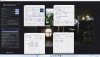
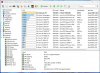
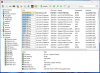
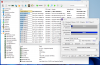
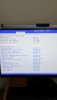
I downgraded bios 2.1 to 1.1 here is the current firmwares.
But i didnt downgrade CLPD or BMC only downgraded BIOS.


Thanks.
 
Last edited:

RolloZ170

Well-Known Member
Apr 24, 2016
9,362
2,997
113
germany
I ordered step 4 EO CPU and Supermicro X13DEI-T motherboard but no display. After the power its shutdown.
Do you have any idea ?
Current Config
2 x 8490H ( Q03J)
Supermicro X13DEI-T Motherboard
have seen Q03J orking on X13DEI but i have noticed Q03J E0 is still not same than other E0 like Q0K?
Q03J runs not on ASRock Rack SP2C741 but Q0K? do work.
Possibly you need BIOS 1.0 - unfortunaly this can only be flashed by hardware programmer.
 

ardabilal

New Member
Dec 12, 2022
12
1
3
have seen Q03J orking on X13DEI but i have noticed Q03J E0 is still not same than other E0 like Q0K?
Q03J runs not on ASRock Rack SP2C741 but Q0K? do work.
Possibly you need BIOS 1.0 - unfortunaly this can only be flashed by hardware programmer.
Where can i find 1.0 BIOS ?
 

Bert

Well-Known Member
Mar 31, 2018
1,038
528
113
47
2 questions:

1. Has anyone see any benefits of using early E0 chips over D0 chips on W790 platform? Are these chips any better? I only read that they may have lower idle power consumption.
2. Are accelerators available/enabled on QYFR? How can I check that?
 

DHamov

Active Member
Jan 12, 2024
121
31
28
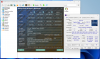
I had both QYFS (D0) and Q03J (E0) on Asus W790 Sage. These cpu's are not the same but quite similar. 56Cores max freq 3.7GHz vs 60 Cores max freq 3.5GHz.

From my perspective and experience the difference was not very large, but i slightly prefer the Q03J. Overall the benchmark scores are pretty similar.
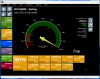
Also, Idle power use (at the wall) was quite similar, less than 10% difference with the same settings in linux and bios. 195W for the QYFS D0 system vs 180W for exactly the same system with Q03J E0. System Asus w790E SAGE+2x3090 + 8x32GB mem.
Later i heard that on windows power use could have been tweaked.

I think the most notable difference was that Q03J E0 had similar effective memory bandwidth with 4800MT memory settings compared to QYFS with 6000MT Memory settings.
Which i still do not really understand.
With Q03JI never managed to get the overclock of my Micron 5600MT server memory working, not even at "stock 5600MT". But any way at 4800MT it was just as fast or even a bit faster than QYFS that could overclock the exact same memory to 6000MT or 6200MT.

For every day work i used both for about a month, i preferred the Q03J.
For my personal use cases under long susstained all core loads, (longer than PL times) Say 2 hours 100% load, Q03J was still was about 8-10% faster than the QYFS.

If you already have an QYFS i personally think the upgrade to Q03J is not really worth it.
But If you buy a new system, I would pick Q03J. But it also depends on the price difference.

Comparing the Q03J on w790 Sage to Q0KG on c741 Asrock Rack SPC741D16X-2T with a single cpu and same memory. The Q03J also wins easily, and was actually cheaper.
With Q0KG+ Asrock SPC741 the memory bandwidth is much lower, for reasons unknown to me.
 

DHamov

Active Member
Jan 12, 2024
121
31
28
User MillionMiles made this compatibility table at the other thread.

Now my question is what about Q0KS with X13DAI?
As far as i know nothing is confirmed compatible yet on X13DAI here on the forum, but what are your guesses? Are they similar enough? The last bios versions on the SM website are different.
No Combination offers with X13DAI and ES on ebay (currently), eventhough same sellers do sell other combinations and ES. Bad signs? No response from ebay sellers yet.
 
Last edited:

DHamov

Active Member
Jan 12, 2024
121
31
28
so far, all evidence suggests that Q0K* works on all C741 boards, Including X13DEI, but no information about X13DAI.

It's too expensive. And these combinations aren't always correct, remember X13SEI+Q03J?

There was never X13DAI in the table.
I was still assuming that X13SEI+Q03J works, eventhough i dont know with what bios.
I know there was no X13DAI in the table. I was not critizising the table. In searches at this and other forums did not come across ES + X13DAI experiences. So that is why i was asking for educated or experenced guesses. I also wrote some of the sellers, maybe they tried, lets see.
 
Last edited:

sam55todd

Active Member
May 11, 2023
212
65
28
X13DAI is predominantly the same as X13DEI (plus audio and some other features),
same chipset (just as it's younger single-CPU bro like X13SEI),
therefore as long as CPU works on official bios (despite not being listed there by SM)
with X13DEI/X13SEI - I would assume it should be compatible with X13DAI too.
But IMV Q1** ES/QS versions would probably be more desirable (instead of Q0**).
Getting early v1 BIOS for X13DAI could be quite a challenge.
 
Last edited:
  • Like
Reactions: DHamov

RolloZ170

Well-Known Member
Apr 24, 2016
9,362
2,997
113
germany
X13DAI is predominantly the same as X13DEI (plus audio and some other features),
while the BIOS may nearly the same, it grants not same compatibility because the CSE SPS is the instance which allows ES or not.
means not SPS 6.0.4.25 is blocking ES in any case, the BIOS engineer configures that with a click (spsMFit.exe)
 
  • Like
Reactions: DHamov

assfucker69

New Member
May 9, 2024
4
2
3
Does anyone have any help or suggestions with a microsoft project olympus gen2 motherboar? I believe I have running, however I can not seem to get a video display from it. I have it going so far with a single xeon silver 4110 and a 8gb stick of ddr4 2400 desktop ram. Ive been keeping track of the post code LED's and such as there seems to be NO documentation for this board. I am 99,9% sure its running properly as I see the post leds "complete" and the keyboard I have plugged in responds to capslock and numlock. even ctrl-alt-del resets the system. Just no display out. Ive tried all the pciex16 with gt730, gt320, x1650, 8600gts, 8800gts and another older geforce card. Any help is super appreciated! thanky