

This one will likely end up becoming my personal workstation, or perhaps just a Linux test workstation. For now, it is going into DemoEval but I decided to use the machine for answering a few questions I had.
Build Parts and Rationale
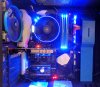
Build Parts and Rationale
- CPU: AMD Ryzen 7 1700
- The included cooler makes this too good of a value to pass up. This is called putting my money where my mouth is after AMD Ryzen 7 1700 Linux Benchmarks - The Zen you should buy
- Motherboard: Gigabyte AX370-Gaming 5 Aorus
- I got this one at a local computer shop. I wanted Ryzen + Intel NIC and since this is going to be a personal workstation, I wanted
LOTS OF LEDSa U.2 NVMe port - RAM: You are going to see 32GB of Patriot Viper DDR4-2666 RAM installed. The 3200MHz 64GB
kit is hopefully going to arrive Friday.
- Case: NZXT S340
- I was "cheap" and got the $69-$79 non-elite. I somewhat regret it. I should have spent a few more for this Amazon.com: NZXT S340VR-Elite Matte Black/Blue (CA-S340W-B5): Computers & Accessories as it has an extra SSD mount. Super easy to install and make look decent. I normally do not care much about appearance but they did a good job. I have no use for 20x 3.5" bays since spinning media is only for NAS units. I was not very happy about the fact that these required me to install aftermarket 4-pin PWM fans.
- PSU: Seasonic 550W
Gold. I use almost all Seasonic at this point. It is complete overkill but silent at any load this will be used for.
- SSDs: Intel DC S3600 800GB, Intel 750 400GB NVMe
- Video Card: I used an old Zotac 610 PCIe x1 card. It works well. Buying today I would get the updated 710 model Amazon.com: ZOTAC GeForce GT 710 1GB DDR3 PCIE x 1 , DVI, HDMI, VGA, Low Profile Graphic Card (ZT-71304-20L): Computers & Accessories the advantage here is that these are $45 and use a PCIe x1 slot. That leaves the PCIe x16 slot open for additional devices.
- NIC: Not installed yet. Likely a Mellanox ConnectX3-EN Pro 40GbE card since I use those everywhere.


