Ryzen AM5 boards with IPMI

Notice: Page may contain affiliate links for which we may earn a small commission through services like Amazon Affiliates or Skimlinks.

masimus

New Member
Aug 11, 2019
7
2
3
What is your solution for fitting 4 x m.2 drives on this board?
I am using the 2x m.2 slots on the motherboard and also 2x RaidSonic ICY BOX IB-PCI208-HS. They work well! Single m.2 slot to PCIe 4.0 x4 adapter with heatsink.

I also updated BIOS to 1.2 during my fault searching of the NIC, and there is now option to enable x4x4x4x4 bifurcation on SLOT6. Which gives other opportunities...
 
Last edited:
  • Like
Reactions: chuqdu and lostmind

masimus

New Member
Aug 11, 2019
7
2
3
yah we have been testing this with the grub conf updated with those lines. It has made it 48 hours without issues so far.
Inspired from a thread in the proxmox forum, I compiled and installed Intels own out-of-tree linux kernel modules, found here:

It has now worked stable for 24+ hours (knock on wood!), without disabling PCIe power management in the linux kernel. nvme drive temperatures and power consumption back to lower levels again.
 

lostmind

Member
Jan 5, 2013
37
9
8
Inspired from a thread in the proxmox forum, I compiled and installed Intels own out-of-tree linux kernel modules, found here:

It has now worked stable for 24+ hours (knock on wood!), without disabling PCIe power management in the linux kernel. nvme drive temperatures and power consumption back to lower levels again.
We tried the new driver, no difference for us.

this:

pcie_port_pm=off pcie_aspm.policy=performance

has run without issue for days... nearly a week now.

I am using the 2x m.2 slots on the motherboard and also 2x RaidSonic ICY BOX IB-PCI208-HS. They work well! Single m.2 slot to PCIe 4.0 x4 adapter with heatsink.

I also updated BIOS to 1.2 during my fault searching of the NIC, and there is now option to enable x4x4x4x4 bifurcation on SLOT6. Which gives other opportunities...
Ahh neat. The bifurcation option is a big deal... I didn't notice it in there, now I will have to check.
 

Heretic

New Member
Mar 3, 2024
1
0
1
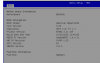
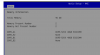
I wanted share my experience, I just built a server with the Asrock Rack B650D4U and 2x48GB 5600 ECC UDIMMs. Had to short out the CMOS settings with the battery pulled but it comes right up afterwards.


Shows on the BMC as part: AVW726GUA1K6560P07-H
Comes up at 5200 MHz, I haven't tried to go to 5600 yet and not sure I care at this point.

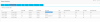
Screenshot 2024-03-03 175933.png

Screenshot 2024-03-03 161820.pngScreenshot 2024-03-03 161623.png
 

diskdiddler

Member
Mar 3, 2017
109
13
18
48
I've opted to go for the regular desktop home user style board, but with a nice geekworm pikvm plugged into it.


This is for my future desktop replacement system (I RDP into my desktop, no monitors attached)


For my NAS however, I would still heavily lean towards a "real" IPMI based solution with ECC and a plethora of sata ports. Luckily that upgrade is a long way away
 

Tom.exe

New Member
Sep 3, 2024
1
0
1
Hi guys
Do you know if the B650D4U have support for AMD Expo memory profiles, I havn't seen any reviewer show all the bios for that board, and with no referance online :(
Thanks a lot
 

max-au

New Member
Dec 19, 2024
5
0
1
I also got Supermicro H13SAE-MF, but ran into issues trying to use 48 GB modules. Specifically, Kingston Server Premier 48 GB ECC UDIMM (
KSM56E46BD8KM-48HA). The motherboard won't boot if I install two of these (but boots fine if I install one 48 GB module in DIMM A1). I tried many combinations. For example, 64 GB (48 Gb in DIMM A1 and 16 GB module in DIMM B1) - that works. But having two 48 Gb modules does not, errors out with POST c5 code (memory error).

I contacted Kingston's support (because they had these modules listed as "compatible" with that motherboard). Unfortunately, we were not able to make it work, so they ended up removing the compatibility claim (48 GB modules no longer listed compatible with that motherboard).

Now, a couple of questions, for anyone running H13SAE-MF:
* has anyone tried 192 GB ECC?
* does anyone run 96 GB ECC? I see some non-ECC configs reported, but does it work with ECC

I'm kinda on the crossroads, Kingston's support recommended returning 48 GB modules and ordering 32 GB. But I actually need that RAM (and ideally 192 GB), so I'm thinking of ordering ASRock B650D4U (despite a number of sudden deaths of that motherboard). For ASRock owners, same questions - does anyone run 192 GB ECC, or 96 GB with Kingston modules?
 

vincococka

Member
Sep 29, 2019
80
44
18
Slovakia
I also got Supermicro H13SAE-MF, but ran into issues trying to use 48 GB modules. Specifically, Kingston Server Premier 48 GB ECC UDIMM (
KSM56E46BD8KM-48HA). The motherboard won't boot if I install two of these (but boots fine if I install one 48 GB module in DIMM A1). I tried many combinations. For example, 64 GB (48 Gb in DIMM A1 and 16 GB module in DIMM B1) - that works. But having two 48 Gb modules does not, errors out with POST c5 code (memory error).

I contacted Kingston's support (because they had these modules listed as "compatible" with that motherboard). Unfortunately, we were not able to make it work, so they ended up removing the compatibility claim (48 GB modules no longer listed compatible with that motherboard).

Now, a couple of questions, for anyone running H13SAE-MF:
* has anyone tried 192 GB ECC?
* does anyone run 96 GB ECC? I see some non-ECC configs reported, but does it work with ECC

I'm kinda on the crossroads, Kingston's support recommended returning 48 GB modules and ordering 32 GB. But I actually need that RAM (and ideally 192 GB), so I'm thinking of ordering ASRock B650D4U (despite a number of sudden deaths of that motherboard). For ASRock owners, same questions - does anyone run 192 GB ECC, or 96 GB with Kingston modules?
Bought 2pcs of H13SAE-MF boards 2-3 weeks ago as AMD offered EPYC 4004 promo on couple of their CPUs (not whole series).
At least let me confirm that 2x 32GB from Kingston KSM52E42BD8KM-32HA works - connected to DIMMA1 and DIMMB1.

Today SuperMicro released new firmwares for H13SAE-MF, I have already upgraded them following this procedure:
1, upload IPMI FW 1.3.6 via management console + uncheck all checkboxes before update
2, turn off power for 35-40 seconds from machine
3, turn on power and access new IPMI (password has been reset to ADMIN / ADMIN )
4, update BIOS to version 2.2 via management console and do not forget to uncheck all checkboxes during upgrade
+ after BIOS update turn on server and reapply all BIOS settings
+ decrease FAN thresholds so board does not think that they are failing (from OS via ipmitool)
 

Harmony

Member
Oct 6, 2022
165
15
18
Bought 2pcs of H13SAE-MF boards 2-3 weeks ago as AMD offered EPYC 4004 promo on couple of their CPUs (not whole series).
At least let me confirm that 2x 32GB from Kingston KSM52E42BD8KM-32HA works - connected to DIMMA1 and DIMMB1.

Today SuperMicro released new firmwares for H13SAE-MF, I have already upgraded them following this procedure:
1, upload IPMI FW 1.3.6 via management console + uncheck all checkboxes before update
2, turn off power for 35-40 seconds from machine
3, turn on power and access new IPMI (password has been reset to ADMIN / ADMIN )
4, update BIOS to version 2.2 via management console and do not forget to uncheck all checkboxes during upgrade
+ after BIOS update turn on server and reapply all BIOS settings
+ decrease FAN thresholds so board does not think that they are failing (from OS via ipmitool)
New update is for what?

And why uncheck all boxes I don't normally do that.
 

max-au

New Member
Dec 19, 2024
5
0
1
> x 32GB from Kingston KSM52E42BD8KM-32HA works

That I also figured, but I need at least 96 (and ideally 192). So I got two 48 GB modules which didn't work with BIOS 2.1. I'll flash 2.2 and see how it goes, thanks. What bothers me, I cannot find any CHANGELOG for that BIOS. Supermicro's website claims 48Gb DIMM compatibility, so I wanted to see if anyone actually has 48 Gb ECC (more than one!) working with that MB.
 

twin_savage

Active Member
Jan 26, 2018
159
124
43
35
@max-au I've got a H13SAE-MF running 2 48GB ECC UDIMMs, they are 24Gb Hynix M-die and I haven't had any trouble running them at 5200MHz. I'd suggest re-seating your CPU if you have trouble running the memory; The Ryzen memory controller is already working overtime just to support the 5200MHz speed memory and any FOD or oxidation on the pins might push it over the edge of instability.
 
  • Like
Reactions: max-au

max-au

New Member
Dec 19, 2024
5
0
1
Updated the BIOS, resetted BMC, reseated CPU, pulled the battery, waited, put it back, eve, kicked the tires... still no luck. Adding second 48 Gb Kingston ECC UDIMM makes it unbootable. Contacted Supermicro support, they also told about the firmware, then mentioned that Kingston is not on their QVL, and ended up with "you may need to RMA the motherboard and memory to us, so we can debug". Since I'm not in a big rush, I might just do that, and see what they come up with. Haven't decided yet what I do in the meantime.

Interesting that I can run a single 48 GB module at 5600 MT/s. I wonder if that's the problem, and if yes, is there any way to tell the motherboard try a lower frequency when there are two DIMMs. Can't find any BIOS settings for that though.

Fun fact, 48 Gb ECC in DIMM A1 and 16 GB non-ECC in DIMM B1 also work together fine (64 Gb total, work in non-ECC mode).
 

RolloZ170

Well-Known Member
Apr 24, 2016
9,502
3,066
113
germany
Interesting that I can run a single 48 GB module at 5600 MT/s. I wonder if that's the problem, and if yes, is there any way to tell the motherboard try a lower frequency when there are two DIMMs. Can't find any BIOS settings for that though.
2 per channel is normaly lower speed automaticaly. ENFORCE_POR is the (intel) setting.
 

max-au

New Member
Dec 19, 2024
5
0
1
@twin_savage what is the 48GB ECC RAM you're running? I might try ordering that instead of Kingston (and/or get an ASRock Rack board too, use it while Supermicro folks debug the Kingston 48 GB ECC DIMMs).
 

twin_savage

Active Member
Jan 26, 2018
159
124
43
35
@max-au I'm running some nemix 5600MHz 48GB ECC UDIMMs, an unmatched set bought as singles, specifically part number 9SIA7S6K3J9487. I was initially hesitant to order nemix because I'd never heard of it before but I can confirm atleast the set I got wasn't some kind of chinese knockoff memory.

When I plug my memory in it automatically runs at 5200MHz and I don't have anyway to even force it to 5600MHz, I wonder if the memory you tried is missing a SPD profile and the motherboard tries to run it at 5600MHz which is too much for the Ryzen memory controller.
 

max-au

New Member
Dec 19, 2024
5
0
1
That might be it! Kingston memory is 5600MT (and it works in this mode when one DIMM A1 is populated). I wonder if it's possible to force it to 5200 somehow. BIOS does not let me change anything memory-related. Maybe I should try populating all 4 DIMMs which should force the motherboard to run at some lower speed. Or just swap my expensive Kingston's for cheaper Nemix...