
ES Xeon Discussion
- Thread starter britinpdx
- Start date
Notice: Page may contain affiliate links for which we may earn a small commission through services like Amazon Affiliates or Skimlinks.
I also picked one of these up recently, it's purring along happily with my QYFQ + 4x some random 16gb Kingston fury rdimms. It's actually the best "behaved" motherboard I have currently, posts _super_ fast compared to all my other systems, though the W790 board I have is close. I wonder who the customer was?
Last edited:
GIGABYTE MS33-CPA MB für Intel Xeon Platinum 8490H ES LGA4677 350w 60C/120T | eBay
I pay 380 Eur.
And 4 Kingston Fury renegade pro 4x32GB also 380 Eur.
And one QY36 for 105 Eur with VAT.
I pay 380 Eur.
And 4 Kingston Fury renegade pro 4x32GB also 380 Eur.
And one QY36 for 105 Eur with VAT.
I also picked one of these up recently, it's purring along happily with my QYFQ + 4x some random 16gb Kingston fury rdimms.
Last edited:
Looks promising, so i may expect upto 50k since they are ES CPUs not QS.i have seen scores from 47k to 87k, depending on the ES/QS model and used motherboard configuration.
you can have easy 50k and up to 70k with a single CPU.Looks promising, so i may expect upto 50k since they are ES CPUs not QS.
but dual SPR ES D0 doesn't scale good in CBR23 for some reason, CBR24 looks better.
No, still F01 here. Seems relatively stable though?has one of your CPA-V10 boards other BIOS than F01 Date 07.12.2023 ???
My board was brand new, 0 power on hours. Literally smelled like new.
relative ? i don't have issues.No, still F01 here. Seems relatively stable though?
F01 date, microcodes and SPS(PCH FW) are similar to BIOS F17 of MS33-AR0 which came one year earlier than the CPA.
There is a branch here about ASRock WS motherboards and D0 processors. Findings with Asrock W790-WS, Xeon SPR-SP D0, and BCLK OC (and lack thereof) Bottom line - it works on ASRock, for the rest - the only way to tell is to try, no manufacturer guarantees that ES processors will work but so far it's 2 working for 2 tried. Well, 4 for 4 if you count Asus and ASRock variants.Has anyone tried using a W790 chipset motherboard other than the Asus W790 with the SPR-SP D0 CPU? I found some very cheap HP Z4G5 workstation motherboards that use the W790 chipset, but I was told that they can only be used with W-24** series CPUs.
the chipset FW(Intel ME) and BIOS must support ES too.I found some very cheap HP Z4G5 workstation motherboards that use the W790 chipset,
HP removed the D0 support, but early E0 can work, e.g. Q03J,Q08S but not tested.
i got D0 & E0 working on supermicro X13SRA-TF because i got the board with very old Intel ME,Has anyone tried using a W790 chipset motherboard other than the Asus W790 with the SPR-SP D0 CPU?
any update of the ME blocked any ES from starting(they helt in reset by ME)
the ME is useless for others because it is in initialized state, cleaning is impossible because the ME Tools v16.10/11 are not avail. so far.
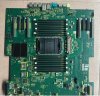
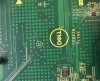
W790. It is a motherboard for Dell Precision T7960 workstation, here’s the link to its page Dell site. It says it supports Xeon W-34xx processors so it is definitely W790.doesn't sound good, but thanks for your reply!
and by the way, can anyone provide info on this motherboard, like is it a w790 chipset or a c741? I can't find any info anywhere.
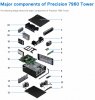
Does motherboard look familiar?

attention: Dell uses proprietäry pin layout for the 24pin,not ATX.doesn't sound good, but thanks for your reply!
and by the way, can anyone provide info on this motherboard, like is it a w790 chipset or a c741? I can't find any info anywhere.
View attachment 38833
View attachment 38834
you need all the expensive PSU and PDU.
in EU i can provide Q08S E0 for testing, have also 12C/112L W5-3425 E3 QS who needs new home.
Last edited:
truly impressive expertise!
my main goal is using SPR-SP ES CPU to test 300 series optane dcpmm with different SKU. since i have succeeded with C741 chipset and Q079, i am wondering the possibility to power (or even overclocking) them with W790 chipset, so i am looking for some suitable W790 motherboards. I’m short on funds, so I have to be thrifty.
anyway, thanks for all the info.
my main goal is using SPR-SP ES CPU to test 300 series optane dcpmm with different SKU. since i have succeeded with C741 chipset and Q079, i am wondering the possibility to power (or even overclocking) them with W790 chipset, so i am looking for some suitable W790 motherboards. I’m short on funds, so I have to be thrifty.
anyway, thanks for all the info.
Q079 is locked, so you can OC only by BCLK. this works only with ASRock W790 WS R1.0(Hyper BCLK Engine)and Q079, i am wondering the possibility to power (or even overclocking) them with W790 chipset, so i am looking for some suitable W790 motherboards.
on all other boards your PCIe etc clocks are rising with the BCLK and get unfunctional at some point.
for the HP/Dell W790 boards it is highly possible the intel ME don't start the D0/E0 ES like the SM X13SRA-TF.
remember my X13SRA-TF starts ES only with early/old ME 16.10.0.1400, next ME ver. 16.10.5.1562 blocks ES from start.
there is a way out, you can update early/old ME but keeping the ES friendly config.
Dell 7960 BIOS 1.0.5( 25 Apr. 2023 ) missing D0 microcode but E0 supported.
HP Z4 G5 WS BIOS 01.01.27 Rev.A ( Nov 16, 2023 ) removed whole D0 support, E0 supported.
all BIOS for W790 lack dcpmm support because Xeon Ws don't support them at all.my main goal is using SPR-SP ES CPU to test 300 series optane dcpmm with different SKU. since i have succeeded with C741 chipset and Q079
extremely helpful info, think you.Q079 is locked, so you can OC only by BCLK. this works only with ASRock W790 WS R1.0(Hyper BCLK Engine)
on all other boards your PCIe etc clocks are rising with the BCLK and get unfunctional at some point.
for the HP/Dell W790 boards it is highly possible the intel ME don't start the D0/E0 ES like the SM X13SRA-TF.
remember my X13SRA-TF starts ES only with early/old ME 16.10.0.1400, next ME ver. 16.10.5.1562 blocks ES from start.
there is a way out, you can update early/old ME but keeping the ES friendly config.
Dell 7960 BIOS 1.0.5( 25 Apr. 2023 ) missing D0 microcode but E0 supported.
HP Z4 G5 WS BIOS 01.01.27 Rev.A ( Nov 16, 2023 ) removed whole D0 support, E0 supported.
in fact, the whole idea comes from a chart made by Yuuki_Ans:all BIOS for W790 lack dcpmm support because Xeon Ws don't support them at all.

if the leak was true, Intel may have been planning support for DCPMM on WS for quite some time at least, and perhaps the W790 has remained compatible, the reason why we can't use DCPMM on W790 is just W-24xx/34xx CPUs do not contain a memory controller that is adapted for DCPMM? and since SPR-SP D0 has proved to contain it, this maybe worth a try?
no,all final stepping QS.if the leak was true, Intel may have been planning support for DCPMM on WS for quite some time at least
Intel® Optane™ Persistent Memory Supported - No
if you believe some chinese sellers, all SPR-SP also have 4x16GB HBM built in.
You may have missed the fact that Intel no longer supports DCPMM 300, this includes intel MRC packages for BIOS support.and since SPR-SP D0 has proved to contain it, this maybe worth a try?
besides there were steppings after D0 because they have bugs.