
Dell Wyse 3040 $35 OBO
- Thread starter Abe87
- Start date
You are using an out of date browser. It may not display this or other websites correctly.
You should upgrade or use an alternative browser.
You should upgrade or use an alternative browser.
Notice: Page may contain affiliate links for which we may earn a small commission through services like Amazon Affiliates or Skimlinks.

Thanks. I've got DietPi and Pi-Hole installed but when I try to log into Pi-Hole I'm getting "Connection Refused". Any ideas?
Did you copy the password Pihole provided when you installed it? Or did you set your own password with this command
Code:
pihole -a -p [password]
Did you copy the password Pihole provided when you installed it? Or did you set your own password with this command
Code:pihole -a -p [password]
I copied the password but not making it to the login screen. Gonna mess with it some more tomorrow. Today has been consumed.
The problem apparently resolved itself. After awhile I was able to access the login screen and successfully log in. So now I'm up and running. I've been wanting Pi-Hole for a long time and now I have it.
EIT: I'd also like to add that it appears this little box is designed to radiate the heat only out the top, all other sides are sealed. Hope it doesn't melt down this summer.
EIT: I'd also like to add that it appears this little box is designed to radiate the heat only out the top, all other sides are sealed. Hope it doesn't melt down this summer.
I just took a look at this thread and see that I actually posted an answer there a year ago, lol.That's interesting. Is the 12v adapter you received Dell-branded with a Dell part number? I've seen reports elsewhere that the barrel connectors are the same. For example, this thread on the Dell Community forums: Re: Wyse 3040 power supply voltage?
My friend at parkytowers also reiterates the 5v/12v issue and there seemed to be two different ones that are functionally the same, unless it is somehow tied to the 16GB or 8GB flash: Specification and hardware description of the Wyse 3040 (N10D) Thin Client
does anyone know the root password for mint xfce?
test
I tried to put a Keystone 1086 battery holder inside but it is too thick to fit. I had to replace the battery like-for-like. The connector is JST SH series. I reused the original harness but lost a bit of length by cutting it. So I added another 4 inches of wire to allow for future replacements.
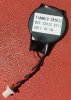

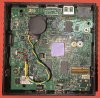
Mine is running Pi-Hole 24/7. Never gave the battery a second thought. Guess it's OK.
For reboot and power off to work in Debian 12 (Bookworm), I created a file /etc/modprobe.d/no_hsuart_dma.conf and ran
Before I did this, initiating a reboot or power off from the OS would result in the system staying powered on, frozen with a blank screen. After the above change, it works as expected.
In my testing under Debian, CPU frequency and network throughput are the same whether or not a display is attached. However, there was an unconfirmed report in the OpenWrt forum that under OpenWrt 22.03.4, the CPU and network will be throttled if the unit is powered on without something connected to the DisplayPort. I haven't done any testing in OpenWrt to confirm or deny.
sudo update-initramfs -u. The file should contain the following:
Code:
blacklist dw_dmac_core
install dw_dmac /bin/true
install dw_dmac_core /bin/true
Before I did this, initiating a reboot or power off from the OS would result in the system staying powered on, frozen with a blank screen. After the above change, it works as expected.
In my testing under Debian, CPU frequency and network throughput are the same whether or not a display is attached. However, there was an unconfirmed report in the OpenWrt forum that under OpenWrt 22.03.4, the CPU and network will be throttled if the unit is powered on without something connected to the DisplayPort. I haven't done any testing in OpenWrt to confirm or deny.
Another seller has some at $24obo, with power supply included:
Seller accepted $19ea for 3pcs. Purchase history also shows seller has accepted BO of less than $24 for 1pcs, exact offer unknown.
Seller accepted $19ea for 3pcs. Purchase history also shows seller has accepted BO of less than $24 for 1pcs, exact offer unknown.
Another seller has some at $24obo, with power supply included:
Seller accepted $19ea for 3pcs. Purchase history also shows seller has accepted BO of less than $24 for 1pcs, exact offer unknown.
The link now goes to $22, “No Adapter”
The link now goes to $22, “No Adapter”
The adapter is not easy to find. Especially the 12v.
EDIT - It does not have a common tip size.
The adapter is not easy to find. Especially the 12v.
EDIT - It does not have a common tip size.
It's 4.0mm x 1.7mm (on mine that takes 5V/3A)
I can confirm that its 4.0 x 1.7mm.It's 4.0mm x 1.7mm (on mine that takes 5V/3A)
I buy an adapter like this:
USB C to 5v 9v 12v DC Power Jack Connector Type C PD to 5.5x2.5 4.0x1.7 5.5x2.1 3.5x1.35 3.0x1.1mm Power Supply Converter
and then plug any 12V USB C adapter


12V version can work with a 5V power supply, but is extremely unstable. I thought mine was a 5V version, and I had big problems with it. Sometimes it would work fine, sometimes it would not even turn on. All problems disappeared the moment I read the label on the box, and connected the right power supply.No matter if it's 12v or 5v, both work from 5v
Found this that might be useful for those using it as a simple proxmox node
2.5 Gigabit PoE Splitter 48V To 12V/2A Type-C 1000Mbps/2.5Gbps Power over Ethernet
2.5 Gigabit PoE Splitter 48V To 12V/2A Type-C 1000Mbps/2.5Gbps Power over Ethernet
Similar threads

- Replies
- 10
- Views
- 12K
- Replies
- 37
- Views
- 16K
