
That's where my knowledge falls short when it's just a pc connected to a switch... where will it get one? and does it matter if I give the switch an address on the same subnet?the dhcp request failed to get a valid ip adress...
Drag to reposition cover
Brocade ICX Series (cheap & powerful 10gbE/40gbE switching)
- Thread starter fohdeesha
- Start date
Notice: Page may contain affiliate links for which we may earn a small commission through services like Amazon Affiliates or Skimlinks.
Assign one. That's the way I set up my switch, with a desktop plugged directly into the management port of the switch.That's where my knowledge falls short when it's just a pc connected to a switch... where will it get one? and does it matter if I give the switch an address on the same subnet?
In Windows 11, type the start button and search for "view network connections". Right click Ethernet and double-click "Internet Protocol Version 4 (TCP/IPv4). You can then "Use the following IP address" and set whatever address you want there. Say 10.1.1.50 with a subnet mask of 255.255.255.0. Then follow fodheesas guide EXACTLY, setting a compatible IP:
factory set-default
setenv ipaddr 10.1.1.99
setenv netmask 255.255.255.0
#tell the switch the IP of your tftp server:
setenv serverip 10.1.1.50
setenv image_name ICX64xx/ICX64R08
...
Once you are done following the guide, set Win 11 back to "Obtain an IP Address automatically" and plug it back into your network.
Hey Wolf,Assign one. That's the way I set up my switch, with a desktop plugged directly into the management port of the switch.
Thanks for your input. I tried that with different, but no better, results........ this time I couldn't ping either way and it just times out!
I was semi-convinced it was my pfsense that was the problem, but with a simple pc to switch connection, it can't be...
So, back to the TFTP.... I've run out of variations to try.... I'm sure it's something simple, it invariably always is, but I just can't see it.
One thing though is that my boot version doesn't recognise the " factory set-default" command. I wonder how important that is?
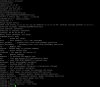
The attached screen grab shows the latest effort and the list of commands available.
Thanks for your time!
Aha! I see you have the same problem me and sdyoung had! You have an older firmware. Two pages back we discussed getting him going.Hey Wolf,
Thanks for your input. I tried that with different, but no better, results........ this time I couldn't ping either way and it just times out!
I was semi-convinced it was my pfsense that was the problem, but with a simple pc to switch connection, it can't be...
So, back to the TFTP.... I've run out of variations to try.... I'm sure it's something simple, it invariably always is, but I just can't see it.
One thing though is that my boot version doesn't recognise the " factory set-default" command. I wonder how important that is?
The attached screen grab shows the latest effort and the list of commands available.
Thanks for your time!View attachment 22572
It sounds like your switch already has an IP (I assume from your DHCP server) so go into the cli and type these commands:
configure terminal
username root password yourpasshere
aaa authentication login default local
aaa authentication web default local
Then open your web browser and browse to the IP of your Brocade. Log in to the webui with your username and password and scroll to the bottom and look for TFTP and click on Image.
Enter the IP of your TFTP server.
Under Image File Name put: ICX64xx/ICX64R08030u.bin
Make sure "Primary" is selected.
Then click "Copy from Server".
If your TFTP server is set up right it should update to the latest firmware. Once its done (I believe you will see the status in the console), type 'reset' in the console and the switch should reboot. Once its booted you should be able to follow the document exactly as all the commands will work. You can skip updating the primary since it's already been done, but do the uboot. And the poe and basically, everything else! It's a good guide and will get you set up.
Let me know how you make out!
this.Hey Wolf,
The attached screen grab shows the latest effort and the list of commands available.
Thanks for your time!
this is bothering me in your screenshot:
TFTP from server 10.10.10.15; our IP address is 10.10.10.98; sending through gateway 10.10.10.1
I don't have a 6450 and have not upgraded one. Maybe my memory is failing but I can't recall seeing "sending through gateway" on any PC<->Switch direct connects that I have done on 7250's, 7150's and my 6610's. Im in the world right now so I can't test my 6610's.
if I am remembering "incorrectly" or it really does go through the gateway on a 6450 then feel free to ignore the rest of this post.
I mean you should not be able to ping your PC and the gateway from the boot rom on the switch if you are using a direct connect between your PC (which is the TFTP server) and your switch?I was semi-convinced it was my pfsense that was the problem, but with a simple pc to switch connection, it can't be...
printenv looks fine for a /24
and honestly with a direct connect you should not even need to specify a (default) gateway...
which "sending through gateway" has me wondering:
just to confirm.
Your PC's ethernet is directly connected to the Switch's management port?
No other ports on the switch are connected to anything?
Your TFTP pc does not have 10.10.10.0/24 configured on any other interfaces (wifi, second ethernet interface etc)? <--- this may also be key
A different way to ask this may be: "10.10.10.0/24 is not currently in use on your home network?"
assuming the above answers are yes.
clear your gateway ip address on the switch.
for @#$@#$ and giggles try configuring your tftp server to an adjacent IP address of .98 assuming smallest possible usable network is a /30 - so configure your TFTP to have .97 and see if it works... who knows maybe the mgmt port has some hardcoded bizzaro subnet in there that is overriding the env vars.
Hi, thanks for your input.................this.
this is bothering me in your screenshot:
TFTP from server 10.10.10.15; our IP address is 10.10.10.98; sending through gateway 10.10.10.1
I don't have a 6450 and have not upgraded one. Maybe my memory is failing but I can't recall seeing "sending through gateway" on any PC<->Switch direct connects that I have done on 7250's, 7150's and my 6610's. Im in the world right now so I can't test my 6610's.
if I am remembering "incorrectly" or it really does go through the gateway on a 6450 then feel free to ignore the rest of this post.
I mean you should not be able to ping your PC and the gateway from the boot rom on the switch if you are using a direct connect between your PC (which is the TFTP server) and your switch?
printenv looks fine for a /24
and honestly with a direct connect you should not even need to specify a (default) gateway...
which "sending through gateway" has me wondering:
just to confirm.
Your PC's ethernet is directly connected to the Switch's management port?
No other ports on the switch are connected to anything?
Your TFTP pc does not have 10.10.10.0/24 configured on any other interfaces (wifi, second ethernet interface etc)? <--- this may also be key
A different way to ask this may be: "10.10.10.0/24 is not currently in use on your home network?"
assuming the above answers are yes.
clear your gateway ip address on the switch.
for @#$@#$ and giggles try configuring your tftp server to an adjacent IP address of .98 assuming smallest possible usable network is a /30 - so configure your TFTP to have .97 and see if it works... who knows maybe the mgmt port has some hardcoded bizzaro subnet in there that is overriding the env vars.
Yep the gateway thing was early on in my ownership when it came back with a response of not being able to find a gateway..... my response was "uh ok... I'll see if I can set one...." I was surprised when it let me use the setenv command to set one. I'm embarassed to say I don't know how to delete the env's, just set them! I'll keep digging..........
Yep, the switch is directly connected from it's ethernet directly to the management port, not a "normal" port. Nothing else connected.
The pc is connected by a seperate wifi interface, but that's on a seperate 10.10.20.x subnet..... and I tried with that disabled as well anyway.
I'll have a look at working through your last S&G suggestion!
without going into details you may also want to consider shutting off the Wifi on that TFTP server PC while you try this in case your wifi network netmask is not what you think it is (a /24)...Hi, thanks for your input.................
Yep the gateway thing was early on in my ownership when it came back with a response of not being able to find a gateway..... my response was "uh ok... I'll see if I can set one...." I was surprised when it let me use the setenv command to set one. I'm embarassed to say I don't know how to delete the env's, just set them! I'll keep digging..........
Yep, the switch is directly connected from it's ethernet directly to the management port, not a "normal" port. Nothing else connected.
The pc is connected by a seperate wifi interface, but that's on a seperate 10.10.20.x subnet..... and I tried with that disabled as well anyway.
I'll have a look at working through your last S&G suggestion!

Did you try my suggestion from my post above? Since you are on the v7 firmware, you will likely need to do what sdyoung and I had to do. You are having the same problems we had.I'll have a look at working through your last S&G suggestion!
its in the fohdeesha docs. but to save you timeI'm embarassed to say I don't know how to delete the env's, just set them! I'll keep digging..........
setenv <varname>
or in your case:
Code:
setenv gatewayEvery day is a school day..... I learnt that using the setenv command without a value, clears the existing one.......clear your gateway ip address on the switch.
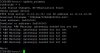
With that done, I returned to square one..... see attached grab...........
Success!!for @#$@#$ and giggles try configuring your tftp server to an adjacent IP address of .98 assuming smallest possible usable network is a /30 - so configure your TFTP to have .97 and see if it works... who knows maybe the mgmt port has some hardcoded bizzaro subnet in there that is overriding the env vars.
I'm not sure exactly what did it..... but I changed the 6450 ip to a different address and also disconnected another switch on the network.... I did need to set a gateway........ but then it all kicked off..... so a HUGE thank you to all who took an interest.....
So, I'm back in the game and returning to the Fohdeesha docs.........
I'm sure I'll be back!
yes.. but you didn't change the TFTP server IP address to be adjacent to your IP address.. If the netmask/broadcast address is whacked it will definitely tell you it needs a gateway 'cause its in a different subnet. could also be a bug in that version of firmware.Every day is a school day..... I learnt that using the setenv command without a value, clears the existing one.......
With that done, I returned to square one..... see attached grab...........
View attachment 22574
Try changing the tftp server address like I asked - change it on the switch and obviously your windows 11 PC. I don't expect it to work. but these are fast easy changes.
do take a look at @Lone Wolf 's posts and comments after my suggestion (probably) doesn't work.
what IP did you change the switch to?Success!!
I'm not sure exactly what did it..... but I changed the 6450 ip to a different address and also disconnected another switch on the network.... I did need to set a gateway........ but then it all kicked off..... so a HUGE thank you to all who took an interest.....
So, I'm back in the game and returning to the Fohdeesha docs.........
I'm sure I'll be back!
I did but unfortunately didn't get very far..... There was no ip set other than the one I set in the bootmanager..... and, even though my router could see the mac address of the 6450, I couldn't get to a GUI........Did you try my suggestion from my post above? Since you are on the v7 firmware, you will likely need to do what sdyoung and I had to do. You are having the same problems we had.
How - how could your router see the mac address of your 6450 if the 6450 management port was directly connected to AND ONLY TO your windows 11 PC/TFTP server???????I did but unfortunately didn't get very far..... There was no ip set other than the one I set in the bootmanager..... and, even though my router could see the mac address of the 6450, I couldn't get to a GUI........
and that being said turning off another switch in your network should have had zero effect on on your TFTP server to 6450 interaction unless one or both were/are connected to another network.
gonna go out on a limb and say you have some things still misconfigured in other parts of your network - netmasks and/or broadcast addresses possibly.
also I'm not quite sure you understand ipv4 subnetting/routing and how that works. Which is okay - gotta start somewhere but...
having multiple devices interconnected across multiple subnets as you learn and then try to burn firmware is a good way to end up with a for-the-time-being-bricked-device ...
you're being way to hard on your self trying to learn by perhaps biting off a bit too much...
simpler is better when trying to update firmware.
my 2cents.
I changed the switch to 10.10.10.97, but I didn't change the W11/TFTP address......what IP did you change the switch to?
It's got me through the first stage anyway......
My bad..... I didn't say that I'd given up with the direct connection and gone back to my original pfsense/HP2910al switch network.How - how could your router see the mac address of your 6450 if the 6450 management port was directly connected to AND ONLY TO your windows 11 PC/TFTP server???????
I ssh'd into the 2910 and could see the the mac address of the 6450 on the port it was connected too.
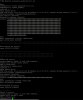
So, I'm back into Fohdeesha's docs but, like Wolf, the "enable" command demands a user name and password and the defaults don't work.
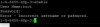
My pfsense has issued the 6450 with an ip address and I can get to the web gui..... again user name/password required with no joy
Did you set them using the commands I posted earlier? I believe by default there is no default user name and password until you set it yourself. The commands I posted earlier should set them and allow you to log into the webui. You need to type them all, starting with 'configure terminal'My pfsense has issued the 6450 with an ip address and I can get to the web gui..... again user name/password required with no joy
That's the bit I didn't get..... Where do I issue the "configure terminal" command? In the boot manager, it's not accepted as a command..... in the OS, only two commands are available.... "enable" which again demands a username/password..... and "show"Did you set them using the commands I posted earlier? I believe by default there is no default user name and password until you set it yourself. The commands I posted earlier should set them and allow you to log into the webui. You need to type them all, starting with 'configure terminal'
............. and I can't get into the GUI for the lack of a user name/password.............