
SRX300 Firmware
- Thread starter frogtech
- Start date
You are using an out of date browser. It may not display this or other websites correctly.
You should upgrade or use an alternative browser.
You should upgrade or use an alternative browser.
Notice: Page may contain affiliate links for which we may earn a small commission through services like Amazon Affiliates or Skimlinks.
Hello everyone,
I am currently using a Juniper SRX300 and am looking to update its software to ensure optimal performance and security. I plan to update it in two phases: first to version 20.2R3 and then to 21.2R3.
I have encountered difficulties registering the device in my name because I received it as a gift, and it was previously registered under a different company. Therefore, I am unable to access the necessary software updates through official channels.
Could anyone provide guidance or share information on how I might obtain these specific firmware versions? I would appreciate any help or advice on how to proceed with these updates.
Thank you in advance for your assistance!
Hello Pawlo.
I have the same problem. I bought a cheap SRX300 but the firmware is v15...
Did you manage to install a recent version?
I have the same problem. I bought a cheap SRX300 but the firmware is v15...
Did you manage to install a recent version?
greetings... got anything newer for the SRX 300's?
22.4R3-S2? preferred
23.2R2?
these cover the latest CVE 2024-21591 & 2024-21611.
Appreciated.
You people need to be running one of these versions if you want to be protected from the security flaw. It was rated 9.8 out of 10.
FIXED versions for CVE 2024-21591 are as follows:
20.4R3-S9
21.2R3-S7
21.3R3-S5
21.4R3-S5
22.1R3-S4
22.2R3-S3
22.3R3-S3
22.4R2-S2
22.4R3
23.2R1-S1
23.2R2 (released March 2024)
23.4R1
and anything newer
Some updated postings would be cool.
Thanks
Gamer-X

Hello,
Has anyone figured out if SATA drives can be connected to SRX300 yet?
SATA RX+/- and TX+/- lanes theoretically always go via capacitors (even on storage device side)
therefore should be safe to experiment on trying to find right combination
(since swapping +/- and RX/TX won't do any harm)
I'm thinking what perhaps one of those (pic attached) 10-pin connectors (J9 / J10 5x-pins in each of two lines) or 8-pin near fan area could have SATA RX/TX pairs (J5), although one of those probably should be diagnostic one or SPI/I2C or other interface.
(and cheap lower capacity SSDs don't burn much power and need only single voltage e.g. rated at +5V 1A)
---------
...
OCTEON CN7020-AAP pass 1.2, Core clock: 1200 MHz, IO clock: 600 MHz, DDR clock: 667 MHz (1334 Mhz DDR)
Base DRAM address used by u-boot: 0x10fc00000, size: 0x400000
DRAM: 4 GiB
Clearing DRAM...... done
Using default environment
...
Using DRAM size from environment: 4096 MBytes
checkboard siege
SATA0: not available
SATA1: not available
SATA BIST STATUS = 0x0
SRX_300 board revision major:1, minor:12, serial #: HIDDEN
OCTEON CN7020-AAP pass 1.2, Core clock: 1200 MHz, IO clock: 600 MHz, DDR clock: 667 MHz (1334 Mhz DDR)
Base DRAM address used by u-boot: 0x10f000000, size: 0x1000000
DRAM: 4 GiB
Clearing DRAM...... done
SF: Detected MX25L6405D with page size 256 Bytes, erase size 64 KiB, total 8 MiB
PCIe: Port 0 link active, 1 lanes, speed gen2
PCIe: Link timeout on port 1, probably the slot is empty
PCIe: Port 2 not in PCIe mode, skipping
Net: octeth0
Interface 0 has 1 ports (SGMII)
Type the command 'usb start' to scan for USB storage devices.
Boot Media: eUSB usb
Found TPM SLB9660 TT 1.2 by Infineon
TPM initialized
Hit any key to stop autoboot: 0
SF: Detected MX25L6405D with page size 256 Bytes, erase size 64 KiB, total 8 MiB
SF: 1048576 bytes @ 0x200000 Read: OK
## Starting application at 0x8f0000a0 ...
Consoles: U-Boot console
Found compatible API, ver. 3.1
USB1:
Starting the controller
USB XHCI 1.00
scanning bus 1 for devices... 2 USB Device(s) found
.....
---------------
practically any small form-factor SATA SSD device with larger than default 8GB eUSB capacity will be much faster and won't have issues with logs consuming all the space and will fit inside limited area under the hood just nicely.
Attachments
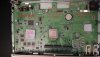
Last edited:
Anyone to share junos-srxsme-23.4R2-S3.4.tgz  ?
?I just acquired a brand new srx340 from a datacenter that never got a chance to deploy them all. They had approximately 150 of these, and only 25 were deployed. Anyhow, I just barely got it unboxed haha, I need the newer firmware for this firewall as well, can someone please share the junos-srxsme-23.4R2-S3.4.tgz firmware? Thank you in advance!!! Would also be very interested in the 24.2R1 firmware as well.
Last edited:
Hello everyone,
I am currently using a Juniper SRX300 and am looking to update its software to ensure optimal performance and security. I plan to update it in two phases: first to version 20.2R3 and then to 21.2R3.
I have encountered difficulties registering the device in my name because I received it as a gift, and it was previously registered under a different company. Therefore, I am unable to access the necessary software updates through official channels.
Could anyone provide guidance or share information on how I might obtain these specific firmware versions? I would appreciate any help or advice on how to proceed with these updates.
Thank you in advance for your assistance!
Do you happen to have 20.2R3? That is what my system came with and I am trying to recover back to that version. Ive been having issues with errors since updating.
I have available junos-srxsme-23.4R2.13.tgz
would you be able to share it?
Also looking for a snapshot of a srx340. Having a weird issue with my unit and would like to restore it to a known working state. also looking to keep I as an emergency recovery.
I’ve done a fresh install with no luck. It is a brand new unit that I literally opened from the juniper package. Unfortunately I can’t call juniper for help since the serial was registered to a data center.plus unless you have a contract they will shut you down quickly.
To avoid instability and need to fall backI just acquired a brand new srx340 from a datacenter
...
can someone please share the junos-srxsme-23.4R2-S3.4.tgz firmware?
Thank you in advance!!! Would also be very interested in the 24.2R1 firmware as well.
(there's a built-in recovery process, as well as firmware backup creation to USB stick option before update)
please check Juniper recommendations first,
for Marvell/Cavium Octeon III CPU (I think it covers SRX3XX series, I have 2-core CN7020 in my SRX300, with theoretical 2x USB 3.0 + 2 x SATA 3.0)
they suggest installing maximum version up to 23.4R2-S3 (suggestion last updated 2024-12-4)
as shown on support page here.
At the same time download section here automatically shows version 24.2R1 (dated 24 Jul 2024).
this last result is slightly contradicting and a bit confusing.
Last edited:
Yeah I did create the recovery on a USB drive, the problem is the USB drive is not readable. I think it was a defective thumb drive. (Patriot Thumb Drive 32gb). The other issue I ran into is I need the install media, apparently to fix the issue I am experiencing. Which is several veriexec errors. According to Juniper it says a fresh install using the install media is what is needed to fix the issue. This puts a huge cramp in everything as I do not have access to these.
This is the article I am referring to. Veriexec in Junos | Junos OS
This is the article I am referring to. Veriexec in Junos | Junos OS
Last edited:
I just got junos-srxsme-22.4R3-S1.12.tgz (checksum miss-match), junos-srxsme-23.2R2.21.tgz (checksum good) and jfirmware-srxsme-23.2R2.21-signed.tgz (checksum valid).
Looking for junos 24
Looking for junos 24
Does anyone have Junos 24.2R1 available to share? I have an SRX300 currently on version 20.4R1.12
Similar threads
- Replies
- 0
- Views
- 688