Supermicro X11DPi-NT hangs at post with 2 intel optane P1600X M.2 118GB SSDs

Notice: Page may contain affiliate links for which we may earn a small commission through services like Amazon Affiliates or Skimlinks.

koval

New Member
Feb 22, 2025
14
1
3
Hi,

I recently bought 2 Intel Optane P1600X M.2 118GB SSDs off ebay Pardon our interruption...

Unfortunately I can't get them to work with my X11DPi-NT mobo.
Despite trying to 2 different PCIe adapters:
* GLOTRENDS PA21 Dual M.2 NVMe to PCIe 4.0 X8 Adapter Without PCIe Bifurcation Function https://www.amazon.co.uk/dp/B09PGDMWKH
* EZDIY-FAB Quad M.2 PCIe 4.0/3.0 X16 Expansion Cad with Heatsink, Support 4 x PCIe NVME M.2 SSD https://www.amazon.co.uk/dp/B0B5G6MN79
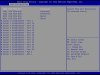
the mobo hangs at counter 92 (bottom right corner) just before entering the BIOS.
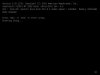
optane-bios-hangs.jpg

Same thing happens when I insert one of the optane disks into the only M.2 slot on the motherboard.

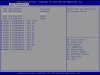
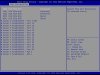
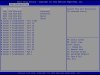
Before plugging in the PCIe adapters I've enabled 4x4x4x4x bifurcation for all slots in BIOS.
CPU1
cpu1_bifurcation.jpg

CPU2
cpu2_bifurcation.jpg

I read this post on bifurcation issues with X11 motherboards https://forums.servethehome.com/index.php?threads/supermicro-x11-s-d-px-bifurcation.22598/
but none of the tips work.

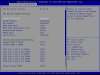
I've got all PCIe connections set to EFI:
pcie_config.jpg


One person suggested in this comment https://forums.servethehome.com/ind...icro-x11-s-d-px-bifurcation.22598/post-456768
to enable `NVMe Firmware source = "AMI Native"` under PCI/PCIe config, but I can't see such option.

I tried all PCIe slots, but to no avail.
The mobo just hangs on post.

Any ideas what's going on?

PS. Dunno if this is related in any way but Intel VMD for Onboard NVMe is set to Legacy Mode, whereas VMD for CPU2 Slot6 is disabled.

My setup:
  • Supermicro X11DPi-NT motherboard
  • 2x Intel Xeon Gold 6148 2.40GHz 20-Core CPU SR3B6
  • 12x Hynix 32GB PC4-2933Y-R 2Rx4 Registered RAM DDR4 PC4-23400 HMA84GR7JJR4N-WM
The motherboard is running the latest available BIOS version and IPMI:
Firmware Revision: 01.74.14
Firmware Build Time: 11/30/2023
BIOS Version: 4.4
BIOS Build Time: 08/16/2024
Redfish Version: 1.8.0
CPLD Version: 02.B1.0F
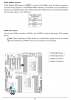
 
If you look at page 17 in the manual you can see there's an x8 link from socket 0 to the PCH, if you bifurcate this to x4x4 it will cause problems (and no, the BIOS isn't friendly enough to prevent you from choosing a broken config.) I would guess you should set IOU2 to Auto, since the block diagram says that's just the PCH and NVMe ports, you shouldn't need to configure it.
 
even one SSD should be detected without Bifurcation.
i guess there is a problem with OpROM rules of that slot.
Supermicro has its own Dual M.2 Card with auto bfurcation ( AOC-SLG3-2M2 )
 
I would guess you should set IOU2 to Auto, since the block diagram says that's just the PCH and NVMe ports, you shouldn't need to configure it.
With IOU2 for CPU1 set to Auto the same thing happens. The boot-up process freezes just before entering BIOS or getting to grub.

I also tried to boot the system with both optanes on PCIe card plugged into every slot for CPU2 (which doesn't have any link to PCH).
And I tried that with bifurcation set to Auto or 4x4x4x4x and nothing worked. The mobo froze in the same place.

Funnily enough, when I plugged EZDIY-FAB Quad M.2 PCIe card with 2 regular NVMe disks (Lexar EQ7900) and with bifurcation set to Auto for IOU2 for CPU1 (which represents CPU1 Slot2 PCIE-E x16 [the slot between two x8 slots]) then only one of the 2 disks was detected. After changing it to 4x4x4x4x both were immediately recognized.

i guess there is a problem with OpROM rules of that slot.
I checked whether disabling OPROM for onboard NVME and every PCI-E slot would make a difference.
It made no difference, the mobo freezes in the same place.


Supermicro has its own Dual M.2 Card with auto bifurcation ( AOC-SLG3-2M2 )
I can't see any component like that on the System Block Diagram.
 
Funnily enough, when I plugged EZDIY-FAB Quad M.2 PCIe card with 2 regular NVMe disks (Lexar EQ7900) and with bifurcation set to Auto for IOU2 for CPU1 (which represents CPU1 Slot2 PCIE-E x16 [the slot between two x8 slots]) then only one of the 2 disks was detected. After changing it to 4x4x4x4x both were immediately recognized.
then you have issue with your Optane SSDs. incompatible or so.
 
Last edited:
how long do you wait ?
10-30s

I didn't wait longer, because when I have only the regular NVMes plugged in, this step takes max 3 seconds. the counter in bottom right corner changes from 92 to A9 and then the BIOS or Grub menu shows up.
 
With my limited experience I would take off all periphery from the board, would do a total CMOS reset first. These boards tend to hang during boot when hardware connected to it changed. Then boot the board with 1 CPU and one ram. Connect one Optane to the m.2 and continue adding and adding until ....

BTW, what revision is your board and have you tried VMD fully deactivated? I suppose you can't go back to a pre 1.15.21 firmware and pre 4.x Bios?
 
Tomorrow, I'll plop them into my other computer with 2 nvme slots on-board and let you know whether those were recognized or not.
Both disks were recognized by Minisforum UM790 without and issue.
optane_1.png

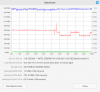
I also run some quick benchmarks and they work just fine.
optane_1_benchmark.png

So something is defo wrong with either my BIOS settings, mobo or the nvme adapter cards.
 
yes
or are you referring to these 2 NVMe (Oculink) connectors?
no. every PCIe slot is connected over i2c and on the ad on card is a jumper for address.
compatible motherboards detect the card and auto bifurcate.
but this is not your isse because u see other vendors M.2
issues with Intel optane sss is well known. not supported by Rasberry Pi etc. for some reason, they have boot rom.
i am not sure if the P1600X is a NVME or AHCI card.
 
With my limited experience I would take off all periphery from the board, would do a total CMOS reset first. These boards tend to hang during boot when hardware connected to it changed. Then boot the board with 1 CPU and one ram. Connect one Optane to the m.2 and continue adding and adding until ....
Later today, I'll try to reset CMOS.

BTW, what revision is your board and have you tried VMD fully deactivated? I suppose you can't go back to a pre 1.15.21 firmware and pre 4.x Bios?
Rev. 2.01A
Yes, I tried VMD fully deactivated. What I haven't tried yet it VMD legacy mode.
 
Funnily enough, when I plugged EZDIY-FAB Quad M.2 PCIe card with 2 regular NVMe disks (Lexar EQ7900) and with bifurcation set to Auto for IOU2 for CPU1 (which represents CPU1 Slot2 PCIE-E x16 [the slot between two x8 slots]) then only one of the 2 disks was detected. After changing it to 4x4x4x4x both were immediately recognized.
swap the Lexar EQ7900 with the optane, if not work its not bifurc. issue. i guess the FW rom on the optane is the issue,
 
Have you tried a p1600x in the PCH M.2 slot to see what happens? Also you may as well replace the CMOS battery, X11 boards are getting to that age.
 
Have you tried a p1600x in the PCH M.2 slot to see what happens? Also you may as well replace the CMOS battery, X11 boards are getting to that age.
Yes, I tried that and mobo hanged in the same place.
The first I did when I got the mobo a month ago was to replace the battery.
 
With my limited experience I would take off all periphery from the board, would do a total CMOS reset first. These boards tend to hang during boot when hardware connected to it changed. Then boot the board with 1 CPU and one ram. Connect one Optane to the m.2 and continue adding and adding until ....

BTW, what revision is your board and have you tried VMD fully deactivated? I suppose you can't go back to a pre 1.15.21 firmware and pre 4.x Bios?
@gb00s was right. I've cleared the CMOS and both optane disks showed up in BIOS!!
Great success! :) Thank you so much!

Once I was able to get into the BIOS, I had to fiddle with bifurcation settings bcos with the Auto setting enabled, only 1 disk from either PCIe card would be recognized.

lspci list both devices and I can pass them through to TrueNas :)
Bash:
# lspci | grep -i optane
18:00.0 Non-Volatile memory controller: Intel Corporation Optane NVME SSD P1600X Series
19:00.0 Non-Volatile memory controller: Intel Corporation Optane NVME SSD P1600X Series

Thank you all for you help and advice!
What a great community!!!


Some side notes for posterity.
From what I've gathered, the IOU devices for CPU1 are mapped to the physical PCIe slots like so:
  • IOU0 IIO PCIE Br1 -> CPU1 Slot 3 PCI-E x8 (with bifurcation=Auto, only 1 Optane disk was recognised)
  • IOU1 IIO PCIE Br2 -> CPU1 Slot 2 PCI-E x16 (with bifurcation=4x4x4x4x all regular NVMe drives were recognised)
  • IOU2 IIO PCIE Br3 -> CPU1 Slot 1 PCI-E x8 (with bifurcation=Auto, the LAN port #1 was down?!)
re. weird behaviour with IOU2 set to Auto and other IOUs set to 4x4x4x4x.
with this config
cpu1_bifurcation_lan1_not_working.jpg

the LAN#1 (eno1np0) interface would remain down:
interfaces_with_IOU2_set_to_auto.jpg


Only when I set all IOUs to 4x4x4x4x:
cpu1_bifurcation.jpg
then the LAN#1 (eno1np0) interface would go up:
interfaces_with_IOU2_set_to_4_by_4.jpg