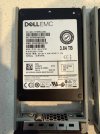
I've recently bought a bunch of PM1643a SAS SSD's, part number MZILT3T8HBLSAD3 (Dell branded, 0CRNPH) which are just seeming a little off to me. Wondering if it's all in my head.
In SmartToolsMon, their part numbers are reported as MZILT3T8HBLS0D3, and their WWNs are all 1 number lower than the label (such as label ending is 1881 shows as ending in 1880 instead.
The attached image is one of the drives, and it's matching SmartCTL output
Am I reading too much into this, or is this an indicator that something is wrong?
When I originally looking into them, I had searched by the model number provided by the seller, MZ-ILT3T8C (which is printed on the drives too), and nothing had popped, but with the longer part numbers I'm wondering if I should worry about the 32k hour bug too. If the label and smart data are accurate, these were made in May 2020 so hoping they would have shipped already patched, but anyone know better?
In SmartToolsMon, their part numbers are reported as MZILT3T8HBLS0D3, and their WWNs are all 1 number lower than the label (such as label ending is 1881 shows as ending in 1880 instead.
The attached image is one of the drives, and it's matching SmartCTL output
Code:
# smartctl -a /dev/sdd
smartctl 7.5 2025-04-30 r5714 [x86_64-linux-7.0.14-25-pve] (local build)
Copyright (C) 2002-25, Bruce Allen, Christian Franke, www.smartmontools.org

=== START OF INFORMATION SECTION ===
Vendor:               SAMSUNG
Product:              MZILT3T8HBLS0D3
Revision:             DSA3
Compliance:           SPC-5
User Capacity:        3,840,755,982,336 bytes [3.84 TB]
Logical block size:   512 bytes
Physical block size:  4096 bytes
LU is resource provisioned, LBPRZ=1
Rotation Rate:        Solid State Device
Form Factor:          2.5 inches
Logical Unit id:      0x5002538b00531880
Serial number:        S5YNNE0N503492
Device type:          disk
Transport protocol:   SAS (SPL-4)
Local Time is:        Sun Nov  1 19:19:53 2026 AEDT
SMART support is:     Available - device has SMART capability.
SMART support is:     Enabled
Temperature Warning:  Enabled

=== START OF READ SMART DATA SECTION ===
SMART Health Status: OK

Percentage used endurance indicator: 1%
Current Drive Temperature:     33 C
Drive Trip Temperature:        74 C

Accumulated power on time, hours:minutes 30128:16
Manufactured in week 18 of year 2020
Accumulated start-stop cycles:  40
Specified load-unload count over device lifetime:  0
Accumulated load-unload cycles:  0
Elements in grown defect list: 0

Error counter log:
           Errors Corrected by           Total   Correction     Gigabytes    Total
               ECC          rereads/    errors   algorithm      processed    uncorrected
           fast | delayed   rewrites  corrected  invocations   [10^9 bytes]  errors
read:          0        0         0         0          0     109269.434           0
write:         0        0         0         0          0     127800.672           0
verify:        0        0         0         0          0     327675.631           0

Non-medium error count:      242

  Pending defect count:0 Pending Defects
SMART Self-test log
Num  Test              Status                 segment  LifeTime  LBA_first_err [SK ASC ASQ]
     Description                              number   (hours)
# 1  Background long   Completed                  96   29739                 - [-   -    -]
# 2  Foreground long   Aborted (device reset ?)  104   29739                 - [-   -    -]
# 3  Foreground short  Completed                  96   29739                 - [-   -    -]
# 4  Background short  Completed                  96   14169                 - [-   -    -]
# 5  Background short  Completed                  96   14168                 - [-   -    -]
# 6  Background long   Completed                  96       4                 - [-   -    -]
# 7  Background short  Completed                  96       4                 - [-   -    -]
# 8  Background long   Aborted (by user command) 104       1                 - [-   -    -]
# 9  Background short  Completed                  96       1                 - [-   -    -]

Long (extended) Self-test duration: 3600 seconds [60.0 minutes]
Am I reading too much into this, or is this an indicator that something is wrong?
When I originally looking into them, I had searched by the model number provided by the seller, MZ-ILT3T8C (which is printed on the drives too), and nothing had popped, but with the longer part numbers I'm wondering if I should worry about the 32k hour bug too. If the label and smart data are accurate, these were made in May 2020 so hoping they would have shipped already patched, but anyone know better?