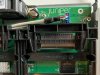
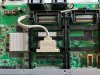
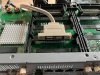
My SRX 300's internal eUSB failed, here are the steps I took to replace it. I didn't backup to external USB, had to restart from scratch, I did have backup of the config though.
1. The system boots into boot loader, you can install from tftp in boot prompt, needs to run set ip and netmask first. The system has IP 192.168.1.1 and you can assign IP 192.168.1.2 to your host. I installed to external USB to run it and wait for replacement eUSB.
2. Order eUSB from eBay, here are the model I ordered, ATP 8GB 9-Pin USB Flash Drive Disk On Module DOM USB (Big 9PIN) (US$8). Swissbit might be more reliable but can't find it, found some from Chinese sites but probably not worth the hassle to get it since it's replaced by newer model.
3. To open the chassis, you need to unscrew 3 from back and all screws from bottom.
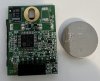
4. I replaced both eUSB and R2032 battery since I opened the case.
5. Run command to clone from external USB to internal eUSB
Lesson learned from this, backup to external USB is the easiest way to get you back quickly. All you need is an external USB and run
1. The system boots into boot loader, you can install from tftp in boot prompt, needs to run set ip and netmask first. The system has IP 192.168.1.1 and you can assign IP 192.168.1.2 to your host. I installed to external USB to run it and wait for replacement eUSB.
Code:
install tftp://192.168.1.2/junos-srxsme-21.4R3-S3.4.tgz2. Order eUSB from eBay, here are the model I ordered, ATP 8GB 9-Pin USB Flash Drive Disk On Module DOM USB (Big 9PIN) (US$8). Swissbit might be more reliable but can't find it, found some from Chinese sites but probably not worth the hassle to get it since it's replaced by newer model.
3. To open the chassis, you need to unscrew 3 from back and all screws from bottom.
4. I replaced both eUSB and R2032 battery since I opened the case.
5. Run command to clone from external USB to internal eUSB
Code:
request system snapshot media internalLesson learned from this, backup to external USB is the easiest way to get you back quickly. All you need is an external USB and run
Code:
request system snapshot media usb
Clearing current label...
Partitioning usb media (/dev/da1) ...
Partitions on snapshot:

  Partition  Mountpoint  Size    Snapshot argument
      s1a    /altroot    579M    none
      s2a    /           587M    none
      s3e    /config     185M    none
      s3f    /var        4.9G    none
      s4a    /recovery/software 316M none
      s4e    /recovery/state 15M none
Copying '/dev/da0s1a' to '/dev/da1s1a' .. (this may take a few minutes)
Copying '/dev/da0s2a' to '/dev/da1s2a' .. (this may take a few minutes)
Copying '/dev/da0s3e' to '/dev/da1s3e' .. (this may take a few minutes)
Copying '/dev/da0s3f' to '/dev/da1s3f' .. (this may take a few minutes)
Copying '/dev/da0s4e' to '/dev/da1s4e' .. (this may take a few minutes)
Copying '/dev/da0s4a' to '/dev/da1s4a' .. (this may take a few minutes)
The following filesystems were archived: /altroot / /config /var /recovery/state /recovery/software
Attachments
Last edited: