
Interesting. Do you know how power is distributed from the PDUs to the PSUs? The sellers can't really provide me with clear details e.g. how much power is sent (since the PSUs themselves are the same as Windmill and are single phase) and i'm trying to figure out. The most I can get is the input plug is a 63A 5-pin commando plug. Any more PSU/PDU related pictures are appreciated..
Potential Deal: 2 x Dual 2011 nodes @$199, Quanta Openrack
- Thread starter abstractalgebra
- Start date
Notice: Page may contain affiliate links for which we may earn a small commission through services like Amazon Affiliates or Skimlinks.
Oh that's an interesting power board. Seems it can accept an 8pin cpu connector + 2 4 pins? Wonder if that's enough to power the whole board.
It looks like power input, look at the big trace that leads to the interconnect. 2 lanes of trace appear to go to the node molex based and gold contact based.Doubt it's power for the board, more like power for an additional device. Like a video card.
The GPU 6 pin you can see on the other end of the motherboard actually, that would probably be a pass through for PCI-e.
8 pin EPS can do up to 300 watts, and 4 pin EPS can do up to 150 watts.
Which is awesome. You could use a 1200W HP platinum PSU, breakout board and do 8pin to 8pin EPS. And power 2-4 of these nodes. Could probably even layer them in a 4u case with stand offs, add fast 120mm fans.You may be right. A similiar power board has this description: "Converter board to allow powering up openrack blades without the rack and busbar. It was specifically designed for lab purposes."
Hey guys, I just bought some RAM and the weirdest thing happens when I try to test it. The BIOS (or command line in Ubuntu) will get about halfway through the mem test then the system will restart. Is it a bad stick? How do I find out which one it is without the test having finished?
Thanks!
PS: I have a WYWINN (if that matters)
Edit: I found the bad stick
Thanks!
PS: I have a WYWINN (if that matters)
Edit: I found the bad stick
Last edited:
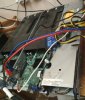
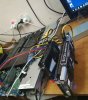
I have 3 Quanta Windmill Servers (6 nodes) that I don't use. 2 servers running 4x Xeon E5 2670v1 each and 1 server with 4x Xeon E5 2640v1, 40-64GB of DDR3 1333 Mhz RAM each node.Is anyone aware of a seller with postage options to Australia? I'd love to get 3-4 pairs with tray and PSU.
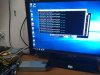
All running UEFI Windows 10 x64 Pro (can include retail license keys for Windows 10/Server 2012/2016 for free).
All of them are Quanta, not Wiwynn and support v2 Xeon E5.
Also each node can handle up to 4 PCI-e devices with a converter + active PCI-e risers. And they actually support GDDR5 GPUs, any OS.
If you need I can ship them to Australia, but I guess shipping cost in such case would be around $150 for each server. Can ship worldwide actually.
Attachments
-
 326.2 KB Views: 131
 -
 816.4 KB Views: 129
 -
 289.9 KB Views: 113
 -
 893 KB Views: 128
What riser do you have in the 4th pic? I have tried this before without luck, and I would love to give it another shot.All of them are Quanta, not Wiwynn and support v2 Xeon E5.
Also each node can handle up to 4 PCI-e devices with a converter + active PCI-e risers. And they actually support GDDR5 GPUs, any OS.
Regular active PCI-e USB 3.0 riser, VER008, just like that one: CHIPAL VER008S 0.6M PCI E 1X to 16X Riser Card PCIe Extender with 4Pin 6Pin SATA Power Connector for BTC LTC ETH Mining Machine купить на AliExpressWhat riser do you have in the 4th pic? I have tried this before without luck, and I would love to give it another shot.
Pic shows regular USB 3.0 riser with a PCI-e to x4 USB converter to plug 4 GPUs, however it will work just with a single riser without anything else. Just make sure you use active riser with all power connectors properly plugged in. When I tried with an old-style IDE passive riser, there was no display, but the videocard was detected by OS.
Last edited:
Windmill (F03 board) works fine with V2 CPU's.Does your power supply adjust the fan speed depending on the CPU load or just use them for maximum speed?
And does anyone work on this motherboard V2 processors ?
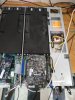
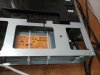
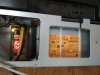
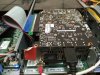
A little mod of Quanta Windmill on the pics below. This will solve the issue for those who have 110V as now it can power up both from 11oV and 220V. Fans are working as usual. Both nodes are operating from the same PSU.
And besides, now the PSU can be easily upgraded to 1200W for example.
In my case I just needed to install GTX 1060 and power it up from 6 pin PCI-e power. Now works with passive IDE riser.
And besides, now the PSU can be easily upgraded to 1200W for example.
In my case I just needed to install GTX 1060 and power it up from 6 pin PCI-e power. Now works with passive IDE riser.
Attachments
-
 127.5 KB Views: 136
 -
 84.3 KB Views: 126
 -
 100 KB Views: 128
 -
 158.7 KB Views: 138
100% Russian mod. Blue electric tape detected.A little mod of Quanta Windmill on the pics below.
100% fail100% Russian mod. Blue electric tape detected.
 . Blue tape is part of IDE Riser which is exclusively Chinese.
 Chenyang 20cm PCI E Express 1X to 16x Riser Extender Card with Molex IDE Power & Ribbon Cable-in Computer Cables & Connectors from Computer & Office on Aliexpress.com | Alibaba Group