
Yes please, a changelog would be good, and some instructions how to apply this firmware (says Windows zip) update from LINUX!Sadly there is no changelist. Anybody knows what changed?
Minisforum MS-01 PCIe Card and RAM Compatibility Thread
- Thread starter Patrick
- Start date
You are using an out of date browser. It may not display this or other websites correctly.
You should upgrade or use an alternative browser.
You should upgrade or use an alternative browser.
Notice: Page may contain affiliate links for which we may earn a small commission through services like Amazon Affiliates or Skimlinks.
The Readme is poorly done but it says you can flash on a non windows machine through the boot shellYes please, a changelog would be good, and some instructions how to apply this firmware (says Windows zip) update from LINUX!
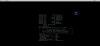
Hi, i've just done it with a Usb key (i'm using proxmox):Yes please, a changelog would be good, and some instructions how to apply this firmware (says Windows zip) update from LINUX!
* Format USBkey to fat32, copy all the content to the root dir.
* Enter Bios then disable secureboot if enabled, select to boot from usbkey (or press F7 @ boot time)
* When in the shell of the usb key, you have to find the right device (for me it was BLK1: ), you can try FS1: then ls to see if you see the content of your usb drive, else try FS2: , etc ..... ('map' command will show the name of the detected devices)
* when you find the right one, type AfuEfiFlash.nsh and you're done as everything will be done by the updater from now
Last edited:

Hi, i've just done it with a Usb key (i'm using proxmox):
* Format USBkey to fat32, copy all the content to the root dir.
* Enter Bios then disable secureboot if enabled, select to boot from usbkey (or press F7 @ boot time)
* When in the shell of the usb key, you have to find the right device (for me it was BLK1: ), you can try FS1: then ls to see if you see the content of your usb drive, else try FS2: , etc ..... ('map' command will show the name of the detected devices)
* when you find the right one, type AfuEfiFlash.nsh and you're done as everything will be done by the updater from now
View attachment 36530
So you managed to successfully update to the latest version of BIOS?
yesSo you managed to successfully update to the latest version of BIOS?
Pci Passthrough to Windows VM the whole usb3 controller. I end it up buying as i said in a previous post a multiplexer card (2 x NVME) where in the 1st slot i poped in an M2 renesas usb3 controller and a m2 to pcie for the GFX card. After this i was able to passthrough for example a simple usb device which is my UPS to my Home Assistant that runs in the box with NUT.That is really odd and just to confirm when you say USB controller you mean PCI passthrough of USB controller?
New BIOS just popped up. minisforum
Thanks for sharing this.
Sadly there is no changelist. Anybody knows what changed?
Yes please, a changelog would be good, and some instructions how to apply this firmware (says Windows zip) update from LINUX!
I just sent a mail to support@minisforum.com asking for a changelog. My MS-01 works fine except some quirks but its rock solid. I dont want to pass something that maybe will reduce any ability or anything for the general sake of stability, i have been there and done that so i am cautious.Hi, i've just done it with a Usb key (i'm using proxmox):
* Format USBkey to fat32, copy all the content to the root dir.
* Enter Bios then disable secureboot if enabled, select to boot from usbkey (or press F7 @ boot time)
* When in the shell of the usb key, you have to find the right device (for me it was BLK1: ), you can try FS1: then ls to see if you see the content of your usb drive, else try FS2: , etc ..... ('map' command will show the name of the detected devices)
* when you find the right one, type AfuEfiFlash.nsh and you're done as everything will be done by the updater from now
View attachment 36530
Guys a question.. anyone managed to update the firmware on the x710 intel card? and if yes how he did it? i ask because i have small troubles with the sriov and maybe its the firmware version or the proxmox driver....
thx
thx
Just booted mine, it arrived today, and it looks like it shipped with version 1.22 alreadyNew BIOS just popped up. minisforum
For those looking for a rack mount for the MS-01, I just received an email from Winther3D that they're making one of their injected molded panels for it.
I'm planning on ordering one as soon as they're available.
I'm planning on ordering one as soon as they're available.
1.22 is the beta bios they were working on with me. One thing I know it was for was m.2 compatibility issues. They still haven't fixed my issue but I'm hopeful.
That's kind of unusual. Why would release and install beta BIOS on production device? Without changelog I'm kind of hesitant to install, newer does not necessarily mean better.
For those looking for a rack mount for the MS-01, I just received an email from Winther3D that they're making one of their injected molded panels for it.
I'm planning on ordering one as soon as they're available.
Sounds interesting. Do you have pictures by any change? These are 1U, I assume?
These would be 2u, and no pictures yet, as Winther3D isn't expecting to get his MS-01 til later this month.Sounds interesting. Do you have pictures by any change? These are 1U, I assume?

Just booted mine, it arrived today, and it looks like it shipped with version 1.22 already
Same here. Received mine MS-01 via Anazon last week.
BIOS 1.22 was already installed.
I got a reply of them saying that "This is the most original version of BIOS, and nothing has been modified."That's kind of unusual. Why would release and install beta BIOS on production device? Without changelog I'm kind of hesitant to install, newer does not necessarily mean better.
if that is the case, what is the point of a new bios? i replied accordingly and i will reply here if i get a new response.
Either way i dont pass it in my MS-01 of course.
Hi All,
so im planning to get 3 of these units to build a vmware cluster vsan based and do some testing. unfortunately, the 48GB DIMMS seems to be a price increase and is very expensive at the moment, so I'm going to use 64GB per node.
Can i ask for some confirmed memory that works without issue on the MS01? the only ones I got at the moment are the ones mentioned in serve the home review:
Crucial CT2K32G52C42S5
Thanks
RS
so im planning to get 3 of these units to build a vmware cluster vsan based and do some testing. unfortunately, the 48GB DIMMS seems to be a price increase and is very expensive at the moment, so I'm going to use 64GB per node.
Can i ask for some confirmed memory that works without issue on the MS01? the only ones I got at the moment are the ones mentioned in serve the home review:
Crucial CT2K32G52C42S5
Thanks
RS
Hi All,
so im planning to get 3 of these units to build a vmware cluster vsan based and do some testing. unfortunately, the 48GB DIMMS seems to be a price increase and is very expensive at the moment, so I'm going to use 64GB per node.
Can i ask for some confirmed memory that works without issue on the MS01? the only ones I got at the moment are the ones mentioned in serve the home review:
Crucial CT2K32G52C42S5
Thanks
RS
You can also use : CT48G56C46S5
Hey @dvdplm, I have exactly the same issue with the same hardware. When you move back in this thread you can find the advice to tape few pins in the pcie card. I tried almost everything, disabling other pcie ports, removing disks, tapeing every combination of pins, but it still doesn't work. If you find a solution please post it here. Today I flashed bios hoping it will help but no, it didn't.I'm having problems with this one, driving me a bit nuts. The SFF-8088 card included with the TL-D400s – a qxp-400es-a1164 – is not recognized in the MS-01. The card is good, shows up fine in my desktop (tried in windows, ubuntu and unraid) but the minisforum does not see it.
I tried a network card to check if the PCIe slot was perhaps bad in the MS-01: it's not, the NIC shows up fine.
Before I send back the QNAP, is there anything obvious I'm missing? Any advice appreciated!
I'm waiting for newer bios, this is only hope.
Btw, this is my second MS-01, I sent back the first one because of this issue, I thought I got broken unit.
Stay in touch, I hope they will finally fix it.
Similar threads
- Replies
- 40
- Views
- 27K
- Replies
- 19
- Views
- 10K
- Replies
- 0
- Views
- 2K
