
Gigabyte MS74-HB0, F07 bios
- Thread starter rig
- Start date
You are using an out of date browser. It may not display this or other websites correctly.
You should upgrade or use an alternative browser.
You should upgrade or use an alternative browser.
Notice: Page may contain affiliate links for which we may earn a small commission through services like Amazon Affiliates or Skimlinks.


Oh you figured something out while I was checking something.
I'll just post it anyway.
The F07 bios never had a public release/download, the MS74-HB0 boards produced before August 2024 came shipped with it.
F08 became available as the first bios download same time August 2024.
So if the F07 bios had something special in it not available in F12 you lost a unicorn there probably.
Just in case you didn't know you board has a second bios and firmware flash chip which keeps a copy/backup of the bios before you updated. (see attached screenshot)
But how you get the 2nd flash with old bios to boot or restore to the main flash chip is documented in no usefully way.
My best guess based on what I could dig up, you can dump the 2nd flash contend somehow in the BMC to a file and use some over complicated restore method involving gigabyte server manager server to get it back on the 1th flash chip.
And there might be a way using the poorly documented BMC Redfish API.
But I'm happy you can skip all this and use the F12 bios.
I'll just post it anyway.
The F07 bios never had a public release/download, the MS74-HB0 boards produced before August 2024 came shipped with it.
F08 became available as the first bios download same time August 2024.
So if the F07 bios had something special in it not available in F12 you lost a unicorn there probably.
Just in case you didn't know you board has a second bios and firmware flash chip which keeps a copy/backup of the bios before you updated. (see attached screenshot)
But how you get the 2nd flash with old bios to boot or restore to the main flash chip is documented in no usefully way.
My best guess based on what I could dig up, you can dump the 2nd flash contend somehow in the BMC to a file and use some over complicated restore method involving gigabyte server manager server to get it back on the 1th flash chip.
And there might be a way using the poorly documented BMC Redfish API.
But I'm happy you can skip all this and use the F12 bios.
Attachments
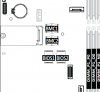
called Platform Firmware Resilency.Just in case you didn't know you board has a second bios and firmware flash chip which keeps a copy/backup of the bios before you updated. (see attached screenshot)
Supermicro has the best implementation to this: on currupted BIOS the system reflashes from back up without user interaction.
you can dump BIOS, but can you chosse between main and backup's ?My best guess based on what I could dig up, you can dump the 2nd flash contend somehow in the BMC to a file
if yes it will be saved as bin not RBU.
called Platform Firmware Resilency.
Supermicro has the best implementation to this: on currupted BIOS the system reflashes from back up without user interaction.
Yes that's a nice feature, Gigabyte probably copied the idea and only did half the required engineering for what they call Dual ROM Architecture.
no Gigabyte was first with dual BIOS, feature is still in BMC firmware included.Gigabyte probably copied the idea and only did half the required engineering for what they call Dual ROM Architecture.
but this is different. i guess soon it will be done automatic like at SM.
there is a BIOS Recovery (BIOS_RCVR) Jumper, maybe it works now on these boards. ?
Good you mention it, you can get in the 2nd bios with the jumper (but not sure it's exactly the backup bios, as docs motion you have to have a functional boot sector in the main flash to use it) anyway you are force to use a external firmware file as only recovery option when using the jumper.there is a BIOS Recovery (BIOS_RCVR) Jumper, maybe it works now on these boards.
Judging from available documentation, it does not mention any way to just restore the backup rom to main.
If anyone happens to test this I don't mind being proven wrong at all.
Last edited:
Yip totally on, been using the Gigabyte ipmitool: gbtipmitool-linux to do the flashingyou can dump BIOS, but can you chosse between main and backup's ?
if yes it will be saved as bin not RBU.
That jumper is not identifiable from the manual or from the board, and best guesses seemed to have no impact on the success of flashing either of the bios slotsthere is a BIOS Recovery (BIOS_RCVR) Jumper, maybe it works now on these boards.
you can make RBU from bin, just a 16bytes footer with checksum.Yip totally on, been using the Gigabyte ipmitool: gbtipmitool-linux to do the flashing
i see it in the manual.That jumper is not identifiable from the manual or from the board
Hardware installation -29-
Yeah but have a look at a photo of the board, not exactly easy to tell exactly which jumper is which + the markings on the board seem to differ from the manual.you can make RBU from bin, just a 16bytes footer with checksum.
i see it in the manual.
Hardware installation -29-
Similar threads
- Replies
- 10
- Views
- 3K
- Replies
- 31
- Views
- 12K
- Replies
- 29
- Views
- 19K
- Replies
- 12
- Views
- 2K
