
Zaktualizuj BIOS do F13 lub F14
[/CYTAT]
Can I ask for a link to the F14 version? On the manufacturer's website I only see F13
EU Gigabyte Mainboard MC12-LE0 Re1.0 AMD B550 AM4 Ryzen
- Thread starter flobert
- Start date
You are using an out of date browser. It may not display this or other websites correctly.
You should upgrade or use an alternative browser.
You should upgrade or use an alternative browser.
Notice: Page may contain affiliate links for which we may earn a small commission through services like Amazon Affiliates or Skimlinks.
Hi,
I'm still struggling with this board. I thought that updating to version F14 would help. The board displays sensors and fans are spinning, but there is no image in IPMI. I complained to the seller, but he couldn't do anything. He put in components that work, but my board is dead. Does anyone have an idea what could be wrong, because I'm already pissed off with this situation. I bought a second board, but I'll check if anything will come of it.
Memory put in A1 slot and this is samsung M391A1K3BB2-CTDQ and Ryzen 7 3800.
@mackspain @ook512 @SlowmoDK I found on german forum hardwareluxx.de that user "MultumInParvo" post solution for IOMMU groups...
In BIOS you need enable ACS (Access Control Services) under NBIO Common Options.
Before:
View attachment 37874
After:
View attachment 37875
Then you need apply in Proxmox GRUB config ACS patch.
Code:GRUB_CMDLINE_LINUX_DEFAULT="quiet pcie_acs_override=downstream,multifunction"
I don't have board to test this but is someone have option please do it and report back...
My BIOS settings:
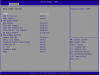
Now IOMMU is seperated and SATA controller is in own group ...
Code:
┌──────────┬────────┬──────────────┬────────────┬────────┬─────────────────────────────────────────────────────────┬──────┬──────────────────┬────────────────
│ class    │ device │ id           │ iommugroup │ vendor │ device_name                                             │ mdev │ subsystem_device │ subsystem_devic
╞══════════╪════════╪══════════════╪════════════╪════════╪═════════════════════════════════════════════════════════╪══════╪══════════════════╪════════════════
│ 0x010601 │ 0x43eb │ 0000:02:00.1 │         17 │ 0x1022 │ 500 Series Chipset SATA Controller                      │      │ 0x1000           │
├──────────┼────────┼──────────────┼────────────┼────────┼─────────────────────────────────────────────────────────┼──────┼──────────────────┼────────────────
│ 0x010802 │ 0x0100 │ 0000:08:00.0 │         25 │ 0x1bb1 │ Nytro Flash Storage                                     │      │ 0x0123           │ Nytro 5000
├──────────┼────────┼──────────────┼────────────┼────────┼─────────────────────────────────────────────────────────┼──────┼──────────────────┼────────────────
│ 0x010802 │ 0x0100 │ 0000:09:00.0 │         26 │ 0x1bb1 │ Nytro Flash Storage                                     │      │ 0x0123           │ Nytro 5000
├──────────┼────────┼──────────────┼────────────┼────────┼─────────────────────────────────────────────────────────┼──────┼──────────────────┼────────────────
│ 0x020000 │ 0x00b1 │ 0000:01:00.0 │         15 │ 0x1d6a │ AQC100 10G Ethernet MAC controller [AQtion]             │      │ 0x101b           │
├──────────┼────────┼──────────────┼────────────┼────────┼─────────────────────────────────────────────────────────┼──────┼──────────────────┼────────────────
│ 0x020000 │ 0x1533 │ 0000:06:00.0 │         23 │ 0x8086 │ I210 Gigabit Network Connection                         │      │ 0x1000           │
├──────────┼────────┼──────────────┼────────────┼────────┼─────────────────────────────────────────────────────────┼──────┼──────────────────┼────────────────
│ 0x020000 │ 0x1533 │ 0000:07:00.0 │         24 │ 0x8086 │ I210 Gigabit Network Connection                         │      │ 0x1000           │
├──────────┼────────┼──────────────┼────────────┼────────┼─────────────────────────────────────────────────────────┼──────┼──────────────────┼────────────────
│ 0x030000 │ 0x2000 │ 0000:05:00.0 │         22 │ 0x1a03 │ ASPEED Graphics Family                                  │      │ 0x2000           │
├──────────┼────────┼──────────────┼────────────┼────────┼─────────────────────────────────────────────────────────┼──────┼──────────────────┼────────────────
│ 0x060000 │ 0x1480 │ 0000:00:00.0 │         -1 │ 0x1022 │ Starship/Matisse Root Complex                           │      │ 0x1000           │
├──────────┼────────┼──────────────┼────────────┼────────┼─────────────────────────────────────────────────────────┼──────┼──────────────────┼────────────────
│ 0x060000 │ 0x1482 │ 0000:00:01.0 │          0 │ 0x1022 │ Starship/Matisse PCIe Dummy Host Bridge                 │      │ 0x0000           │
├──────────┼────────┼──────────────┼────────────┼────────┼─────────────────────────────────────────────────────────┼──────┼──────────────────┼────────────────
│ 0x060000 │ 0x1482 │ 0000:00:02.0 │          3 │ 0x1022 │ Starship/Matisse PCIe Dummy Host Bridge                 │      │ 0x0000           │
├──────────┼────────┼──────────────┼────────────┼────────┼─────────────────────────────────────────────────────────┼──────┼──────────────────┼────────────────
│ 0x060000 │ 0x1482 │ 0000:00:03.0 │          4 │ 0x1022 │ Starship/Matisse PCIe Dummy Host Bridge                 │      │ 0x0000           │
├──────────┼────────┼──────────────┼────────────┼────────┼─────────────────────────────────────────────────────────┼──────┼──────────────────┼────────────────
│ 0x060000 │ 0x1482 │ 0000:00:04.0 │          7 │ 0x1022 │ Starship/Matisse PCIe Dummy Host Bridge                 │      │ 0x0000           │
├──────────┼────────┼──────────────┼────────────┼────────┼─────────────────────────────────────────────────────────┼──────┼──────────────────┼────────────────
│ 0x060000 │ 0x1482 │ 0000:00:05.0 │          8 │ 0x1022 │ Starship/Matisse PCIe Dummy Host Bridge                 │      │ 0x0000           │
├──────────┼────────┼──────────────┼────────────┼────────┼─────────────────────────────────────────────────────────┼──────┼──────────────────┼────────────────
│ 0x060000 │ 0x1482 │ 0000:00:07.0 │          9 │ 0x1022 │ Starship/Matisse PCIe Dummy Host Bridge                 │      │ 0x0000           │
├──────────┼────────┼──────────────┼────────────┼────────┼─────────────────────────────────────────────────────────┼──────┼──────────────────┼────────────────
│ 0x060000 │ 0x1482 │ 0000:00:08.0 │         11 │ 0x1022 │ Starship/Matisse PCIe Dummy Host Bridge                 │      │ 0x0000           │
├──────────┼────────┼──────────────┼────────────┼────────┼─────────────────────────────────────────────────────────┼──────┼──────────────────┼────────────────
│ 0x060000 │ 0x1440 │ 0000:00:18.0 │         14 │ 0x1022 │ Matisse/Vermeer Data Fabric: Device 18h; Function 0     │      │ 0x0000           │
├──────────┼────────┼──────────────┼────────────┼────────┼─────────────────────────────────────────────────────────┼──────┼──────────────────┼────────────────
│ 0x060000 │ 0x1441 │ 0000:00:18.1 │         14 │ 0x1022 │ Matisse/Vermeer Data Fabric: Device 18h; Function 1     │      │ 0x0000           │
├──────────┼────────┼──────────────┼────────────┼────────┼─────────────────────────────────────────────────────────┼──────┼──────────────────┼────────────────
│ 0x060000 │ 0x1442 │ 0000:00:18.2 │         14 │ 0x1022 │ Matisse/Vermeer Data Fabric: Device 18h; Function 2     │      │ 0x0000           │
├──────────┼────────┼──────────────┼────────────┼────────┼─────────────────────────────────────────────────────────┼──────┼──────────────────┼────────────────
│ 0x060000 │ 0x1443 │ 0000:00:18.3 │         14 │ 0x1022 │ Matisse/Vermeer Data Fabric: Device 18h; Function 3     │      │ 0x0000           │
├──────────┼────────┼──────────────┼────────────┼────────┼─────────────────────────────────────────────────────────┼──────┼──────────────────┼────────────────
│ 0x060000 │ 0x1444 │ 0000:00:18.4 │         14 │ 0x1022 │ Matisse/Vermeer Data Fabric: Device 18h; Function 4     │      │ 0x0000           │
├──────────┼────────┼──────────────┼────────────┼────────┼─────────────────────────────────────────────────────────┼──────┼──────────────────┼────────────────
│ 0x060000 │ 0x1445 │ 0000:00:18.5 │         14 │ 0x1022 │ Matisse/Vermeer Data Fabric: Device 18h; Function 5     │      │ 0x0000           │
├──────────┼────────┼──────────────┼────────────┼────────┼─────────────────────────────────────────────────────────┼──────┼──────────────────┼────────────────
│ 0x060000 │ 0x1446 │ 0000:00:18.6 │         14 │ 0x1022 │ Matisse/Vermeer Data Fabric: Device 18h; Function 6     │      │ 0x0000           │
├──────────┼────────┼──────────────┼────────────┼────────┼─────────────────────────────────────────────────────────┼──────┼──────────────────┼────────────────
│ 0x060000 │ 0x1447 │ 0000:00:18.7 │         14 │ 0x1022 │ Matisse/Vermeer Data Fabric: Device 18h; Function 7     │      │ 0x0000           │
├──────────┼────────┼──────────────┼────────────┼────────┼─────────────────────────────────────────────────────────┼──────┼──────────────────┼────────────────
│ 0x060100 │ 0x790e │ 0000:00:14.3 │         13 │ 0x1022 │ FCH LPC Bridge                                          │      │ 0x1000           │
├──────────┼────────┼──────────────┼────────────┼────────┼─────────────────────────────────────────────────────────┼──────┼──────────────────┼────────────────
│ 0x060400 │ 0x1483 │ 0000:00:01.1 │          1 │ 0x1022 │ Starship/Matisse GPP Bridge                             │      │ 0x1000           │
├──────────┼────────┼──────────────┼────────────┼────────┼─────────────────────────────────────────────────────────┼──────┼──────────────────┼────────────────
│ 0x060400 │ 0x1483 │ 0000:00:01.2 │          2 │ 0x1022 │ Starship/Matisse GPP Bridge                             │      │ 0x1000           │
├──────────┼────────┼──────────────┼────────────┼────────┼─────────────────────────────────────────────────────────┼──────┼──────────────────┼────────────────
│ 0x060400 │ 0x1483 │ 0000:00:03.1 │          5 │ 0x1022 │ Starship/Matisse GPP Bridge                             │      │ 0x1000           │
├──────────┼────────┼──────────────┼────────────┼────────┼─────────────────────────────────────────────────────────┼──────┼──────────────────┼────────────────
│ 0x060400 │ 0x1483 │ 0000:00:03.2 │          6 │ 0x1022 │ Starship/Matisse GPP Bridge                             │      │ 0x1000           │
├──────────┼────────┼──────────────┼────────────┼────────┼─────────────────────────────────────────────────────────┼──────┼──────────────────┼────────────────
│ 0x060400 │ 0x1484 │ 0000:00:07.1 │         10 │ 0x1022 │ Starship/Matisse Internal PCIe GPP Bridge 0 to bus[E:B] │      │ 0x1458           │
├──────────┼────────┼──────────────┼────────────┼────────┼─────────────────────────────────────────────────────────┼──────┼──────────────────┼────────────────
│ 0x060400 │ 0x1484 │ 0000:00:08.1 │         12 │ 0x1022 │ Starship/Matisse Internal PCIe GPP Bridge 0 to bus[E:B] │      │ 0x1458           │
├──────────┼────────┼──────────────┼────────────┼────────┼─────────────────────────────────────────────────────────┼──────┼──────────────────┼────────────────
│ 0x060400 │ 0x43e9 │ 0000:02:00.2 │         18 │ 0x1022 │ 500 Series Chipset Switch Upstream Port                 │      │ 0x0201           │
├──────────┼────────┼──────────────┼────────────┼────────┼─────────────────────────────────────────────────────────┼──────┼──────────────────┼────────────────
│ 0x060400 │ 0x43ea │ 0000:03:06.0 │         19 │ 0x1022 │                                                         │      │ 0x3308           │
├──────────┼────────┼──────────────┼────────────┼────────┼─────────────────────────────────────────────────────────┼──────┼──────────────────┼────────────────
│ 0x060400 │ 0x43ea │ 0000:03:08.0 │         20 │ 0x1022 │                                                         │      │ 0x3308           │
├──────────┼────────┼──────────────┼────────────┼────────┼─────────────────────────────────────────────────────────┼──────┼──────────────────┼────────────────
│ 0x060400 │ 0x43ea │ 0000:03:09.0 │         21 │ 0x1022 │                                                         │      │ 0x3308           │
├──────────┼────────┼──────────────┼────────────┼────────┼─────────────────────────────────────────────────────────┼──────┼──────────────────┼────────────────
│ 0x060400 │ 0x1150 │ 0000:04:00.0 │         22 │ 0x1a03 │ AST1150 PCI-to-PCI Bridge                               │      │ 0x1150           │
├──────────┼────────┼──────────────┼────────────┼────────┼─────────────────────────────────────────────────────────┼──────┼──────────────────┼────────────────
│ 0x080600 │ 0x1481 │ 0000:00:00.2 │         -1 │ 0x1022 │ Starship/Matisse IOMMU                                  │      │ 0x1000           │
├──────────┼────────┼──────────────┼────────────┼────────┼─────────────────────────────────────────────────────────┼──────┼──────────────────┼────────────────
│ 0x0c0330 │ 0x43ee │ 0000:02:00.0 │         16 │ 0x1022 │ 500 Series Chipset USB 3.1 XHCI Controller              │      │ 0x1000           │
├──────────┼────────┼──────────────┼────────────┼────────┼─────────────────────────────────────────────────────────┼──────┼──────────────────┼────────────────
│ 0x0c0330 │ 0x149c │ 0000:0b:00.3 │         30 │ 0x1022 │ Matisse USB 3.0 Host Controller                         │      │ 0x1000           │
├──────────┼────────┼──────────────┼────────────┼────────┼─────────────────────────────────────────────────────────┼──────┼──────────────────┼────────────────
│ 0x0c0500 │ 0x790b │ 0000:00:14.0 │         13 │ 0x1022 │ FCH SMBus Controller                                    │      │ 0x1000           │
├──────────┼────────┼──────────────┼────────────┼────────┼─────────────────────────────────────────────────────────┼──────┼──────────────────┼────────────────
│ 0x108000 │ 0x1486 │ 0000:0b:00.1 │         29 │ 0x1022 │ Starship/Matisse Cryptographic Coprocessor PSPCPP       │      │ 0x1000           │
├──────────┼────────┼──────────────┼────────────┼────────┼─────────────────────────────────────────────────────────┼──────┼──────────────────┼────────────────
│ 0x130000 │ 0x148a │ 0000:0a:00.0 │         27 │ 0x1022 │ Starship/Matisse PCIe Dummy Function                    │      │ 0x1000           │
├──────────┼────────┼──────────────┼────────────┼────────┼─────────────────────────────────────────────────────────┼──────┼──────────────────┼────────────────
│ 0x130000 │ 0x1485 │ 0000:0b:00.0 │         28 │ 0x1022 │ Starship/Matisse Reserved SPP                           │      │ 0x1000           │
└──────────┴────────┴──────────────┴────────────┴────────┴─────────────────────────────────────────────────────────┴──────┴──────────────────┴────────────────
Last edited:

I checked the second board and I'm also stuck. I managed to update the BMC and in theory the BIOS to version F14. But the BMC still shows version F06. Does anyone have an idea what could be wrong?Hi,
I'm still struggling with this board. I thought that updating to version F14 would help. The board displays sensors and fans are spinning, but there is no image in IPMI. I complained to the seller, but he couldn't do anything. He put in components that work, but my board is dead. Does anyone have an idea what could be wrong, because I'm already pissed off with this situation. I bought a second board, but I'll check if anything will come of it.
Memory put in A1 slot and this is samsung M391A1K3BB2-CTDQ and Ryzen 7 3800.
you need a full usccessful POST to update the BIOS version shown in the BMC,I checked the second board and I'm also stuck. I managed to update the BMC and in theory the BIOS to version F14. But the BMC still shows version F06. Does anyone have an idea what could be wrong?
you have no POST = you see old BIOS ver.
1)CPU deadI checked the second board and I'm also stuck. I managed to update the BMC and in theory the BIOS to version F14. But the BMC still shows version F06. Does anyone have an idea what could be wrong?
2) PSU issue was reported, other corsair worked then(PWR Good issue)
+12V not connected / too weak.
edit:
3) memory defektive
Last edited:
Hello,1)CPU dead
2) PSU issue was reported, other corsair worked then(PWR Good issue)
The power supply should be working, because I had another board and it's a Supermicro psw-351-1h. After starting, I see the values from the sensors. It could be the processor, although I bought a new processor twice and there were similar symptoms. Also, one of the boards was sent to the seller, where he supposedly pulled components from a working server based on this board. But I guess the only thing left to do is check the PSU, because I didn't do that.
Hello,
The power supply should be working, because I had another board and it's a Supermicro psw-351-1h. After starting, I see the values from the sensors. It could be the processor, although I bought a new processor twice and there were similar symptoms. Also, one of the boards was sent to the seller, where he supposedly pulled components from a working server based on this board. But I guess the only thing left to do is check the PSU, because I didn't do that.
[/CYTAT]
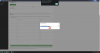
I managed to update BMI to the 2023 version, but when I try to update to the latest one, it looks like the screenshot
The power supply should be working, because I had another board and it's a Supermicro psw-351-1h
some time ago there was a symphtome called "be-quiet bug" because it happend first with this vendor.But I guess the only thing left to do is check the PSU, because I didn't do that.
some doesn't like the PSU but other combination work fine.
pls check with other PSU(+12V CPU power connector plugged?) and memory outside a chassis to eleminate short curcuits from misplaced standoffs.although I bought a new processor twice and there were similar symptoms. Also, one of the boards was sent to the seller, where he supposedly pulled components from a working server based on this board. But I guess the only thing left to do is check the PSU, because I didn't do that.
don't reply to translated posts, better learn reading english.I have already updated BMI to the latest version. I have downloaded another file. I will test these boards in another case with a different power supply, although I would prefer it not to be the power supply. I have a nice rack case that fits in the rack. The 12+ connector is connected near the processor
you must not run the baord forever outside, just for testing and find the issue.
you have selected update type "BMC" and choosed BIOS file image.RBUI managed to update BMI to the 2023 version, but when I try to update to the latest one, it looks like the screenshot
image.RBU is BIOS file not BMC Firmware.
Yeau, you 've be right, but i buy a lot of components, to run server. I'm buy motherboard for private person and I don't have a support, because I'm write here. I'll write when I figure something out.don't reply to translated posts, better learn reading english.
you must not run the baord forever outside, just for testing and find the issue.
4x32GB ECC UDIMM Crucial MTA18ASF4G72AZ-3G2R
I'm interested in buying these RAM modules: 32GB ECC UDIMM Crucial MTA18ASF4G72AZ-3G2R.
According to @matt_garman's post, all memory tests ran without problems. However, I'm concerned because this model doesn't appear on the QVL list, and Crucial's compatibility tool indicates that this module is not compatible with this motherboard.
Is anyone else using these RAM modules and can confirm that the system is stable? Thank you in advance for your help.
Can someone help me and tell me if this is possible?
I would like have multiple FAN profiles activated at same time. Is this possible and how?
One for CPU which will control CPU fan and another for case which will control case FAN's(Different duty/slope for different fans's)?
I would like have multiple FAN profiles activated at same time. Is this possible and how?
One for CPU which will control CPU fan and another for case which will control case FAN's(Different duty/slope for different fans's)?
yes. new policy. select your policy and make settings. after that next new policy, sel. policy 2 and male your....Can someone help me and tell me if this is possible?
I would like have multiple FAN profiles activated at same time. Is this possible and how?
One for CPU which will control CPU fan and another for case which will control case FAN's(Different duty/slope for different fans's)?
it is still one FAN profile running but you have then just more than one independent policy in your FAN profile.
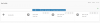
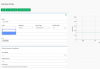
Try the green button labeled "New policy"
Im try press this button multiple times but nothing happen(visual nothing change)... Now I see that it add new policies to list...
Thanks for this hint...
I think I have another strange issue...
Im enable power on state after power loss in BIOS. If I shutdown motherboard and remove power cable from it and then reconnect it back motherboard start and it stuck in D7 state. In BMC remote it do not react on any key press... Then I need to restart it by BMC and it boot normaly...
Any idea what can be wrong?
Im enable power on state after power loss in BIOS. If I shutdown motherboard and remove power cable from it and then reconnect it back motherboard start and it stuck in D7 state. In BMC remote it do not react on any key press... Then I need to restart it by BMC and it boot normaly...
Any idea what can be wrong?
Similar threads
- Replies
- 2
- Views
- 2K
- Replies
- 0
- Views
- 1K
