
ohhhh ok ,so i have to make it back with the turbo step, if i understand i cant get more than 31000 pts1.7Ghz is base clock, at load all cores go higher until the CPU hits TDP wattage.
if you want base clock 2.2 but no turbo you may get lower clocks.
some features of your WS board are not suported by non Xeon W like qwan,
ES Xeon Discussion
- Thread starter britinpdx
- Start date
You are using an out of date browser. It may not display this or other websites correctly.
You should upgrade or use an alternative browser.
You should upgrade or use an alternative browser.
Notice: Page may contain affiliate links for which we may earn a small commission through services like Amazon Affiliates or Skimlinks.
yes on single cores but not all same time.is there a way to make it a 3.00 ghz???
all cores limit is fused 2.8Ghz.
you can try set PL1 Time window to max. seconds (should be in socket RAPL config.)
The price of the tyan C741 motherboard was adjusted to $365 at Newegg, which is really tempting, and I am wondering if this motherboard supports xeon es cpu well?
link
P.S. This is a weird commodity. Everything on the page indicates that this is a C741 motherboard except for the 'S5642' in the title, which I queried to find out that it's a C621a motherboard model (i.e. the same motherboard from the previous generation). Cause it's an overly attractive price for C741 motherboard I still chose to place the order. Let's see which motherboard Newegg will ship.
Confirmed: newegg shipped a Tyan S5652, c741 motherboard
link
Confirmed: newegg shipped a Tyan S5652, c741 motherboard
Last edited:
Tyan S5652AGMNREand I am wondering if this motherboard supports xeon es cpu well?
no way. whether it is possible through BIOS modd is unknown.
the all in one stepping E container MCU is there, so probably E0 steppings like Q0K? work but not tested so far.
Last edited:
The price of the tyan C741 motherboard was adjusted to $365 at Newegg, which is really tempting, and I am wondering if this motherboard supports xeon es cpu well?
link
I would love to hear what they actually send. On the same page in the technical details they list
| CPU Socket Type | LGA 4189 |
|---|---|
| CPU Type | Intel Xeon |
| North Bridge | Intel C252 |
|---|
| DDR4 Standard | DDR4 3200 |
|---|
But on the photo it is clearly LGA 4677 board. Just wonder which board it is.
stepping E3 and E5 QS work.Hi. Is there a SPR ES CPU that is compatible with DELL OEM motherboards (Precision 5860, F4Y1M) with W790 chipset?
Last edited:
if you can, check if a D0 or early E0(Q03J,Q08S) gives at least a POST code, if not the ES is helt in reset by Intel ME (PCH FIrmware)If that is not possible, I would like to add BIOS microcode, and I am also wondering if that is possible.
this is not the end but the Tool required to tweak the ME(mfit.exe & co.) is not available so far.
on my X13SRA-TF the Q08S doesn't need a BIOS modd, needs only Intel ME which allows ES to run.
the BIOS of 5860 doesn't include D0 cpuid806F3 microcode but E0 cpuid806F4,
and the known fits all E steppings container cpuid806F8(+806F7,+806F6,+806F5,+806F4)
Last edited:
I would love to hear what they actually send. On the same page in the technical details they list
Chipsets
CPU Socket Type LGA 4189 CPU Type Intel Xeon
Memory
North Bridge Intel C252
DDR4 Standard DDR4 3200
But on the photo it is clearly LGA 4677 board. Just wonder which board it is.
Yeah, I'm also curious as to which motherboard newegg will actually ship.
I thought Q03J and Q08S were LGA 4189 whereas the Precision 5860 is on LGA 4677.if you can, check if a D0 or early E0(Q03J,Q08S) gives at least a POST code, if not the ES is helt in reset by Intel ME (PCH FIrmware)
this is not the end but the Tool required to tweak the ME(mfit.exe & co.) is not available so far.
on my X13SRA-TF the Q08S doesn't need a BIOS modd, needs only Intel ME which allows ES to run.
the BIOS 5860_1.1.11 doesn't include D0 cpuid806F3 microcode but E0 cpuid806F4,
and the known fits all E steppings container cpuid806F8(+806F7,+806F6,+806F5,+806F4)
Q03J = 60 core, Q08S = 48 core.I thought Q03J and Q08S were LGA 4189 whereas the Precision 5860 is on LGA 4677.
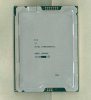
yes on single cores but not all same time.
all cores limit is fused 2.8Ghz.
you can try set PL1 Time window to max. seconds (should be in socket RAPL config.)
Hey Rollo,
Do you know which BIOS setting re-enables/disables turbo? QYFR hits all core 2800, but won't hit 3700 single core turbo after PL1 adjustments. But I believe I may have hit another performance setting somewhere.
Hi, I have installed the ES Xeon8480+ processor on the Supermicro X13DAI-T motherboard but the power cuts out after a certain time. The processor heats up after a few attempts. There is no screen at all. How can I solve this problem. Thank you.
PL1 don't give you 3700 all core, but the processor can draw package power more than TDP longer time.Do you know which BIOS setting re-enables/disables turbo? QYFR hits all core 2800, but won't hit 3700 single core turbo after PL1 adjustments
disable 28 cores to see 3700 all cores.

QYFS/QYFR ?Hi, I have installed the ES Xeon8480+ processor on the Supermicro X13DAI-T motherboard but the power cuts out after a certain time. The processor heats up after a few attempts. There is no screen at all. How can I solve this problem. Thank you.
supermicro doesn't support stepping D0 and early E0 ES.
on some X13 boards there is a a debug/test BIOS 1.0 with full of bugs, you don't want.
all supermicro BIOS (except the WS parts) are RootOfTrust protected = can't be modified.
PL1 don't give you 3700 all core, but the processor can draw package power more than TDP longer time.
disable 28 cores to see 3700 all cores.
Quite funny that 4th gen scalable pull 500+ watts at the wall on idle, versus Broadwell-E and 1st Gen Platinum's...
Good info for that though! Should test if works in dual socket config? 48 cores boosting to 3700 all core would be quite amazing in some task...

Gigabyte MS73 bios do not cover intel's speedstep well either... and finding actual material outside of marketing jargon is difficult.
Intel SSP-CP - Enabled
Intel SSP-PP - Enabled
Intel SSP-BC - Enabled
Intel SSP Dynamic - Enabled
Bios also do not really depict what these do either... Dynamic wording states it puts cores to sleep entirely, but cores never rest for more than half a second, might be Windows scheduling issues as set to OS Control and Native OOB?
only if you adjust them to stay at 3ghz and more without doing anything useful...imho thats not called IDLE.Quite funny that 4th gen scalable pull 500+ watts at the wall on idle
IDLE is all cores and Mesh/LLC @800mhz ? package power is around 77 Watts for a 48core
Windows power plan options seems not ready for SPR/EMR.might be Windows scheduling issues as set to OS Control and Native OOB?
only if you adjust them to stay at 3ghz and more without doing anything useful...imho thats not called IDLE.
IDLE is all cores and Mesh/LLC @800mhz ? package power is around 77 Watts for a 48core
Windows power plan options seems not ready for SPR/EMR.
Not sure what is happening then... With 30 ANTEC P12s, D5 on draw is variable 55-70 watts no HDDs.
Booting with motherboard/unplugged socket draw 95-120 from wall while inside remote IPMI.. average 190 we'll go with.
QYFR/8480s on chipset init wall draw is 800 watts/two sockets and minus, is about 600 watts. with OS pref and set to powersaving and verify with HWInfo 800mhz across board is 450-470 steady, is 260 draw both sockets. 130 per? Sounds about right for 54 core?
At wall BIOS set balance performance pref is anywhere between 450-670 stuck 1.9ghz and R23 pull is 1400 total watts, as high as meter will go before zeroes out. That's 1,200 watts between both sockets of CPU draw? This ES issue? Setting PL1/PL2 max wattage does not change this, doesn't even seem to recognize this.
All this is from wall, and HWINFO report PL1 static is 350, PL2 static is 420... package power doesn't report correctly, states max 1 watt...
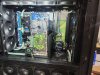
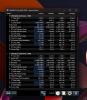
added hwinfo to pic
Last edited:
i don't know what you doing.That's 1,200 watts between both sockets of CPU draw? This ES issue?
Q08S ES stepping E0 77 watts.(HWinfo64)
houston....package power doesn't report correctly, states max 1 watt...

I would love to hear what they actually send. On the same page in the technical details they list
Chipsets
CPU Socket Type LGA 4189 CPU Type Intel Xeon
Memory
North Bridge Intel C252
DDR4 Standard DDR4 3200
But on the photo it is clearly LGA 4677 board. Just wonder which board it is.
Confirmed: newegg shipped a Tyan S5652, c741 motherboard

Similar threads
- Replies
- 0
- Views
- 669
- Replies
- 35
- Views
- 8K

- Replies
- 0
- Views
- 721
- Replies
- 2
- Views
- 2K
