CWWK/Topton/... Nxxx quad NIC router

Notice: Page may contain affiliate links for which we may earn a small commission through services like Amazon Affiliates or Skimlinks.
Were you able to figure out how to power the device via the PSU?

I would assume you just use one of the 12v lines and ground the green cable to power it on.
You can buy those DC connectors quite easily (5.5mm * 2.1mm) or just cut it off of the original PSU.
 
CWWK has a five port version of their new N100 CPU product line available on AliExpress. Has anyone looked at it yet?

It looks very promising to me because:
  • Five I226-v ports instead of 4 (duh)
  • Two M.2 slots w/o the need for adapter card. (Note, these are only x1 slots each)
  • Two SATA 3.0 ports
  • USB-C port
  • Two HDMI 2.1 plus DP 1.something
This, to me, has a lot more flexibility than than 4 port models and its only sale for about $220 as of today.

Anyone know why I shouldn't purchase this?

EDIT: The HUNSN RJ39 appears to be identical to the CWWK product.

EDIT: Pulled the trigger... I bought the bare bones version and I'm adding 16 GB of Crucial DDR5 5600 RAM together with two 500 GB Western Digital SN570 SSDs.

I plan to make this my OpnSense router running as a VM on Proxmox with PCI passthru for the NICs. The two SSDs will be configured in a ZFS mirror (RAID-1).

But, for initial testing, I'll use OpnSense on Proxmox as a layer 2 switch (i.e. as a software bridge) to replace a dumb ethernet switch connecting my two PCs to my upstream router. I want to check stability before using this to replace my Asus router.

I'll try to remember to report my findings once this arrives and I've had time to futz with it.

Hi,

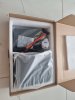
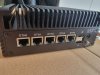
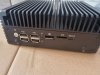
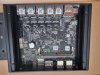
I just got it from AliExpress with Topton Store, added Crucial DDR5 16GB and Samsung 970 Evo Plus 500GB.
I didn't have much time to push it yet, but tried OPNsense, Casa OS, pfSense on Proxmox. It works well. I'm happy with it.
 

Attachments

  • 20230720_130253_Copy.jpg
    20230720_130253_Copy.jpg
    62.5 KB · Views: 237
  • 20230720_130537 - Copy.jpg
    20230720_130537 - Copy.jpg
    134.9 KB · Views: 248
  • 20230720_130552 - Copy.jpg
    20230720_130552 - Copy.jpg
    115.6 KB · Views: 294
  • 20230720_131243 - Copy.jpg
    20230720_131243 - Copy.jpg
    152.1 KB · Views: 294
  • Like
Reactions: Keikun
I would assume you just use one of the 12v lines and ground the green cable to power it on.
You can buy those DC connectors quite easily (5.5mm * 2.1mm) or just cut it off of the original PSU.

I think there is a 4 Pin ATX connector on the board, so you probably don't need to get a DC connector.
I was wondering how grounding the Green wire to would work. It would certainly make the PSU provide power, does it matter that there is no way to indicate that it should turn on/off like when it's connected to a standard ATX board?
Just fit a momentary switch in that case between the green cable and ground.
 
Can anyone help me with fan cable adapter?

I get my n305 pc without any additional cable (SATA and fan). Now can't find what kind of fan connector needed to attach it to board? Maybe anyone can say it number/name or (it will be better) link to aliexpress. I have about 75+°C on my ssd and overheating RAM in memtest. Maybe inner fan will help with it.

Left on this photo: https://forums.servethehome.com/index.php?attachments/p30714-183023-jpg.30298/
 
Hello.

What size shims do you use? And where did you buy them?

Just got mine and there is a clear gap between the copper and the CPU :-/
 
I hope this isn't the wrong place to post.

I've been looking at one of these n100 boxes but the main gripe for me is the lack of usb3.0, no practical reason why, I just can't swallow the idea of being stuck with 2.0 in 2023.

So in my search I found this box from BeiKong/BKHD (G30M): 241.36US $ |BKHD 2023 Mini PC Soft Router Firewall VPN G30M 4 LAN 2.5G Intel Alder Lake N N100 Quad Cores Pfsense OPNsense DP HD MI NVMe| | - AliExpress
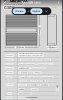
Edit: Google translate of the product specs from TaoBao. Source: https://m.tb.cn/h.5c4x19J?tk=STzdduGtCKA
Screenshot_20230725_231000_Google.jpg

I've attempted to search for this model on this forum and Google but found nothing on this box.

My initial thoughts is that the case doesn't look like the best heat sink, but does anyone else have an opinion on the specs of this box vs say the variation C from CWWK (which seems to be the most popular)?
 
Last edited:
I hope this isn't the wrong place to post.

I've been looking at one of these n100 boxes but the main gripe for me is the lack of usb3.0, no practical reason why, I just can't swallow the idea of being stuck with 2.0 in 2023.

So in my search I found this box from GuanFeng/BKHD (G30M): 241.36US $ |BKHD 2023 Mini PC Soft Router Firewall VPN G30M 4 LAN 2.5G Intel Alder Lake N N100 Quad Cores Pfsense OPNsense DP HD MI NVMe| | - AliExpress

I've attempted to search for this model on this forum and Google but found nothing on this box.

My initial thoughts is that the case doesn't look like the best heat sink, but does anyone else have an opinion on the specs of this box vs say the variation C from CWWK (which seems to be the most popular)?

Do you actually need USB 3?
This is a fast moving arena and the longer you delay, the greater the chances that the ones being commented on are no longer available and the next gen will be out which may or may not be any better.
There are some new variants out with USB-C if it helps. - New variant

I would at least stick with the stores that have been used in the past as the one you have linked to only shows renders and a photo of a J6412 board with 2x SODIMM.
 
Did anyone flush the BIOS from the link abdullah has mentioned? I would like to try the 4xNVMe board that came with ordered box, but that involves flushing special version of BIOS. In case the PCB doesn't work or doesn't meet the expectations I would very much prefer to roll back to the basics.

Now my box has BIOS 2.22.1287 (arrived with it). What is the version by the mentioned link?
Did you perhaps have time to explore this yet? This 4xNVMe board could potentially be very useful, pity that they seem to have abandoned developing it themselves.
 
I've been looking at one of these n100 boxes but the main gripe for me is the lack of usb3.0, no practical reason why, I just can't swallow the idea of being stuck with 2.0 in 2023.
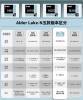
1686942078051.png

Above shows the Intel Nxxx variations available for the ChangWang product range, which many resellers like Topton carry. The 12th gen Nxxx processors have max 9 PCIe 3.0 lanes, so something's gotta give. I personally went for the first model with max NVME speeds to be used as a proxmox node for OPNsense/home assistant/omada/vaultwarden. USB 3.0 was never a consideration and would in fact be a strict no-no due to known signal interference issues with Zigbee USB dongles.
 
I personally went for the first model with max NVME speeds to be used as a proxmox node for OPNsense/home assistant/omada/vaultwarden.

This is good information, I never considered what would be compromised to give the usb3.0. This definitely pushes me away from the BeiKong G30M.

Edit, the brand is BeiKong, not GuanFeng
 
Ive been lurking and reading through this thread and unable to determine does the case matter that much? if it does which is better the Y fins or the one with the ear like openings on the side?
seems each place offers different cases or at least different pictures.
 
I hope this isn't the wrong place to post.

I've been looking at one of these n100 boxes but the main gripe for me is the lack of usb3.0, no practical reason why, I just can't swallow the idea of being stuck with 2.0 in 2023.

So in my search I found this box from BeiKong/BKHD (G30M): 241.36US $ |BKHD 2023 Mini PC Soft Router Firewall VPN G30M 4 LAN 2.5G Intel Alder Lake N N100 Quad Cores Pfsense OPNsense DP HD MI NVMe| | - AliExpress
Edit: Google translate of the product specs from TaoBao. Source: https://m.tb.cn/h.5c4x19J?tk=STzdduGtCKA
View attachment 30491

I've attempted to search for this model on this forum and Google but found nothing on this box.

My initial thoughts is that the case doesn't look like the best heat sink, but does anyone else have an opinion on the specs of this box vs say the variation C from CWWK (which seems to be the most popular)?

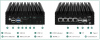
My HUNSN RJ-42 seems to have USB3 and USB-C. ( Got it delivered directly from Amazon Germany https://www.amazon.de/dp/B0C985FVT1 )
Screenshot 2023-07-26 at 05.49.31.png
 
  • Like
Reactions: oek and Stovar
Does anyone get better performance than 1.6 Gbps up/down from their N100 board (got the one I posted right above) with Debian 12?

I installed Proxmox on mine, iperf3 tests never go above 1.6 Gbps with Linux. Usually with Intel NICs, I could fix this compiling in drivers from their website, no luck finding any for the 226 NICs though.

I have passed through 2 interfaces to an OPNsense VM. Their driver seems to be much better, getting full 2.35 Gbps with iperf3 up/down measured against the OS, and also through the device. Linked are a few throughput measurements I have taken, against a local server on WAN. Zenarmor performance is awesome for me: Zenarmor throughput with N100 / i226v
 
This would be the CW-ADLN-D4, as shown in the table a few posts up. Key compromises are DDR4 vs DDR5, and NVME x1 vs x4 when compared against the other 4-port variant CW-AL-4L. You'd get better peripheral IO but lower system performance.

Odd, my tech specs say
Screenshot 2023-07-26 at 06.33.21.png
As for NVME x1, and I am no expert so might be completely wrong, I was under the impression with PCIe 3.x there's 1G throughput. This should be sufficient for a firewall VM, even with heavy logging / database activity from Zenarmor.