
CWWK/Topton/... Nxxx quad NIC router
- Thread starter Becks0815
- Start date
You are using an out of date browser. It may not display this or other websites correctly.
You should upgrade or use an alternative browser.
You should upgrade or use an alternative browser.
Notice: Page may contain affiliate links for which we may earn a small commission through services like Amazon Affiliates or Skimlinks.

Good luck in trying to hack/alter/break into the BIOS of my machine only using TCP/UDP packets, which are all filtered off if my FW doesn't expect them (=part of a data exchange initiated by one of my local machines), or trying to sent data packets which force my firewall (Opnsesne) to alter the BIOS.
If you are so afraid and think you are such an important target, you shoudln't connect to the internet at all.
And if you think of something like this, you haven't understood how it works.
If you are so afraid and think you are such an important target, you shoudln't connect to the internet at all.
And if you think of something like this, you haven't understood how it works.
Hi all fellas, i didn't proceed yet, but i'm really prone to order a barebone n305 from cwwk, hoping for some luck in the heatsink gap roulette 
What expansions/adapter could i try to ask in the site chat before filling my order?
I'm trying to find insights in the thread which i'm sure i already read, but struggling actually
I will not use wifi antenna because i plan to use a dedicated device.
I have an m2 nvme and a sata ssd lying around and would like to use those for a raid1 zfs mirror, would i need any kind of adapter to achieve this?
Thanks in advance for any idea and, of course, for all the info you guys are sharing here
For those using it as a firewall/router, how concerned are you about the security of the BIOS since this is your gateway to the Internet?
It is one of the reasons I'm using a HP Thin Client as my firewall.
An open source BIOS would be ideal but I don't know how you can trust any provider over another if the BIOS is not open to review.
It was only a 2-3 years ago HP were logging every keystroke in an audio driver so security is not always at the forefront for them.
BTW - how old is your thin client and is it still receiving BIOS updates?
That is the use case I intend to implement, without SATA, just 2 x NVMe drives. CWWK store has reported that they have trouble with testing a PCB-adapter that provides 4 x NVMe slots like thiswould i need any kind of adapter to achieve this?
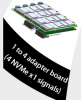
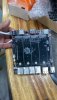
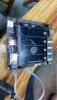
I asked them if it works with a WiFi module along and awaited their answer for a couple of weeks.
Eventually, I ordered from CWWK store on Ali a N305 box, and they promised to give me several boards just in case. As I have learned from this thread and the forum, the H-type adapter that convert WiFi slot into an additional NVMe slot is in the shipped box by default. Also this is proved by the posts in the thread to be a working case for a ZFS mirror. Once the ordered device is arrived I provide the info how it works actually.
Last edited:
I have an m2 nvme and a sata ssd lying around and would like to use those for a raid1 zfs mirror, would i need any kind of adapter to achieve this?
Thanks in advance for any idea and, of course, for all the info you guys are sharing here
My box has space for 2x NVME and no SATA but there are some boards with both.
Is the speed difference an issue between NVME and SATA in RAID 1?
Last edited:
I have an m2 nvme and a sata ssd lying around and would like to use those for a raid1 zfs mirror, would i need any kind of adapter to achieve this?
As mentioned by @AnthonyUK and @lucker , the board does not have a SATA port, the m.2 is NVME only. You can get a cheap second m.2 NVME (I use a Kongston NV1 in my N5105), use a adapter board from CWWK (don't konw if they are already available) or go for a different unit. Either the N5104/N6005 or the Alder Lake U with a Pentium Gold/i3/i5.
There are also units with N100 and a different board layout, these seem to have bluetec or similar boards (they have a RJ45 console port). At least the cWWk units have some support, BIOS updates are available. Not sure about the bluetec ones.
Personally I would just buy a second m.2 NVME, but don't buy a high end SSD because tend to get hot. The low end NVME are much cooler, it's better in a passively cooled device (and the second port is PCIe 3.0 x1 anyway).
Last edited:
An open source BIOS would be ideal but I don't know how you can trust any provider over another if the BIOS is not open to review.
It was only a 2-3 years ago HP were logging every keystroke in an audio driver so security is not always at the forefront for them.
Could you please explain how a keylogger in a driver is a danger for any kind of BIOS, and how a machine acting as router should transfer any kind of data without knowing which of the 4 ports to use and how to act as router during boot time and send this data, or how the BIOS should be able to use any port during runtime, while all ports are under control of Proxmox, pfsense or opnsense?
And if you go the driver route - how do you plan to smuggle a keylogger within a driver of FreeBSD or Linux, without being detetced?
Did you make any changes in bios that I should follow along? I have confirmed virtualization is enabled ... I have also tried it with the settings replicated from Becks Wrap up post.
Try disabling FBID, either in the bios or the kernel boot options. Linux and FreeBSD have both had issues with e-cores. Someone linked a bug earlier and I found an article on Phoronix about it.
The symptom on FreeBSD is data corruption for UFS and FAT file systems. I'm not sure what happened on Linux.
For those using it as a firewall/router, how concerned are you about the security of the BIOS since this is your gateway to the Internet?
I'm not sure how realistic a supply chain attack is for my home internet connection. If I felt it was critical such as for a business, I'd probably use different hardware.
Protectli supports coreboot on their systems, which is probably the best option in terms of transparency.
Last edited:
And if you go the driver route - how do you plan to smuggle a keylogger within a driver of FreeBSD or Linux, without being detetced?
There was a USB interface controller exploit a few years back that allowed arbitrary code execution. I didn't require any drivers, was invisible to the OS, and persisted after a reboot. The Unpatchable USB Vulnerability
Something like this would be easy to ship in a BIOS.
Could you please explain how a keylogger in a driver is a danger for any kind of BIOS...
I didn't say it was. It was an example to show that from major vendors, security is often not their top priority.
Just looking at the Hikvison cam situation currently, the Chinese govt do not need to risk installing anything and being found out if people are going to not bother patching systems anyway.
Supply chain attack is one thing, potential lack of BIOS updates for new vulnerabilities is another though the latter is true for EOS name brand products too....
I'm not sure how realistic a supply chain attack is for my home internet connection. If I felt it was critical such as for a business, I'd probably use different hardware.
Protectli supports coreboot on their systems, which is probably the best option in terms of transparency.
Looks like the stock heatsink is pretty decent on my type C variant IMHO:
Running stress -c 4 -i 4 -m 4 on it for over 15 minutes and load average: 12.56, 9.63, 5.08
root@pve:~# sensors
coretemp-isa-0000
Adapter: ISA adapter
Package id 0: +61.0°C (high = +105.0°C, crit = +105.0°C)
Core 0: +61.0°C (high = +105.0°C, crit = +105.0°C)
Core 1: +59.0°C (high = +105.0°C, crit = +105.0°C)
Core 2: +59.0°C (high = +105.0°C, crit = +105.0°C)
Core 3: +59.0°C (high = +105.0°C, crit = +105.0°C)
up from about 27'C base temp (it's winter here so house is cool)
Within 2 minutes of me stopping the stress test it was back down to 32'C
For those using it as a firewall/router, how concerned are you about the security of the BIOS since this is your gateway to the Internet?
It is one of the reasons I'm using a HP Thin Client as my firewall.
Older/unpatched enterprise gear with vPro is also a concern. Different threat vector (vulnerable to attack rather vs. possibility of vendor backdoors) but these systems operate much more like a "computer within a computer" than UEFI/BIOS:

Intel fixes critical flaw in corporate remote management platform
Intel today addressed nine security vulnerabilities with the release of the September 2020 Platform Update, one of them being a critical flaw impacting the Active Management Technology (AMT) and Intel Standard Manageability (ISM) platforms.
I didn't say it was. It was an example to show that from major vendors, security is often not their top priority.
Just looking at the Hikvison cam situation currently, the Chinese govt do not need to risk installing anything and being found out if people are going to not bother patching systems anyway.
Supply chain attack is one thing, potential lack of BIOS updates for new vulnerabilities is another though the latter is true for EOS name brand products too.
I had a look at all quoted/mentioned attacks. They either require special software to be installed on the target machines (HP, Intel), which can be exploited, or rely on physical access to the hardware (key logger, USB exploits) or target the (operating) software of a machine (Hikvision camera, any kind of outdated system). All of those are not relevant, as long as you keep your FW software up to date, and "Supply Chain attack" isn't relevant here at all, as it is based on any kind of exploits, with the goal to disrupt your Supply Chain.
For a remote attack on a firewall router using an exploit in an BIOS (or a back door, implemented by the Chinese), the software/exploit in the BIOS would have to be able to receive data from a remote destination first, which is impossible, because the NICs are under control of the operating system (Opnsense, PFsense and also Proxmox) during runtime. And then the exploit/software would have to be able to guess the OS and running FW software and modify it during the runtime in a way, so it could be remotely attacked and taken over. This is a risk I am willing to take, no matter of the vendor of the machine.
Looks like the stock heatsink is pretty decent on my type C variant IMHO:
Yes, it is. It is pretty heavy and can buffer a lot of heat, and with the big fins it exchanges it pretty well with the surrounding air. My box doesn't go above 48°C, even after and during long data exchange sessions, and the temperature immediately drops after I stop moving data around.
Hi new here.
Great forum!
I’ve been looking to get one of these for a while.
There is a new one: https://www.aliexpress.com/item/100...631233e664c!12000034186534720!sh!DK!180297067
It has N100 - 2*USB3.2 - 2*NVMe - 2*SATA – Which is exactly what I am looking for.
What do you think? Is there going to be a bios updates for this, should I wait for a v2 or should I just go for it?
I had a look at all quoted/mentioned attacks. They either require special software to be installed on the target machines (HP, Intel), which can be exploited, or rely on physical access to the hardware (key logger, USB exploits) or target the (operating) software of a machine (Hikvision camera, any kind of outdated system). All of those are not relevant, as long as you keep your FW software up to date, and "Supply Chain attack" isn't relevant here at all, as it is based on any kind of exploits, with the goal to disrupt your Supply Chain.
For a remote attack on a firewall router using an exploit in an BIOS (or a back door, implemented by the Chinese), the software/exploit in the BIOS would have to be able to receive data from a remote destination first, which is impossible, because the NICs are under control of the operating system (Opnsense, PFsense and also Proxmox) during runtime. And then the exploit/software would have to be able to guess the OS and running FW software and modify it during the runtime in a way, so it could be remotely attacked and taken over. This is a risk I am willing to take, no matter of the vendor of the machine.
I think you do not understand the risk of BIOS/UEFI poses. It is run as soon as the machine is turned on so can affect everything that loads after it which is why it has been the 'holy grail' for cyber criminals.
Also it is easy to say keep your firmware updated assuming that the vendor provides updates to start with. A lot of people are using older SFF PCs or thin clients which may be well out of support.
The risk is small however as these criminals tend to target the 'low hanging fruit' not people running prosumer level routers on BSD and maybe virtualised on Linux.
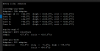
Just installed proxmox and opnsense. With almost no load the unit was quite warm. Cpu temps seems okay, but I also see a pci temp that's way to high. Then reapplying thermal paste wouldn't make sense right?
I would just use good thermal paste like MX4 and replace the original stuff. This gives you the chance to check for a CPU/case gap (remove the paste, partially reassemble the box and use a bright headlamp to see if/how much light shines through at the CPU). If there is a too big gap and you see no improvements after repasting, just order a bunch of those copper shims (just pick a set with the correct size and different thicknesses) and put a good fitting one into the gap.
My 2 cents: as long as the CPU stays under 60°C under load (= heavy data transfers going on), I wouldn't care at all. The whole thing depends a bit on the case type and the environment, but 60°C is not critical at all. My 5800X3D easily reaches 95°C under stress load with default settings, even while using a goo AIO water cooling system.
Similar threads
- Replies
- 9
- Views
- 3K

- Replies
- 3K
- Views
- 1M
- Replies
- 3
- Views
- 2K
- Replies
- 0
- Views
- 2K