CWWK/Topton/... Nxxx quad NIC router

Notice: Page may contain affiliate links for which we may earn a small commission through services like Amazon Affiliates or Skimlinks.
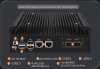
Hi, I wanted to get another aliexpress/topton minipc for a new site, but noted they are currently all sold out. I am on the lookout for a quad NIC, N150 or better machine with large cooling fins.
Any hints, why are they sold out? New generation incoming? AI craze? Any suggestions for alternatives?
 
This one is in stock. Ordered several times at cwwk.net (and also on Aliexpress from them). All went smooth. But the unit is about $90 more expensive than a few months ago.
 
  • Like
Reactions: abq
Hi, I wanted to get another aliexpress/topton minipc for a new site, but noted they are currently all sold out. I am on the lookout for a quad NIC, N150 or better machine with large cooling fins.
Any hints, why are they sold out? New generation incoming? AI craze? Any suggestions for alternatives?
with the banning of many other brands of routers in the usa lot of people are turning to custom route for long term support and futureproofing. so they are all selling out.
 
Any hints, why are they sold out? New generation incoming? AI craze? Any suggestions for alternatives?
I've asked cwwk few month ago (before the new year), if higher core count models will appear again (like n305, n355) - they replied it's near impossible to get any AlderLake-N/TwinLake chips. Probably because Intel winds down the production of this architecture, and shifts to newer panther/wildcat lake.
Anyway, I still see they have few 4-core variants in stock, which should be enough for some routing and filtering
 
  • Like
Reactions: KevinR
PS I think I found the answer


Find some details for each version here:

Thanks for the links. I updated n100 quad i-226V BK-1264NP Ver 1.2 from windows11. Nic version flashed was 2mb 2.13 to:

FXVL_125C_V_2MB_2.32.bin2.3280000422

OPNsense link with better instructions for multi nic flash:

Few notes:
-Multi nic boxes need MAC address to select NIC with command from OPNsense thread:
nvmupdate64e -b -l nvm.log -m 00E0B468DCBC -f -u -c nvm.cfg

-Make log1-4 files to individual nic flashes so you can check them later.

-DO NOT CONNECT ANYTHING TO NIC WHILE FLASHING. I forgot cable in one port and flash failed in Error: couldn't backup .bin

-Reboot 2 - 3 times and refresh inventory.txt if nics dont wake up from flash instantly.
 
  • Like
Reactions: metlrise
Does anyone here have the CW-AT-2L-10G variant?
1778185296880.png

I was just looking at a product description, particularly the one with dual 10G SFP+, and it looks to have a fan incorporated into the NIC, is this true?
1778185327742.png

I was initially interested in picking up a N305 with dual SFP+ and limit the wattage via BIOS.
 
Does anyone here have the CW-AT-2L-10G variant?
View attachment 48702

I was just looking at a product description, particularly the one with dual 10G SFP+, and it looks to have a fan incorporated into the NIC, is this true?
View attachment 48703

I was initially interested in picking up a N305 with dual SFP+ and limit the wattage via BIOS.
Just keep in mind that the N305 doesn't have enough PCI-E lanes for the dual SFP+ slots using the old Intel 82599ES. That's a PCI-E 2.0 NIC, meaning that it needs 8 lanes for full performance while the N305 only has 9 lanes in total, with some of them taken up by the 2.5G NICs, etc.

It's also a 17 year old NIC, so it naturally isn't nearly as power efficient as something more modern. Active cooling of some sort is fairly common for that chip.

You really need a PCI-E 3.0 NIC for dual 10G with that CPU range. :)
 
  • Like
  • Sad
Reactions: abq and jauling
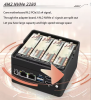
I have a CWWK mini server for which the motherboard has the reference CW-X86-P5-V3-N100-4X1. This comes with an adapter in the NVME slot of the motherboard which is connected to a daughter board with 4 NVME slots:

Capture d’écran 2026-05-24 à 00.58.23.png Capture d’écran 2026-05-24 à 00.58.38.png

I want to use a single NVME and use the motherboard in a smaller case. However if I plug the NVME in the slot on the motherboard, it is not detected. I understand this is due to the PCIE biffurcation or something similar. How can I disable this? Do I need to update the BIOS and if yes which file to use?

Thank you for your help...
 
I have a CWWK mini server for which the motherboard has the reference CW-X86-P5-V3-N100-4X1. This comes with an adapter in the NVME slot of the motherboard which is connected to a daughter board with 4 NVME slots:

I want to use a single NVME and use the motherboard in a smaller case. However if I plug the NVME in the slot on the motherboard, it is not detected. I understand this is due to the PCIE biffurcation or something similar. How can I disable this? Do I need to update the BIOS and if yes which file to use?

Thank you for your help...

I think I've read somewhere on their support forums that people were able to do this re-flashing back to the standard PCIe x4 configuration. But as always with BIOS flashing - better be prepared for restoring using external programmer
 
I have a CWWK mini server for which the motherboard has the reference CW-X86-P5-V3-N100-4X1. This comes with an adapter in the NVME slot of the motherboard which is connected to a daughter board with 4 NVME slots:

View attachment 48924 View attachment 48925

I want to use a single NVME and use the motherboard in a smaller case. However if I plug the NVME in the slot on the motherboard, it is not detected. I understand this is due to the PCIE biffurcation or something similar. How can I disable this? Do I need to update the BIOS and if yes which file to use?

Thank you for your help...

you cannot disable it, you have to flash the single nvme bios variant to make it work, if needed i can upload them somewhere i have both files.
 
  • Like
Reactions: KevinR and FaFo
I tried and it didn't go well :(

I have a picture of the the initial BIOS screen, and I can see that the indicated model was "CH-ADLNTC-1C2L-4X1". After the flash, I could access once the BIOS again, and it reported "CH-ADLNTB-1C2L", with a B instead of the C... After that, the server never booted again; when I plug it in, the LED blinks once and then it stops immediately.

Any chance I fix this witha BIOS programmer? I ordered a replacement motherboard, but I'd like to fix this.

Thanks.
 
Well, if the board can’t get to any bootable state, at least uefi shell - there is no non-invasive way to re-flash. Btw, you did make a backup of the original factory bios, didn’t you?
 
I did not :( I count on the fact that I can get the correct file from the support of from a more knowledgeable member here.
 
seems wierd that it booted once with the new bios but not again, also v3 is the same revision of my n100 and n305 so dunno how you ended up so stuck :(
 
did you leave it on for a while? when i updated bios it took nearly 5 minutes for it to boot to show the bios screen. try leaving it on for some time
 
  • Like
Reactions: KevinR