Broadcom HBA 9500-16i doesn't seem to support NVMe drives.

Notice: Page may contain affiliate links for which we may earn a small commission through services like Amazon Affiliates or Skimlinks.

fjstore

Member
Jan 17, 2019
46
2
8
Hi everyone,
I recently purchased a 9500-16i, but I've run into a few issues. I'm unable to update the official firmware, and it doesn't seem to support NVMe drives.
Also, there's no BIOS screen during boot, and the device isn't detected in my motherboard's BIOS settings. However, once the OS loads, I can successfully read the hardware info using storcli.
Does anyone know how I can get it to support NVMe drives? I've already tried running erase all and then flashing the FW and BIOS, but it didn't work.
Any advice would be appreciated!"
 
I'm unable to update the official firmware
What happens/doesn't happen?
What os?
What files did you use?
What versions?
What version is currently flashed?

I have two 9500-8i hbas here and when I update the firmware there are 2 files I can choose from, one for sata/sas only (HBA_9500-8i_SAS_SATA_Profile.bin) and one for mixed (sata/sas/nvme, HBA_9500-8i_Mixed_Profile.bin)
 
I tried both the P36 versions of both Mixed Profile and SAS+SATA (files HBA_9500-16i_Mixed_Profile.bin and HBA_9500-16i_SAS_SATA_Profile.bin)

Command: storcli /c0 download file=HBA_9500-16i_Mixed_Profile.bin


Downloading image.Please wait...

CLI Version = 007.2807.0000.0000 Dec 22, 2023
Operating system = Linux 6.6.44-production+truenas
Controller = 0
Status = Failure
Description = Flash image contains invalid secure hash key.
 
I encountered the same situation. This card seems to be from an OEM, but I don't know which one, so I don't know where to download the firmware
 
you do not want any nvme, through that controller.

it works, but its sooooooooooo horrible.
turn your nvme into a sata
 
I've seen poost like this this for multiple generations of broadcom hbas. Is it a rumor or a fact? Do people confuse it with the weirtd things microsoft does with their storage stack in windows? (see Announcing Native NVMe in Windows Server 2025: Ushering in a New Era of Storage Performance | Microsoft Community Hub)
its my own (and our company) experience with the HBA's


windows nvme performance, with new versions in 2025, is amazingly fast, unrelated to the HBA's and reqire direct pcie
 
Hi everyone, does anyone have the UART pinout/wiring diagram for the 9500-16i? Also, what tools do I need to read the debug logs when flashing the firmware?
 
I've seen poost like this this for multiple generations of broadcom hbas. Is it a rumor or a fact?
There is some truth to this, the Broadcom HBA's abstract NVMe disks and present them as a SCSI disks to the OS, be it Windows or Linux and some performance is lost under most circumstances. The performance is still okay though, much faster than any SATA drive would be.

Some of the better hardware raid controllers actually have a native NVMe presentation firmware that will present the NVMe disks/volumes to the OS as NVMe and the performance overhead mostly goes away.
 
There is some truth to this, the Broadcom HBA's abstract NVMe disks and present them as a SCSI disks to the OS, be it Windows or Linux and some performance is lost under most circumstances. The performance is still okay though, much faster than any SATA drive would be.

Some of the better hardware raid controllers actually have a native NVMe presentation firmware that will present the NVMe disks/volumes to the OS as NVMe and the performance overhead mostly goes away.
Yes, actually, when NVMe goes through a chip conversion, it still runs on the SAS protocol instead of the PCIe protocol, so the speed is significantly reduced
 
Updated using 9500_16i_Pkg_P40_MIXED_FW_BIOS_UEFI and now NVME drives are visble using cable
HBA 9500-16i Tri-Mode Storage Adapter | PCIe Gen 4.0
  • Part number: 05-60002-00
  • Broadcom assembly number: 5067-6862
  • Host connector: 1 × SFF-8654 SlimSAS x8
  • Backplane connectors: 2 × SFF-8643 Mini-SAS HD x4
  • Special wiring: NVMe / Supermicro Purley.
Both SAS and Nvme drives are working fine:
CablePurpose
05-60002-00NVMe, special SMC wiring
05-60003-00Conventional SAS/SATA wiring

HBA_9500-16i_Mixed_Profile.bin
IT_HBA_X64_BIOS_PKG_E6.rom
Firmware Package Build = 40.00.00.00
Firmware Version = 40.00.00.00
NVDATA Version = 40.01.00.11
Device Interface = PCIe-16GT/s
Supported Drives = SAS, SATA, NVMe


NVME drives were NOT VISIBLE on HBA is running firmware package 14.00.00.00!

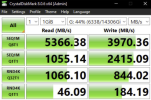
Speed test looks great (Port C0 used for 2x Nvme x4 lanes),
only read performance is affected a bit,
but I suppose, it may reserve some bandwith for SAS drives (Port C1 2x 4 SAS drives)


1794438829049.png
Samsung PM1733 (MZ-WLJ15T0) 15.36TB enterprise NVMe SSD features the following official performance specifications:
  • Sequential Read Speed: Up to 7,000 MB/s [1]
    • Sequential Write Speed: Up to 3,800 MB/s (with some vendor specs citing around 3,500 MB/s to 3,800 MB/s depending on the workload and firmware) [1, 2, 3]
    • Random Read: Up to 1,450,000 – 1,500,000 IOPS [1, 2]
    • Random Write: Up to 135,000 IOPS [1, 2]
Key Specifications
    • Capacity: 15.36TB (15,360GB) [1]
    • Interface: PCIe Gen4 x4 (PCI-E 4.0 x4) [1]


its my own (and our company) experience with the HBA's


windows nvme performance, with new versions in 2025, is amazingly fast, unrelated to the HBA's and reqire direct pcie

don't see any issue with my drive and HBA, works great.
Definitely it doesn't downgrade connection to SATA :) works close to PCIE4.0 x4 speeds.
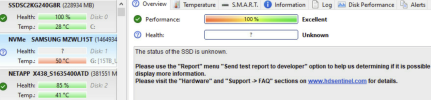
only downside is no real smart data from it, as it kind of masks it as SAS device

1794439665612.png
1794439704698.png
 
Last edited: